

Question

Variable Panel: duplicated collections that are now greyed out and I can't delete

  • April 10, 2026
  • 3 replies
  • 44 views

Theresa Steele

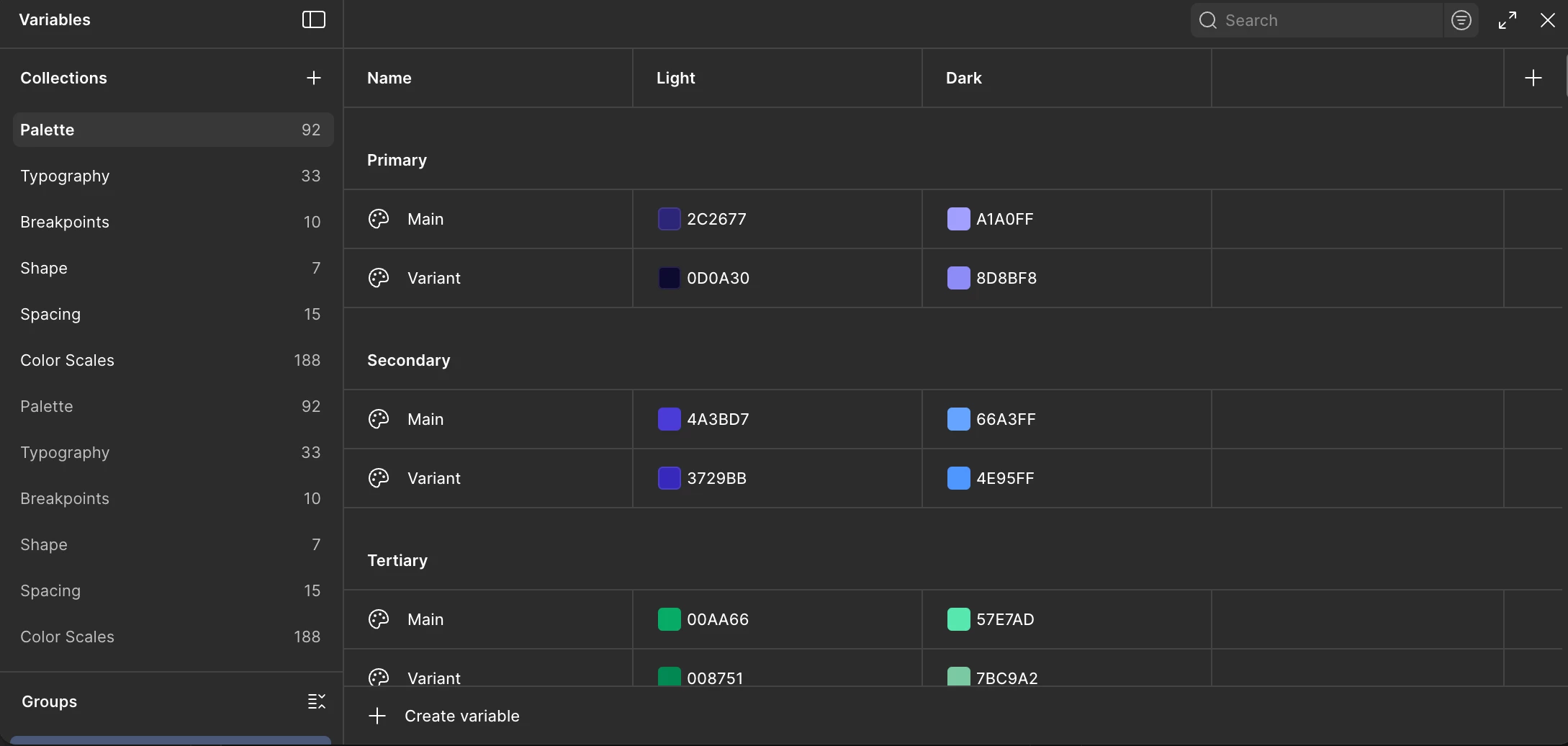
I woke up this morning to find that all my design system’s variables have been duplicated (automatically not manually by a user overnight), and that these duplications are showing grayed out and I can’t delete them. 

I have tried restarting & refreshing. I have tried/searched for ghost variables used in the design system file and in all attached files (results came back as 0 exist). I am hoping someone can help me understand why this is happening and how to resolve it. In the attached image you can see all my variable collections, and then the greyed out duplicated ones of each collection below it. I have no option to delete the greyed out version, and when I try deleting one of the editable collection It doesn’t change the status of the greyed out one.


3 replies

KellyS
  • New Member
  • April 30, 2026

I have the same exact problem - what are they and how can we remove. 


  • Figmate
  • May 1, 2026

Hi ​there,


I understand you're seeing duplicated variable collections appearing grayed out in your variables modal, and you're unable to delete them.


I tested this on my end — if you click "Collection options" and enable "All collections", you may see additional grayed-out collections alongside those created in your file. 
However, these grayed-out collections appear to be different from the ones not grayed out on my end, so this may not fully explain what you're seeing.


Since we're unable to investigate individual files directly due to privacy and security policies, let me escalate this issue to our support specialist so you can share your file URL directly through a dedicated ticket for our team to investigate further.


@Theresa Steele,  I've gone ahead and created a support ticket(#1879181) on your behalf.

Once you receive the ticket confirmation email, please reply with:

  • The URL of the file where you're seeing the issue, and grant view access to support-share@figma.com (this won't affect your billing)

@KellyS , Thanks for flagging that you're experiencing the same issue!

I can see you've already created a support ticket (#1878230) — that's exactly the right next step. I've gone ahead and added a note to your ticket to help prioritize your case.

Please also include your file URL where you're seeing the issue, and grant view access to support-share@figma.com (this won't affect your billing) in your reply to the ticket email.


Thanks for your help!


Pragati_Singh

Do you have other libraries on in this library? They might be coming from a different library if you turn them off. It should go away.