
Question

Urgent: Request to restore accidentally deleted Figma file (titled "作品集" / portfolio-related)

  • January 17, 2026
  • 1 reply
  • 9 views

史可心

Hi Figma Support Team,

I need urgent help restoring a Figma file that I accidentally deleted.

**Key details to help locate the file:**

- File name: Related to "作品集" (portfolio) – exact name is not fully remembered, but it was for my design portfolio
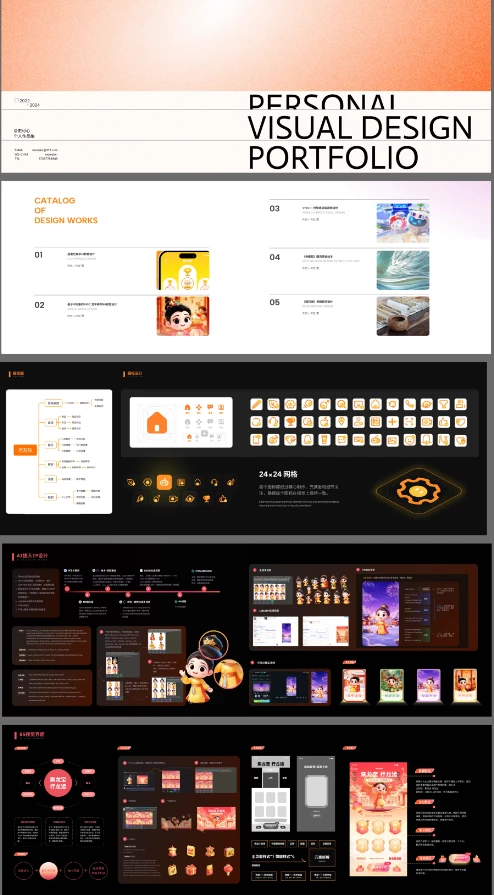


- File creation time: Around March 2025
- Approximate deletion time: Between May and June 2025
- I have original screenshots of the file's content, which I will attach to this post to help identify it.
- My Figma account email: [redacted by moderator to remove personal information]

1 reply

Tom Reem
Figmate
  • Figmate
  • January 18, 2026

Hi ​@史可心 — thanks for raising this, and I’m really sorry to hear about the trouble with this file.

Do you recall the steps leading up to the deletion, or if you received any specific notifications during the process? I must ask because permanently deleting a file removes it for everyone with access, and this action cannot be reversed. For guidance on where to check for the file in your account, see: Delete and restore files → Restore files from the trash.

While I can’t access or share account specifics here, I want to make sure this gets a closer look as soon as possible. I’ve opened a ticket on your behalf with our Product Support team. Your case number is: 1694784, and they’ll be in touch once they’ve reviewed the situation.

Please keep an eye on the email inbox tied to your Figma account for updates. In the meantime, let us know if any additional context or screenshots could help the team locate the file.

I also wanted to let you know that I removed some personal information from your original post for your privacy’s sake. Thanks again for your patience — we’re on it.