

KellyK
Active Member
September 3, 2026
Question

"Update from main" conflict preview is wrong

  • September 3, 2026
  • 3 replies
  • 24 views

Hello! I’m trying to resolve conflicts as I update from main, but the preview doesn’t make sense and it’s making it difficult to choose the right version.

The branch is for adding the new pink banner. When I look at the main file, there is no pink banner, as expected.

But as I try to resolve conflicts, the preview is showing the banner in both the main file and the branch:
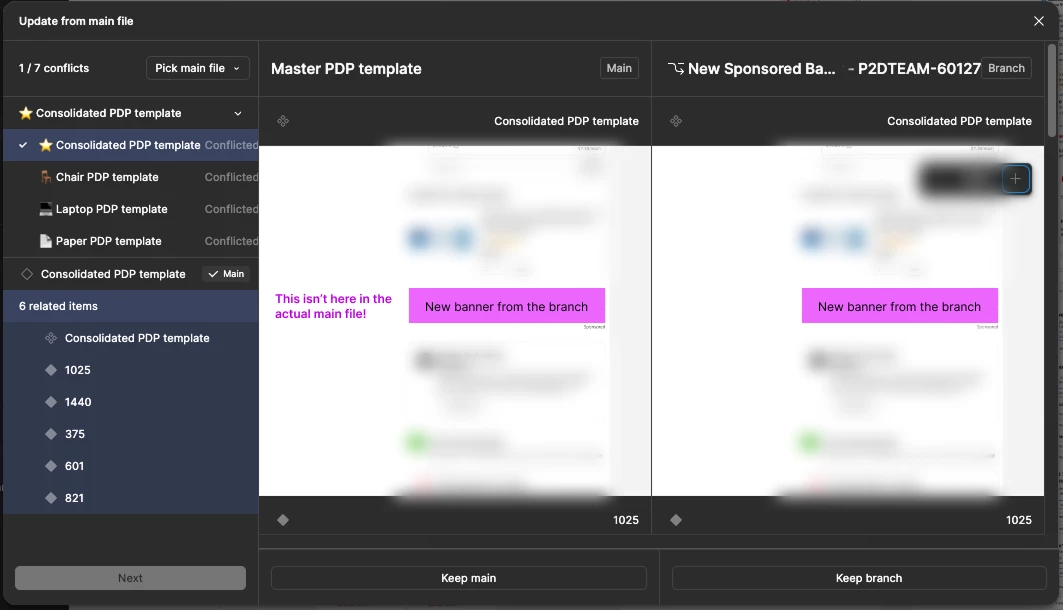

I promise I opened the actual main file and looked at the correct frames, that pink banner is absolutely not there. So why is it showing in the preview?

This has to be a bug right? (I restarted Figma and restarted my computer, the issue persists)

Thanks in advance for any help!

EDIT: I might have figured it out. Is it because the preview shows NOT what that frame looks like in the main file right now, it shows what it will look like AFTER you select it and update from main? So the main preview reflects components that were updated in the branch?

3 replies

djv
Figmate
Community Support
September 3, 2026

Hi ​@KellyK, thanks for reaching out! 

I understand how this must be slowing down your workflow. The good news is your edit is spot on.

The conflict previews aren't snapshots of what each file looks like right now; they're previews of what your branch will look like after you apply the update with that option selected. The Help Center puts it this way: "You can see a preview of the latest versions, but it's not a before and after of what's changed."

Here's why the banner shows on both sides specifically. Figma groups changes into smaller portions and only flags a smaller portioned group as a conflict when both main and your branch edited it. Your pink banner only exists in the branch, so it isn't a conflict, which means it gets kept no matter which side you pick. Both previews render that outcome, so the banner appears in both. What you're actually choosing between is whatever else changed inside that conflicting frame. A couple of questions so we can make sure that fully accounts for what you're seeing:

  • Does the frame in the preview differ from your branch in any other way (spacing, text, colors), even if the banner looks identical? That difference is the real conflict.
  • Is the banner built from a component or instance that lives in the branch, or was it drawn directly into that frame?

Two things that may help while you work through this:

  • Conflicts resolve at the frame level, not per-layer, so picking "main" on a frame discards all your branch edits inside it. It’s worth a careful look before you apply.
  • Updating from main frequently keeps conflicts small and previews much easier to read.

If after checking the above something still looks genuinely wrong (the preview showing changes you never made, or a frame you never touched appearing as a conflict), reply here with a screen recording, and we'll take a closer look.

KellyK
KellyKAuthor
Active Member
September 9, 2026

Thanks so much for your help!

I’m assuming “chunks” is an informal term here? (I have a new issue now which I may start a new thread for, but understanding at what level Figma finds conflicts might help.)

As I understand it, Figma is looking for conflicts by looking at the outer-most frame level and at main component level? (Obviously it couldn’t consider all the zillion nested frames within :P And component variants need to share all kinds of attributes, so you can’t mix-and-match variants as you resolve conflicts.)

Does it consider Sections at all? I’m assuming Sections are just to help keep things organized and shouldn’t collapse frames into one “chunk” that Figma will consider one entity to check conflicts against.

Do I have this right?

djv
Figmate
Community Support
September 9, 2026

Hi ​@KellyK, thanks for following up! 

I understand your confusion in regards to my use of “chunks”, so I’ve updated my previous reply for clarity. That said, Figma groups changes by top-level objects on a page; the outermost frames, components, and variant sets plus things that live outside the canvas like variable collections and styles. You're right that it can't reason about every nested layer, and right that a variant set is treated as a single unit, which is why you can't mix and match individual variants while resolving.

Sections aren't purely organizational; they do participate in how changes get grouped. Sections originally collapsed everything inside them into a single change, so one edit anywhere in a section put the whole section up for grabs. That was fixed a while back, and top-level frames inside a section are now tracked individually.
 

Two things that still hold:

  • The section itself is an object with its own properties. Renaming it, resizing it, or changing its ready-for-dev status is a change to the section, separate from anything inside it.
  • Nesting matters more than section membership. A frame nested inside another frame is part of that outer frame's group, section or no section.


Definitely start that new thread when you're ready, and if what you're seeing is a whole section or page coming through all together rather than frame by frame, please let us know. That's not how it's meant to behave, so it'd be useful to look at.