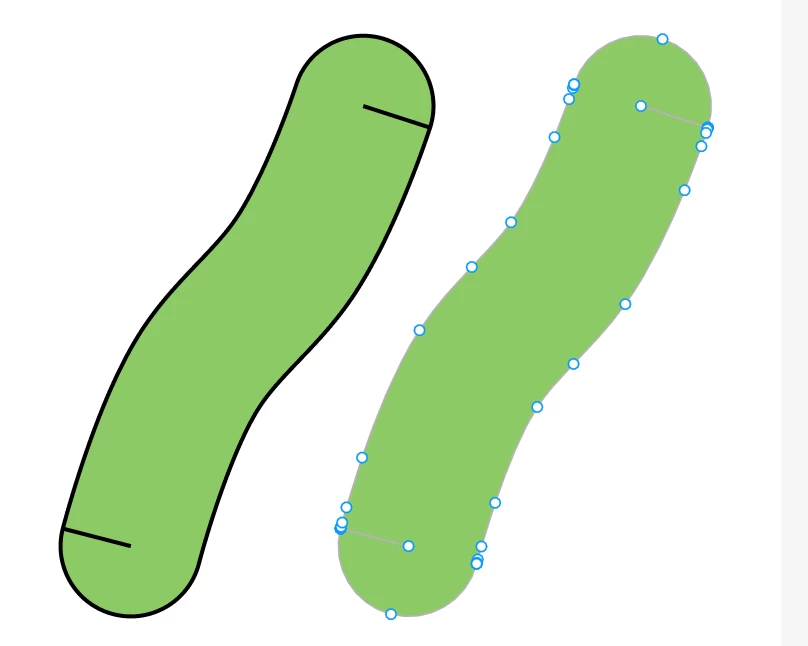
Unexpected Inward Lines at Both Ends After Using Outline Stroke
Hello everyone,
I would like to ask about an issue I encounter when using the Outline Stroke feature in Figma.
Here is my workflow:
-
I create a vector path using the Pen tool.
-
I use the Bend tool to curve the path.
-
I apply a stroke with rounded caps.
-
I right-click the path and select "Outline Stroke" to convert it into an editable vector shape.
However, after applying Outline Stroke, unexpected inward-pointing path segments appear at both ends of the resulting shape. These segments extend into the filled area and become visible as unwanted internal lines.
This happens consistently regardless of the stroke weight I use.
I would like to understand:
-
Why do these inward-pointing path segments appear at both ends?
-
Is this an expected result of the Outline Stroke operation?
-
Is there a way to prevent this from happening and obtain a clean outlined shape?
I have attached screenshots illustrating the issue.
I would appreciate any explanation or suggestions. Thank you!