Luis E González
New Member
September 29, 2026
Solved

Unable to submit prompts with kit

Hi.

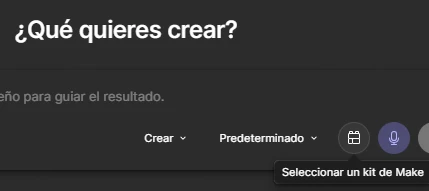
I’m trying to send a prompt with a kit selected

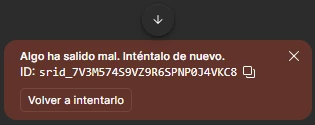
But when i send the prompt i have this error: srid_7V3M574S9VZ9R6SPNP0J4VKC8

If i try another prompt (“Hello” for example) it’s work but i need to select the kit.

Thanks

This topic has been closed for replies.
Celine_
Celine_Solution
Community Support
September 29, 2026

Thanks for trying those additional steps and for sharing the results and screenshots.

Since you’re still encountering errors when using different Make Kits, I’ve gone ahead and created a Support case on your behalf so our team can investigate this further. I’ve shared the details you shared here to our support team. For visibility, your case number is #2159682.

Please check your inbox and continue the conversation directly through your support case. The team will take a closer look at the behavior you’re seeing and share the next steps with you there. Thanks again for all the details you’ve provided!

Update: I see in the backend that you’ve informed our support agent that your issue has been resolved. I’ll mark as solved and close the thread here.

Still, if the issue appears, please feel free to reply directly to your support case, it will re-open automatically, thank you!


3 replies

Celine_
Figmate
Community Support
September 29, 2026

Hey ​@Luis E González ! Celine from the Community Support team at Figma here. Thanks for flagging this and for sharing the screenshots! Since it seems that prompting works normally without the Make kit selected, but returns the error when the kit is added, it looks like the issue may be specific to using that Make kit rather than prompting in general.

As a first step, could you try:

  • Creating a new Make file, selecting the same kit, and sending a prompt there.
  • Selecting a different Make kit, if available, to see whether the error only occurs with this specific kit.
  • Retrying the prompt after reloading Figma.

For persistent “Something went wrong” errors, our troubleshooting guidance also recommends trying a duplicated file and reporting the issue if it continues. You can find the full details in our Help Center article for Troubleshooting in Figma Make.

If you’re still seeing the error specifically when this kit is selected, I’d recommend submitting a bug report to our Support team. To do that, go to the Support Hub / Type “Report a bug” / Click Start a chat / select Enter and follow the prompts.
Then in the form, please share the error ID you shared (srid_7V3M574S9VZ9R6SPNP0J4VKC8), the affected Make file, the kit link you intended to add and the screenshots you shared here. Thanks!

Luis E González
New Member
September 29, 2026

Hi. I’m trying and i have anothers errors

If i create another Make with the same kit and a little prompt, Figma generates something (previously i have to select “solve errors”), and i try to put my complete prompt and then it seems works and i hope

If i use another kit, “Astra Demo Kit” that i think is an example kit, i have the same error and i have to select “Solve errors” again

At this moment i can continue with both. I’m trying to generate one kit and then can work with multiple projects that read this kit, and when i change de original kit, all the others projets change automatically.

Thanks a lot.

Celine_
Figmate
Celine_Solution
Community Support
September 29, 2026

Thanks for trying those additional steps and for sharing the results and screenshots.

Since you’re still encountering errors when using different Make Kits, I’ve gone ahead and created a Support case on your behalf so our team can investigate this further. I’ve shared the details you shared here to our support team. For visibility, your case number is #2159682.

Please check your inbox and continue the conversation directly through your support case. The team will take a closer look at the behavior you’re seeing and share the next steps with you there. Thanks again for all the details you’ve provided!

Update: I see in the backend that you’ve informed our support agent that your issue has been resolved. I’ll mark as solved and close the thread here.

Still, if the issue appears, please feel free to reply directly to your support case, it will re-open automatically, thank you!