

Unable to Select Educational Institution During Student Verification

  • July 14, 2026
  • 1 reply
  • 11 views

MARAM AMRUTHA VARSHINI

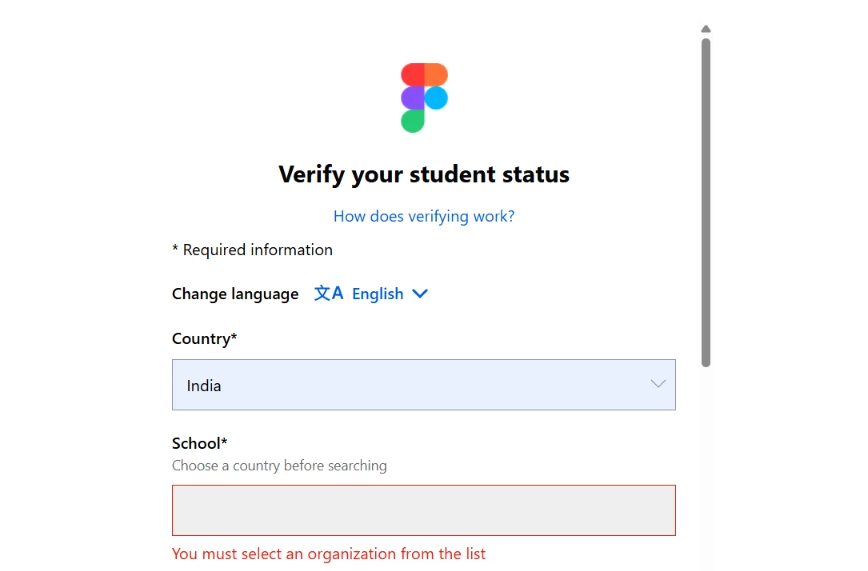
I'm trying to verify my student status for the Figma Education plan, but I'm experiencing an issue with the verification form.

After selecting India as my country, the School field doesn't display any colleges or institutions to choose from. Instead, it remains empty and shows the message "You must select an organization from the list." Since no list appears, I'm unable to continue with the verification process.

This seems to be a technical issue rather than my institution not being available.
 

1 reply

Celine_
Figmate
  • Community Support
  • July 14, 2026

Hi ​@MARAM AMRUTHA VARSHINI , Celine from the Community Support at Figma here! Thanks for reaching out and for providing all of those details.

I tried reproducing this on my end, and after selecting India as the country, I was able to search for schools successfully.

As a first step, could you try the following:

  • Perform a hard refresh of the page (Ctrl + Shift + R on Windows or Cmd + Shift + R on macOS).
  • Try in an incognito/private window or a different browser
  • Type the full name of your academic institution (rather than an acronym or abbreviation).
  • If your institution has multiple campuses, try searching for the main campus instead.

If your school still doesn't appear in the list, you can request that it be added by submitting the Request to add your academic institution form.

If you've already tried all of the above and the School field remains completely empty (with no institutions appearing at all), could you let us know:

  • Which browser you're using (and its version)
  • Whether this happens in an incognito/private window or a different browser as well
  • Whether you're accessing the verification flow on desktop or mobile

That will help us determine whether this is a technical issue and investigate further if needed, thank you!