Answer

Unable to publish updates in figma

  • July 31, 2025
  • 4 replies
  • 156 views

Harsh Kharsani

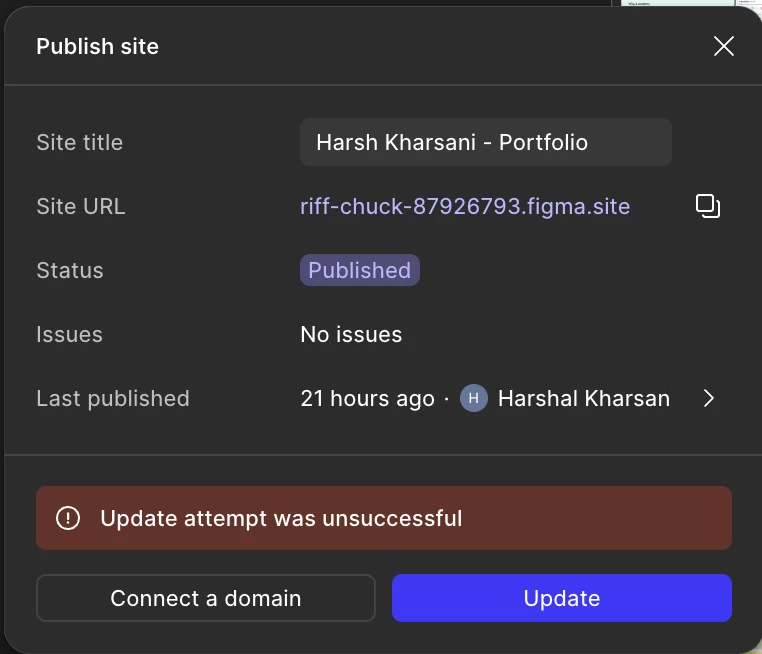
I'm trying to publish my website but this error keeps returning:

Could you please help me resolve this ?

Best answer by Tom Reem

Thank you again for raising this! I wanted to circle back and share a related thread where another designer ran into a similar issue — and where ​@Harsh Kharsani was able to identify a couple of key causes. You can check out the reply marked as the best answer here: Publishing website in Figma Sites is unsuccessful. ✅

Two things to double-check in your file:

1. At the extreme left bottom if there is an icon button with (A?). That means you are using a font that is not a Google font and figma only supports Google font and not machine fonts. 

2. If you are using any Video in the file make sure it is not more than 10,485,760 bytes. 

In my case it was both custom font as well as had a video with more bytes.

4 replies

Tom Reem
Figmate
  • Figmate
  • Answer
  • August 3, 2025

Thank you again for raising this! I wanted to circle back and share a related thread where another designer ran into a similar issue — and where ​@Harsh Kharsani was able to identify a couple of key causes. You can check out the reply marked as the best answer here: Publishing website in Figma Sites is unsuccessful. ✅

Two things to double-check in your file:

1. At the extreme left bottom if there is an icon button with (A?). That means you are using a font that is not a Google font and figma only supports Google font and not machine fonts. 

2. If you are using any Video in the file make sure it is not more than 10,485,760 bytes. 

In my case it was both custom font as well as had a video with more bytes.

Patrycja Kollek

I’m having a similar issue now but there is no A and I’m not using any video files


Nicole_Erthein

I am also having this issue. No A and no videos in my file.


Celine_
Figmate
  • Community Support
  • November 4, 2025

Hi there! I am Celine, I work closely with Tom, happy to help!
First, could you check if there are any “Issues to review” listed in the publishing modal under the Issues section? You should see a “Fix errors” button that can help guide you through resolving them. Then, please wait a couple of minutes and try publishing again.

If the issue persists, please reach out to our Support team so they can investigate more closely: Submit a bug report

When filling out the form, please:

  • Use the email linked to your Figma account

  • Invite support-share@figma.com with “can edit” access to the file (this won’t count toward your billing)

  • After reproducing the issue, attach your console logs (steps here: Export console logs)

This will help the team to investigate it faster. Thanks!

