

Solved

Unable to publish Figma plugin

  • February 9, 2026
  • 19 replies
  • 114 views

cmouchet

Hi there, 

I’m unable to publish a new version of the pligin this evening. The error only shows in the console, but I can see that the Author (Share As) section is empty, there’s no way for me to edit this.
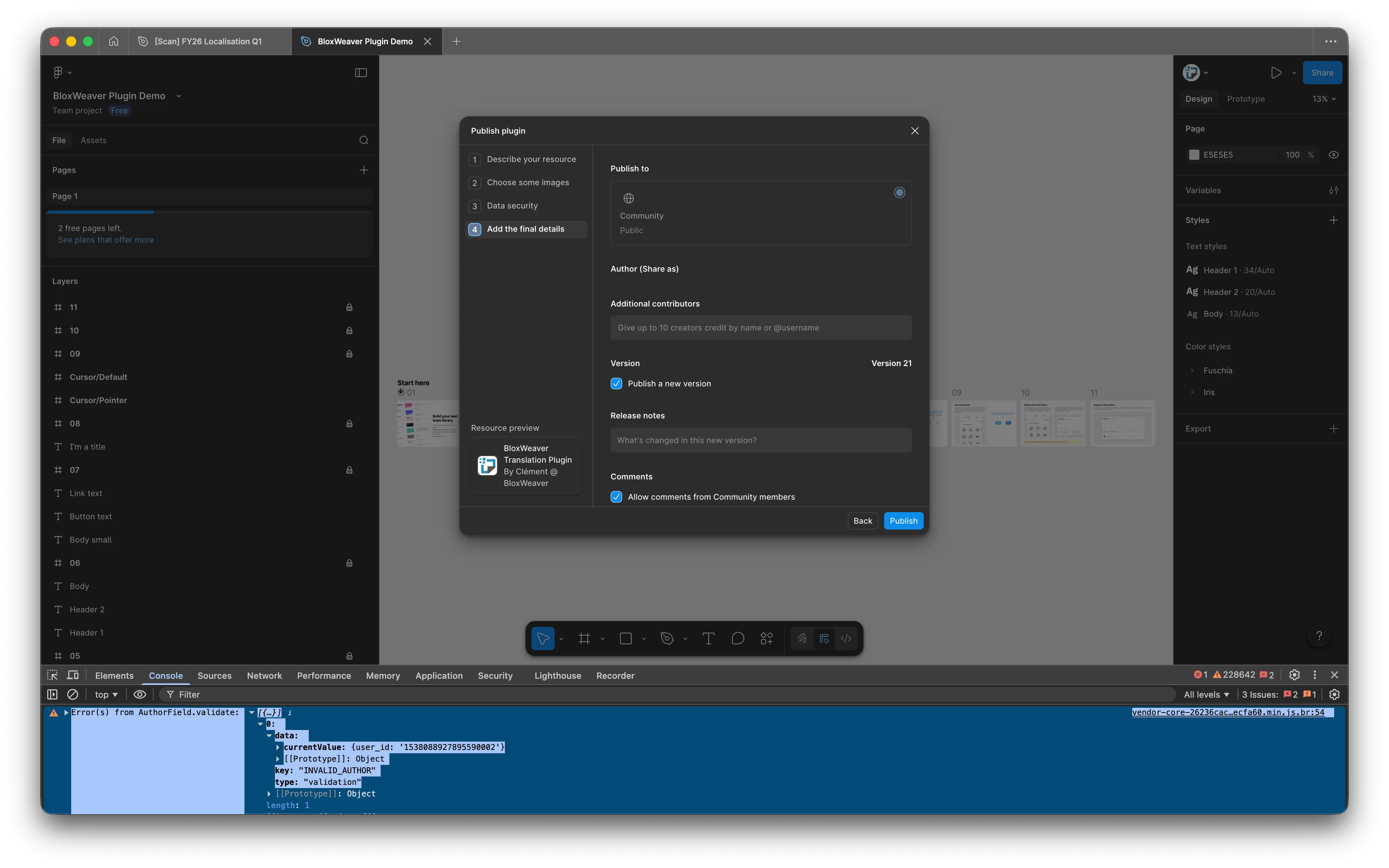
validation error INVALID_AUTHOR 


vendor-core-26236cac…ecfa60.min.js.br:54 Error(s) from AuthorField.validate:

  1. [{…}]
    1. 0:
      1. data:
        1. currentValue: {user_id: '1538088927895590002'}
        2. [[Prototype]]: Object
      2. key: “INVALID_AUTHOR"
      3. type: "validation"


Can you advise?


Best answer by Celine_

Hey everyone again, our engineering team has pushed a fix!
Please refresh your tab and try publishing again. Feel free to let us know if you’re still running into issues. Thank you

19 replies

  • Figmate
  • February 10, 2026

Hi ​@cmouchet


I understand that you’re experiencing an issue when trying to publish an update to your plugin. You’re seeing the “INVALID_AUTHOR” error in the console, and the Author (Share As) field in the publishing modal appears empty, preventing you from continuing.

Thanks for sharing those details. While we wait to see if other community members have additional insight, I’ll also check on this internally and will follow up once I learn more.


Thanks,


maqibin
  • New Member
  • February 10, 2026


@Junko3 The same  Problem ,The console keeps triggering verification when I open the publishing window


maqibin
  • New Member
  • February 10, 2026

This problem occurred again today. It was okay yesterday


  • Figmate
  • February 10, 2026

Hi ​@maqibin,

Thanks for flagging!

I’ve gone ahead shared your case internally as well, we’ll update when I hear back anything.


Ejiro Pinnock

I’m seeing the same issue


Ivan Krot
  • New Member
  • February 10, 2026

I have the same problem


Amelian58
  • New Participant
  • February 10, 2026

This is a Figma-side issue. The INVALID_AUTHOR error happens when the plugin’s author data fails to load, which is why the “Share As” field is empty and locked. There is nothing you can fix locally. You need to wait for Figma to resolve it or contact Figma Support to have the plugin author association refreshed.


I2olanD
  • New Member
  • February 10, 2026

+1. Facing the same issue


MuellMorty
  • New Member
  • February 10, 2026

+1, cant publish any updates since yesterday evening


m4sbay
  • New Member
  • February 10, 2026

Hi Figma Team,

I'm encountering a blocking error while trying to publish an urgent update for my plugin, iTailwind (ID: 1586682727528531603).


I recently updated some information in my account settings, which seems to have triggered a security flag. Since this update is critical for my current users, I need assistance in validating my account status so I can resume publishing.

I have already:

  • Checked my account settings for missing fields.

  • Tried re-logging into the Figma desktop app.

Could you please help me unlock the publishing capability for this plugin?

Thank you!


Upbuilder's Team


Ever since today I am unable to publish my plugin: https://www.figma.com/community/plugin/1465483905491954235/upbuilder-figma-to-webflow-plugin-no-auto-layout-needed


I am getting this error. Why? It gets stuck on the final publish panel and doesn’t show any errors. I had to open the development console to see those errors. 


Vytautas Grižas

Im trying to publish Plugin Update, but i get loop in error spam 9000 prints in just few seconds...

 
​​​​​​When i click error for a brief milisecond i see an error message “Please fill out required fields and correct any errors” it clears instantly but all required fields are filled.


coodersio
  • Active Member
  • February 10, 2026

I have the same issue!


Vytautas Grižas

Same here, my topic: 


Celine_
Figmate
  • Community Support
  • February 10, 2026

Hi everyone, Celine from Figma here, and I am working closely with Junko on this! Thank you everyone for flagging this.

We’ve escalated this internally and the team is actively investigating. Appreciate your patience while we look into it.


wolfr
  • Active Member
  • February 10, 2026

Same issue, I can’t publish my plugin.


Celine_
Figmate
  • Community Support
  • Answer
  • February 10, 2026

Hey everyone again, our engineering team has pushed a fix!
Please refresh your tab and try publishing again. Feel free to let us know if you’re still running into issues. Thank you


cmouchet
  • Author
  • New Member
  • February 10, 2026

I was able to publish, thanks!


Celine_
Figmate
  • Community Support
  • February 10, 2026

Thanks for confirming, I am glad it’s working on your end now!
