

ayload
New Member
Jul 23, 2026 7:42 PM UTC
Solved

Unable to preview mobile in figma make

I don’t have the device icon next to the page (All my coworkers show an icon to the right of /signup)



It is on the far right for me and it wont let me change any settings. 
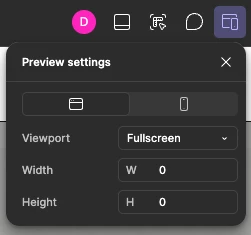
 

I tried reinstalling, removing all plugins, updating to newest version, reseting figma

    ayload
    ayloadSolution
    New Member
    Jul 24, 2026 4:51 PM UTC

    I have resolved this issue by updating to the newest version of OSX Tahoe

    6 replies

    ayload
    ayloadAuthor
    New Member
    Jul 23, 2026 7:43 PM UTC

    this is what my coworkers see


    Jaycee Lewis
    Figmate
    Figmate
    Jul 24, 2026 3:09 PM UTC

    Hi ​@ayload 👋 Thanks for flagging this. I took this to my internal resources. Is the issue still occurring today? Talk soon — Jaycee

    ayload
    ayloadAuthor
    New Member
    Jul 24, 2026 3:14 PM UTC

    Hi ​@ayload 👋 Thanks for flagging this. I took this to my internal resources. Is the issue still occurring today? Talk soon — Jaycee

    yes, still not resolved

    Jaycee Lewis
    Figmate
    Figmate
    Jul 24, 2026 3:32 PM UTC

    Hey ​@ayload Thanks for confirming. I’m sorry it’s still occurring for you. I opened a support ticket to help track this issue. The ID is 2032310 and the subject line is Unable to preview mobile in Figma make. Talk soon! — Jaycee 

    Jaycee Lewis
    Figmate
    Figmate
    Jul 24, 2026 4:46 PM UTC

    Hi ​@ayload can you update/refresh your Figma instance and try toggling your mobile preview settings? Thank you! — Jaycee

    ayload
    ayloadAuthorSolution
    New Member
    Jul 24, 2026 4:51 PM UTC

    I have resolved this issue by updating to the newest version of OSX Tahoe