
Typography Selection

  • June 25, 2026
  • 1 reply
  • 16 views

Megan Cannella

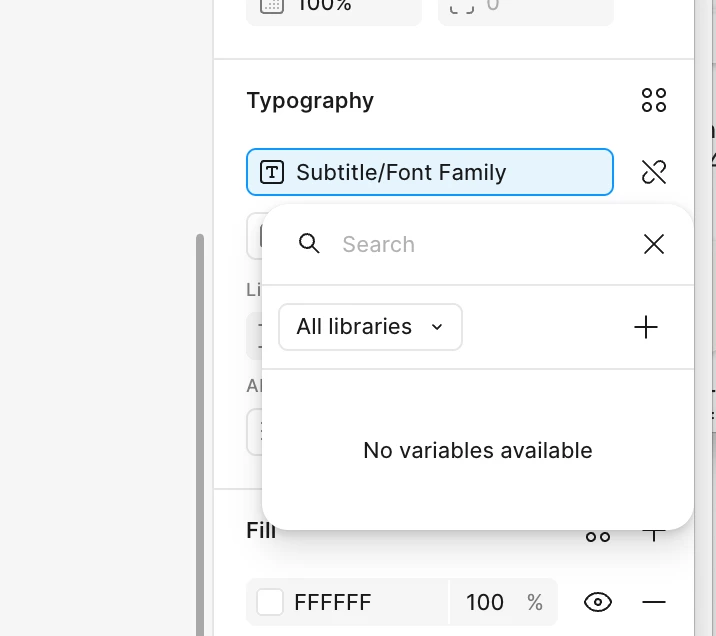
I’m having issues selecting the proper font. When I click into the Typography selector, I don’t get a drop down of fonts at all. 


1 reply

Jaycee Lewis
Figmate

Hey hey ​@Megan Cannella 👋 Happy to help.

My request — Could you grab one quick screenshot to help us pin it down: the full right-hand **Typography** panel with the text layer selected (not just the picker that's open). That'll show us whether the font field is bound to a variable, which changes what you'll see when you click in.

One thing worth checking — your font field shows a variable pill ("Subtitle/Font Family"), so the popover opening is the *variable* picker, not the font list. Is it possible the field is bound to a typography variable? If so, clicking the unlink icon next to it should bring back the normal font dropdown

A couple of quick questions:

  • Are you clicking directly on the font-family field, or on the small variable/link icon beside it?
  • Is this your own file, or one copied/shared from a team library? ("No variables available" often means the source library with those variables isn't enabled in this file.)

Here's the doc on how variable-bound font fields behave. Thank you! — Jaycee
