Solved

Toolbar panel not expanding

  • April 9, 2026
  • 2 replies
  • 31 views

sarah.klos

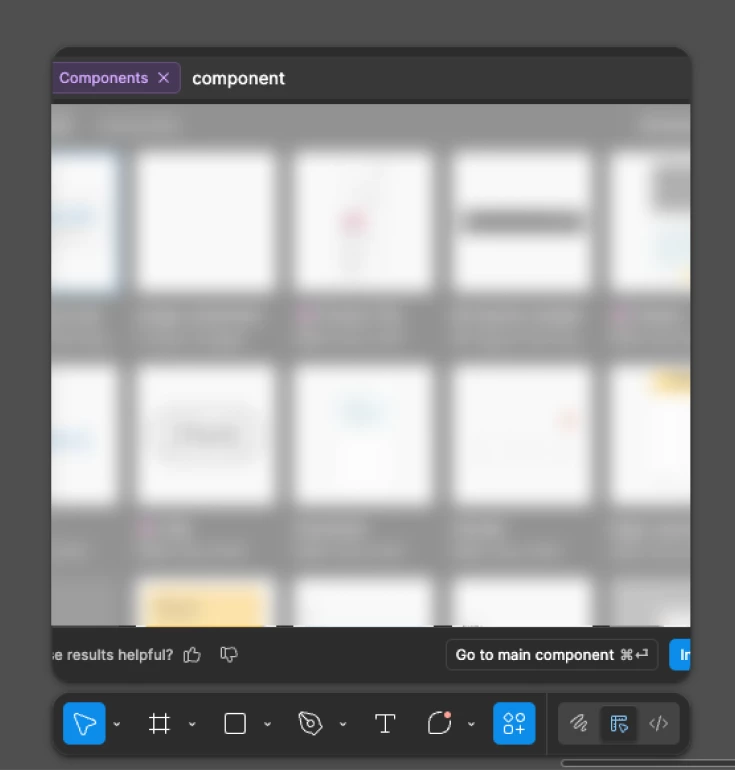
My component panel shortcut is not expanding fully and cutting off components. When I double click and add a component into my designs, all the components inside shift around and I end up inserting the wrong component. Started happening this week

Best answer by Junko3

Quick update on this: Our engineering team has deployed a fix, and I can confirm the issue is now resolved on my end.

Please fully refresh Figma, as this should resolve the issue. If the problem persists, please let us know.

Thanks again for your report.

2 replies

  • Figmate
  • April 10, 2026

Hi ​@sarah.klos


Thanks for flagging this.

I was able to reproduce this on my end. Here are the steps:

  1. Click "Actions" in the toolbar.
  2. Go to the "Assets" tab and use the search bar to find a component.
  3. Click "See more" in the Components section.

I can confirm the window that opens doesn't allow for horizontal scrolling or resizing, which results in some components being cut off from view.

I'll go ahead and pass this issue along to our team for review and will update this post once I have more information.


For now, please try using more precise keywords to narrow down your search results. It's also worth remembering that the 'Assets' search can find components with related terms, not just exact names.

For more details on searching, you can also check out this guide: Find assets and designs using AI


Thanks,


  • Figmate
  • Answer
  • April 14, 2026

Quick update on this: Our engineering team has deployed a fix, and I can confirm the issue is now resolved on my end.

Please fully refresh Figma, as this should resolve the issue. If the problem persists, please let us know.

Thanks again for your report.