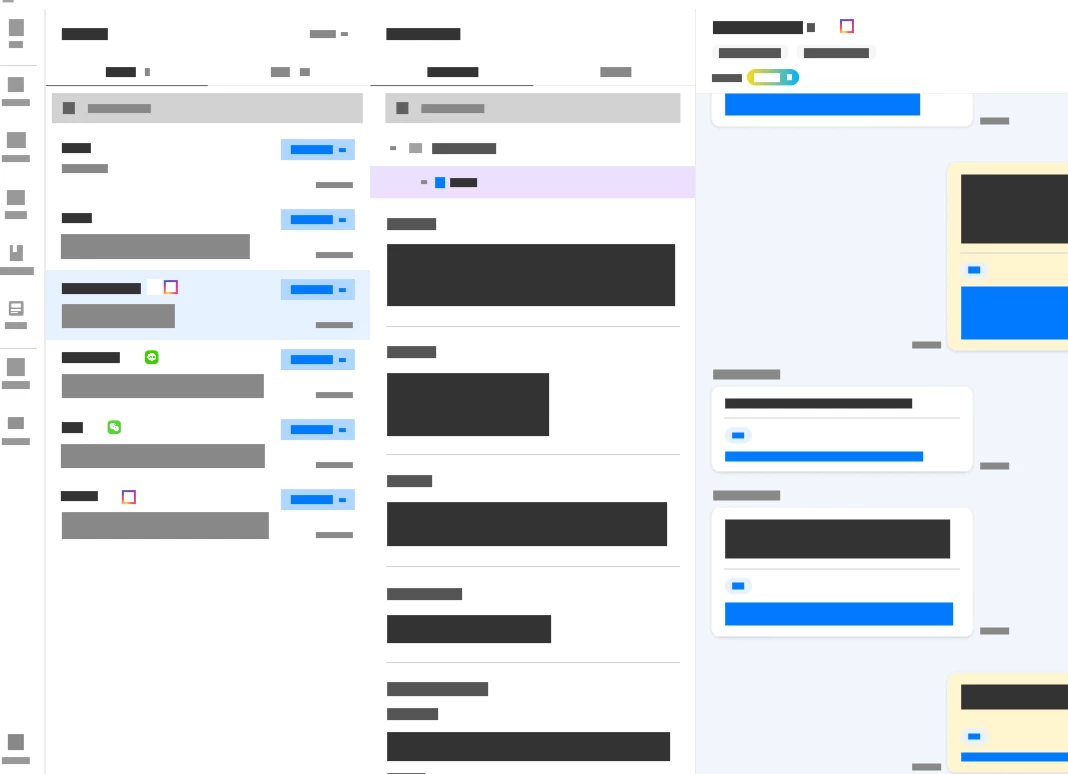
Text rendering failure (blocks) in Presentation mode triggered by specific frame
1. Issue Description
All fonts and text display correctly in Design Mode. However, when running the prototype in Presentation (Preview) Mode, the text fails to render properly and appears as grey or black rectangular blocks.
2. Occurrence Pattern
-
The prototype displays normally immediately after starting Presentation Mode.
-
The text corruption occurs exactly when navigating to a specific frame.
-
Once the issue is triggered, all text throughout the prototype (including previous and subsequent screens) renders as blocks.
3. Environment & Diagnostic Checks
-
Environment: The issue persists in both the Figma Desktop App and Web Browsers (e.g., Chrome).
-
Font Status: All local and web fonts are correctly installed/linked. There are no missing font warnings in Design Mode.
-
Other: This does not appear to be a temporary loading lag. The issue is consistently reproducible at the same specific frame even after restarting the application.
Preview: