
iKristy
New Participant
Sep 21, 2026 1:34 PM UTC
Question

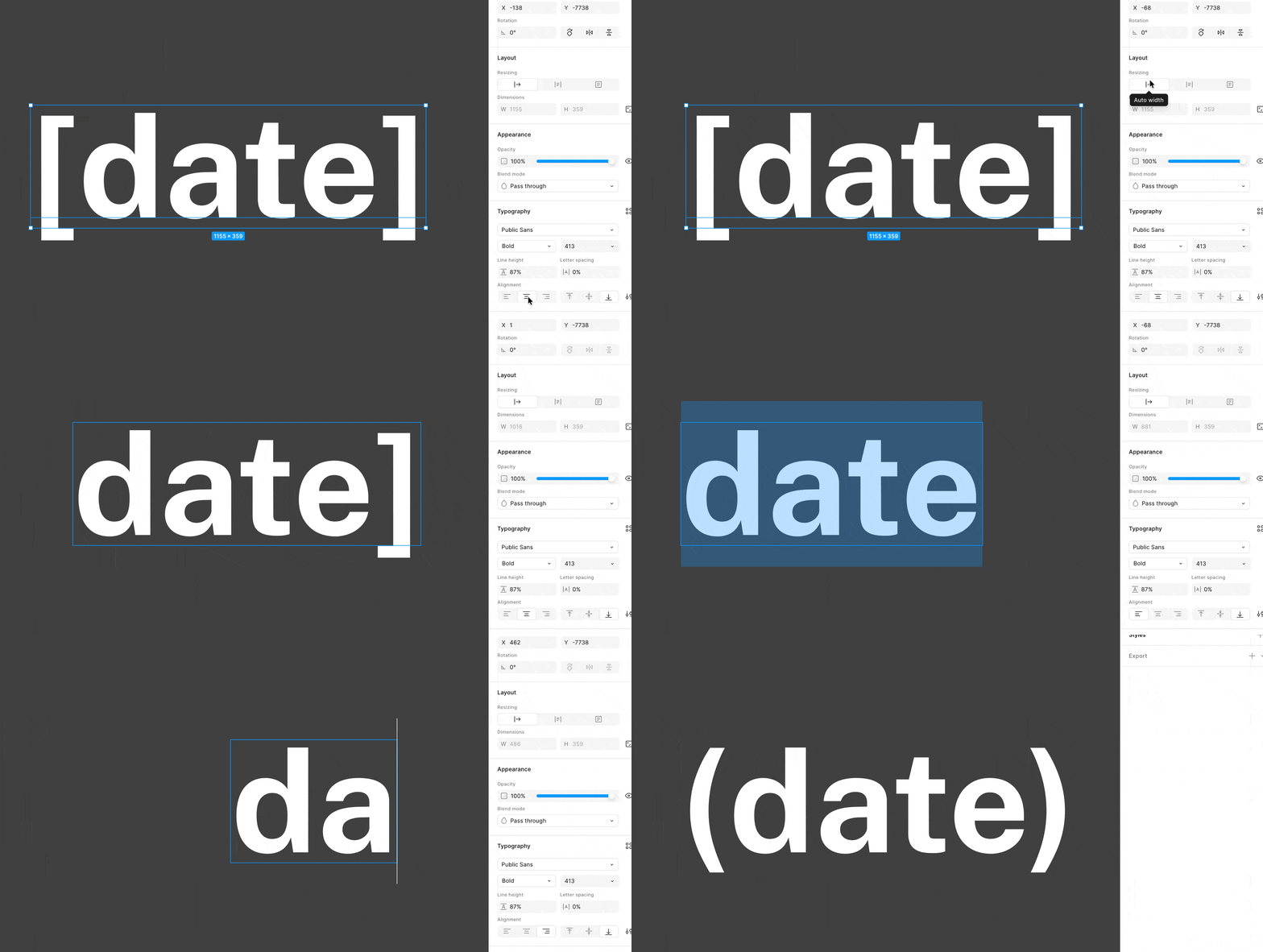
Text bounds get borked when using symbols at the start and end of a text layer, and when aligned left/right

When I was trying to make a placeholder layer, I noticed that the text bounding box was behaving weirdly when I used symbols (like `()`, `{}`, `[]`) at the start and end of the text layer, and when I had left or right alignment applied. As you can see below, the text bounds end before one of the symbols.


6 replies

Jaycee Lewis
Figmate
Figmate
Sep 21, 2026 9:27 PM UTC

Hey ​@iKristy 👋 Thanks for posting. The GIF is super helpful. I was trying to repro but could get it to break the way your GIF shows.

  • Does this happen for you with Browser and Desktop?
  • What is your OS, browser and version (if Desktop)?
  • Can you share a link to the file where this is happening? In case we need to move this to support. You can share it by inviting  support-share@figma.com  as a viewer. Adding support as a viewer won't affect your billing or take up a seat on your team

Thank you for the additional details 🙌 — Jaycee

iKristy
iKristyAuthor
New Participant
Sep 23, 2026 11:09 PM UTC

Hey Jaycee! Thank you.


Jaycee Lewis
Figmate
Figmate
Sep 24, 2026 6:30 PM UTC

Hey hey ​@iKristy 🤩 Thanks for all your help. I opened a support ticket for this. The ID is 2151709 and the email subject line is Text layer bounds exclude leading or trailing symbols with left/right alignment. Please keep an eye on your email (and spam folder if necessary) for the email and any replies from our team. I appreciate all your help so far. Thank YOU! — Jaycee

jyp
New Member
Nov 19, 2026 10:25 AM UTC

Has this issue been resolved? I'm running into the same problem too.

Celine_
Figmate
Community Support
Nov 19, 2026 1:13 PM UTC

Hey ​@jyp ,  we haven’t heard back from the original reporter yet, but I’m sharing our Customer Support team’s findings in case they help you too.

The team checked the file and found that Hanging punctuation was enabled on the affected text layer. This setting places opening quotation marks outside the text layer’s bounding box.

Please select the affected text layer, go to Typography → Type settings → Details → Hanging punctuation, and disable it to see whether this resolves the issue.
 

Hanging punctuation

If the issue persists, please submit a bug report through our Support Hub  / Type “Report a bug” / Click Start a chat and select Enter and follow the prompts, so the Customer Support team can investigate your specific case. Thank you!

jyp
New Member
Nov 20, 2026 2:30 AM UTC

Got it! Thanks for getting back to me!