Question

Text always disappear

  • July 9, 2026
  • 3 replies
  • 35 views

SuSuhihi

Hi good morning,

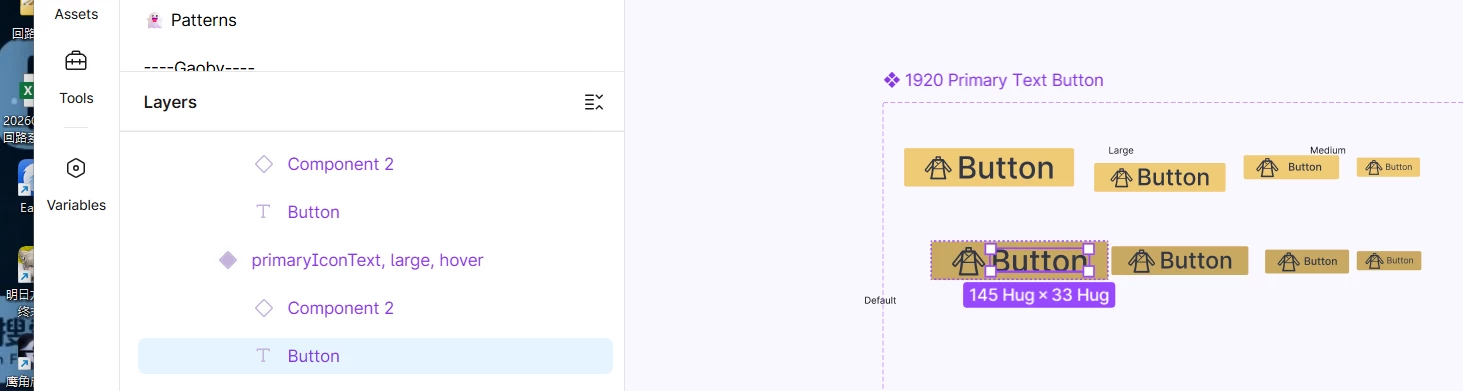
I met some weird problems when creating the design files. The problem is some texts don’t display and when i click the text itself, then it will show again, and this situation shows lots of times and it is a little bit annoying. 

There are the steps:

1.Create the component and the variables of the button

2.Use them in the design file and change the color and font of the text 

3.Warp with some auto layout
 

3 replies

Gayani_S
Figmate
  • Community Support
  • July 9, 2026

Hey ​@SuSuhihi, thanks for reaching out, and for the clear steps and screenshots!

What you're describing might be a rendering hiccup rather than something wrong with your file, but I'd like to narrow down what's triggering it for you specifically:

  1. Try refreshing the file (or fully restarting if you're on the desktop app) the next time it happens, and see if that brings the text back without needing to click into it.
  2. Double-click directly into the text layer when it goes blank. 
  3. Since this is happening with a component that uses variables inside an auto layout frame, could you check whether the text layer's resizing is set to Hug contents vs a fixed size? Mismatches there can sometimes cause a redraw to get missed.

One more thing that'd help me narrow this down: are you seeing this in the browser, the desktop app, or both?

In the meantime, here's our guide on text in Figma Design, which has a troubleshooting section for text rendering issues, plus our general troubleshooting checklist if you want to rule out anything environment-related.


Let me know what you find and we'll go from there!


SuSuhihi
  • Author
  • New Member
  • July 10, 2026

HiHi, Thank you for your reply and the guides you provided! Here are more details, hope it will be helpful.

1.This situation happens both in the brower and the desktop app, and happens to me and my colleges:(

2.Refreshing the file doesn't bring the text back

3.Double click works

4.The text layer‘s resizing is set to Hug

Looking forward your reply~


Gayani_S
Figmate
  • Community Support
  • July 10, 2026

Hey ​@SuSuhihi, thanks for the extra detail! 

Since double-clicking into the text brings it back but a refresh doesn't, this points to the text just needing its layout recalculated rather than anything being lost from the file itself.

One thing worth trying instead of clicking into each text layer one at a time: select the affected frame(s) or instances, then open the quick actions menu (Ctrl/Cmd + /) and run Recompute text layout in selection. That forces the same kind of refresh as double-clicking, but across everything you've selected at once.

To help me understand the pattern a bit more, are you or your colleagues switching between variable modes (like a light/dark mode) around the same time this happens, or does it show up even without switching modes?


For a closer look at what's happening in your specific file, I'd recommend reaching out to our support team directly through our support hub. They'll be able to take a look at the file and dig into the specifics with you.