

Question

Stroke width halved when not center and broken variable width

  • June 10, 2026
  • 3 replies
  • 34 views

Kidhack

Bugs:

  • Stroke is divided by half when set to outside or inside stroke
  • Variable stroke breaks the perfect circle

For context, circle are around 1300px diameter and 100 - 400px stroke made with circle tool.
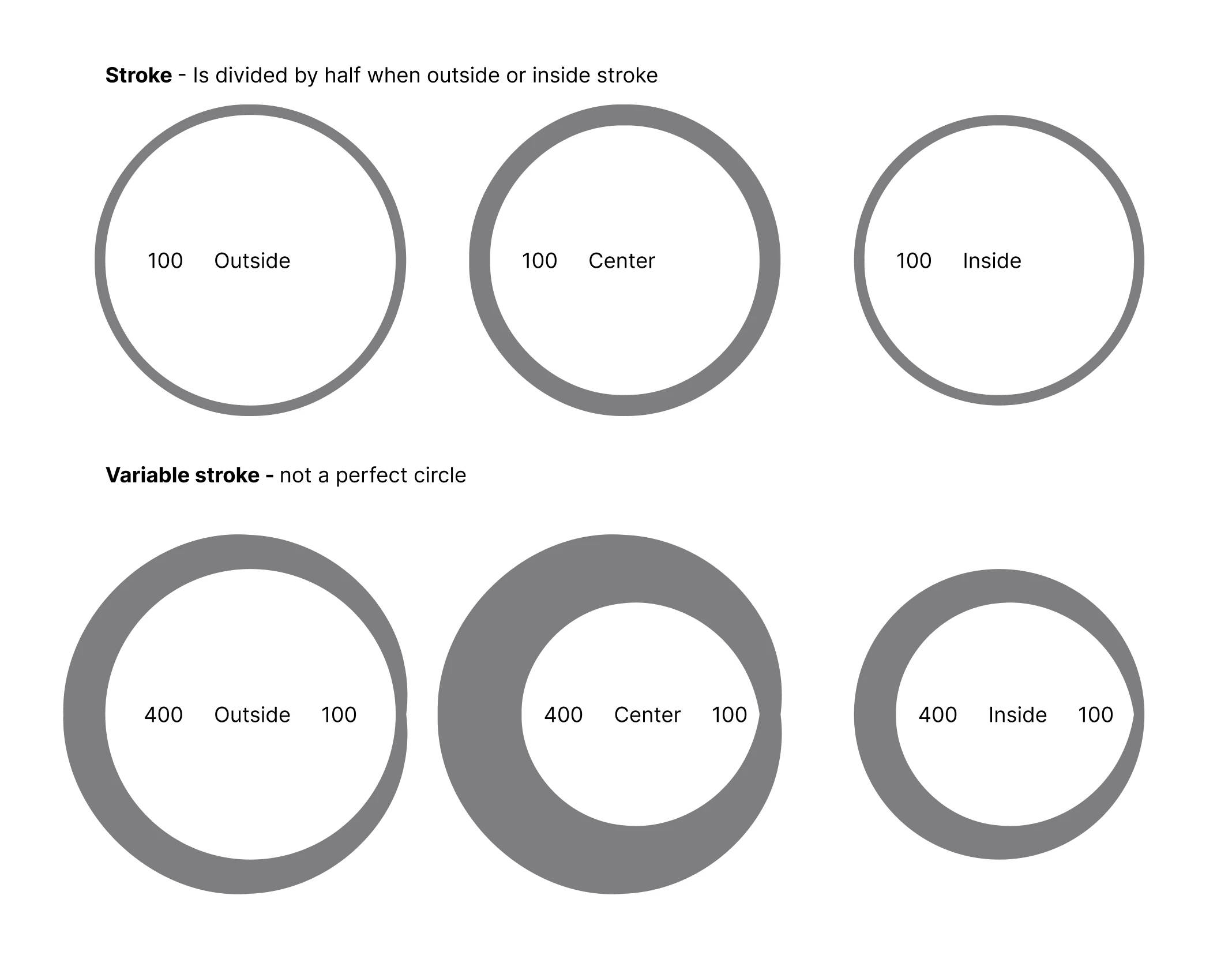
 

3 replies

Jaycee Lewis
Figmate

Hey ​@Kidhack 👋 Thanks for the details and the screenshot — that made this easy to reproduce.

Here's my repro:
- Created an ellipse with a uniform stroke
- Entered vector edit mode and used the Variable width tool to set a 400/100 width spread
- Tested it at Inside, Center, and Outside stroke positions
- Outlined the stroke on each and confirmed the contour stays malformed in the vector itself — not just the preview
- I did this on the Desktop app on a MacBook Pro

The doc for the Variable Width tool, for reference:
https://help.figma.com/hc/en-us/articles/360039957634-Edit-vector-layers#h_01JYM29VEN8ABWTDXJR529446R

Does this match what you're seeing — the variable-width stroke on the circle distorts the same way in my test as in yours? Thanks! — Jaycee


Kidhack
  • Author
  • New Participant
  • June 10, 2026

What happens when you modify the stroke placement in the draw tool?


Jaycee Lewis
Figmate

Hey, ​@Kidhack 👋 I get the same result.

I can open a support ticket open for you. Would you be able to provide the following in the support ticket (not here 😊):

  • The URL of the affected file(s)
  • Grant edit access to support-share@figma.com so our team can attempt to reproduce the issue
  • Include a full-size screen recording of the issue along with your screenshots from this thread
  • *NOTE* Sharing file access with Support won't impact your billing — it just allows our team to debug further on their end. Please be sure to use your Figma email account when sharing

Talk soon! — Jaycee