

agenaidy
March 11, 2021
Solved

Smart animation doesn't work with fix scroll position

  • March 11, 2021
  • 16 replies
  • 4801 views

When I try to use the new beta feature “Swap component” using smart animation transition
And fix the scroll position of that component. the animation jump down then up and doesn’t do the smart transition. I know it is still in beta but i want to shout out for feedback

This topic has been closed for replies.
Best answer by aric

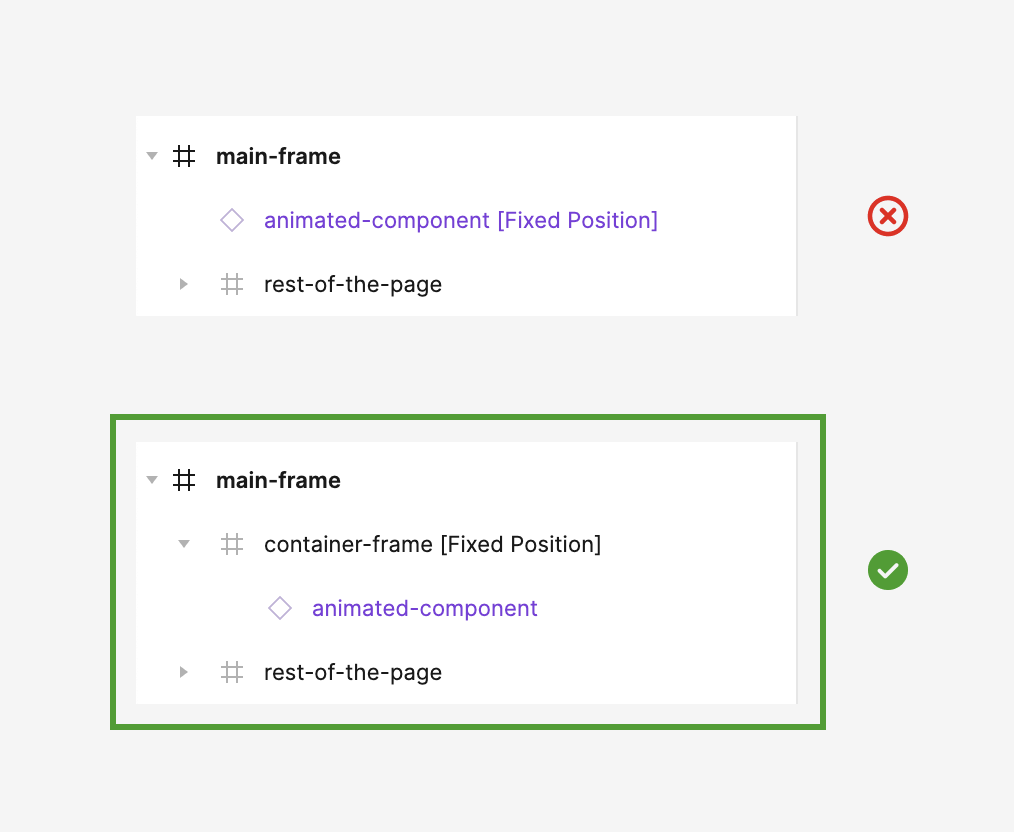
Hey Jason, I’ve attached an image showing the layer set up, hopefully this helps.

16 replies

Gleb
Power Member
March 12, 2021

Can you share an example file?

agenaidy
agenaidyAuthor
March 12, 2021

@Gleb I made that prototype to show the case
Expected behaviour

  • Click on the red element it will shrink in size and expand keeping the position of the element
    What happens
  • the element jump in the page and come back up again while doing the animation
    Figma
Agnese_Martinuzzi
March 4, 2022

Hi everyone, i have found this post after experiencing the same problems with “smart animate” and “fix position when scrolling”. It seems this bug still exist. I have found an “unpolished” solution: use “instant” instead of “smart animate”.
It’s not very nice to see it but it’s better than nothing! 😂

Barak_Paz
July 1, 2022

@Agnese_Martinuzzi thanks for the tip.
bug still exists july 2022. leaving a comment so this thread will stay afloat

AHRAF_ASFARI
August 7, 2022

Agnese_Martinuzzi
Hello iam here to help you

I think your problem is quite common

So here is the fix.

Frame the thing what you have to animate
And resize that as your mainframe size
Do the same on next frame

Your compound = your main frame
Eg: main frame w:270 h:1980
Compound w:270 h:1980

And here you go!

I explained this clearly.
Hope you understand.

AHRAF_ASFARI
August 7, 2022

Agnese_Martinuzzi
Hello iam here to help you

I think your problem is quite common

So here is the fix.

Frame the thing what you have to animate
And resize that as your mainframe size
Do the same on next frame

Your compound = your main frame
Eg: main frame w:270 h:1980
Compound w:270 h:1980

And here you go!

I explained this clearly.
Hope you understand.

Fynn_M_Llyr
October 18, 2022

I think I’m having the same problem, though “fix scroll position” does not seem to be an option with smart animate. I’m using a component at the bottom of the frame to simulate tabs, and most of the times I click on a tab, the prototype jumps to the top of the frame for a second, before returning to the tab component. All of the elements repeated between variants of the component have the same labels, and the sizes are the same, so I have no idea what is causing the problem.

aric
New Member
November 16, 2022

I’ve discovered a very simple workaround—simply contain the component in a frame and put the fixed position property on that instead of directly on your component.

Tascha
Active Member
December 22, 2022

works like a charm! Thank you so much 🙏

Jason26
January 21, 2023

Aric, I still don’t get it, can you explain in more detail please or someone???! HELP