

Slots in nested component instances preserve wrong content across variant changes
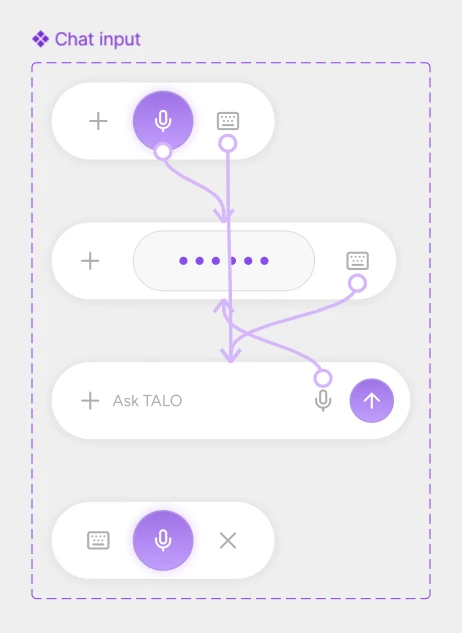
I have an Icon Button component that uses a Slot for its icon, with variants for press state and such. I made a new component set for a Chat Input, with different variants that change on interacting with the Icon Button (such as type, voice etc), so its a nested component in the Chat Input component set. So when I click an icon button with the icon keyboard, the variant in chat input should change to the typing version of the input box. So in this input box, there is an icon button with mic icon, which is there incase the user wants to switch back to voice mode.
Instead of displaying the mic icon defined in the target variant, the slotted icon (keyboard) from the previous state persists and overrides it. To be clear, a Mic button incorrectly displays a Keyboard icon, and replacing the Keyboard icon with a different icon causes that new icon to appear across variants as well. Please refer the screenshot to see what behaviour I expected and the screen recording to see how it is actually behaving. In some cases, other button instances unexpectedly inherit the same icon.
I've reproduced this in a minimal test file. Recreating the icons and button components doesn't help, but detaching the button instance immediately fixes the issue. The behavior also changes depending on the button's position in the layer hierarchy.
Has anyone else encountered this? Is this expected behavior for Slots in nested components, or a bug in how slot content is preserved during variant transitions?