Question

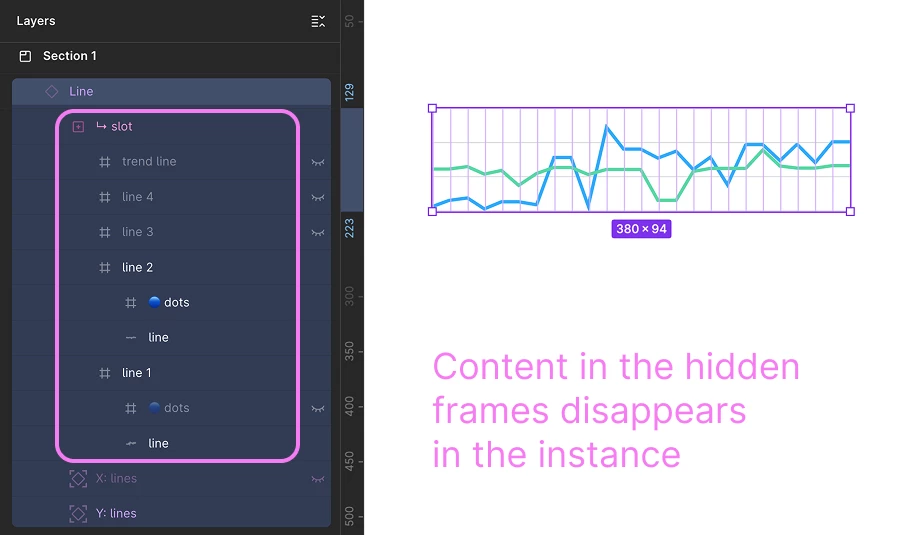
[Slots] Elements wrapped in hidden frames disappear inside instances

  • April 20, 2026
  • 4 replies
  • 31 views

Julia_Mnizhek

Hi team!
I found some strange behavior with Slots in instances.

Context:

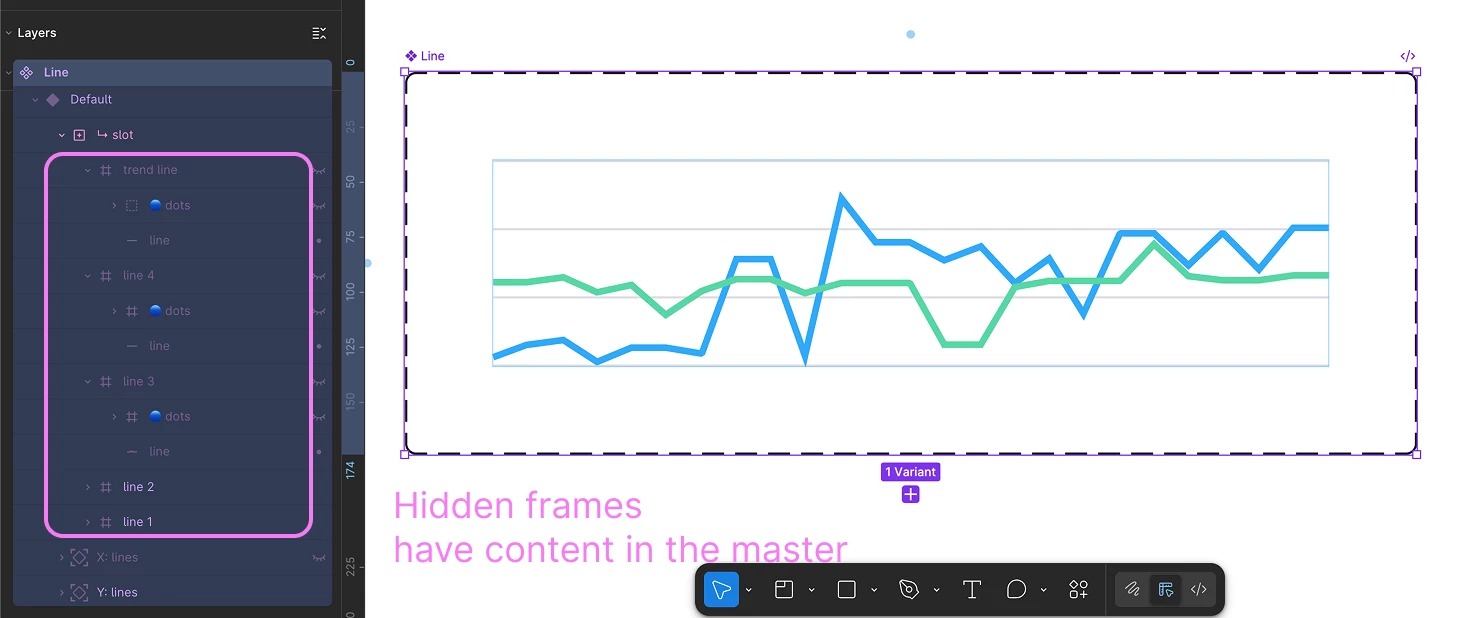
  1. A component has a slot with content, and part of that content is placed inside frames — for example, in my case they are additional chart lines with dots. Frames witn the line 1 and line 2 are visible, other 8 frames with lines are hidden. Some of those hidden elements are controlled by component properties.
  2. If you change the content, enable or disable any of the hidden frames inside the slot in an instance, all hidden elements inside those frames disappear.


4 replies

djv
Figmate
  • Community Support
  • April 20, 2026

Hi ​@Julia_Mnizhek, thanks for reaching out! 

I completely understand how this behavior must have surprised you, but this is currently expected behavior. Removing a slot property from a main component is a destructive action. If an instance has been modified using slots and the slot property is removed from the main component, that instance’s slot area will be reset to its default state. For example, if you add layers to a slot in an instance, and then removed the slot from the main component, those added layers would be automatically removed from the instance.
 

Because of this, we recommend testing slot removal in a separate branch before approving and publishing any changes. This is explained in our Help Center article here. 


Julia_Mnizhek
  • Author
  • Active Member
  • April 21, 2026

Hi ​@djv !

Hi ​@Julia_Mnizhek, thanks for reaching out! 

I completely understand how this behavior must have surprised you, but this is currently expected behavior. Removing a slot property from a main component is a destructive action. If an instance has been modified using slots and the slot property is removed from the main component, that instance’s slot area will be reset to its default state. For example, if you add layers to a slot in an instance, and then removed the slot from the main component, those added layers would be automatically removed from the instance.
 

Because of this, we recommend testing slot removal in a separate branch before approving and publishing any changes. This is explained in our Help Center article here. 


My issue isn’t about removing the slot property. My issue is about elements disappearing inside the slot. I have several frames with lines and dots inside the slot that are present by default in the slot. I’m not removing the slot property, I’m just trying to unhide those hidden by default.


More context:

These hidden frames with lines and dots inside the slot are there so a designer can add more lines to the chart or modify them if needed. None of these frames are connected to component properties.


djv
Figmate
  • Community Support
  • April 22, 2026

Thanks for the additional context, ​@Julia_Mnizhek!


Apologies for the oversight, and thank you again for clarifying. What you’re describing is more likely related to how slot content and overrides behave in instances. When elements exist inside a slot by default (like your hidden frames with lines/dots), a few things can cause them to disappear when you try to reveal or modify them in an instance:

  • Overriding slot content: Once content inside a slot is modified in an instance, it can lose sync with the main component. This can sometimes lead to unexpected visibility issues or elements not rendering as expected.
  • Hidden nested layers: If those frames are set to hidden in the main component, toggling them in an instance doesn’t always behave reliably, especially when nested inside slots.
  • Unpublished or “stale” slot content: If any of the slot contents were updated but not fully published, instances can behave inconsistently or appear “frozen.”

Here’s a few troubleshooting steps to try:

  • Refresh the file (right-click the tab → Reload) to rule out a temporary rendering issue
  • Double-check that those layers are visible in the main component (not just in the instance)
  • Try re-applying the slot content (remove and re-add) to see if it restores correctly

For a more stable setup going forward, we generally recommend keeping default slot content fully visible and published in the main component, rather than relying on hidden layers that get toggled in instances. 


Julia_Mnizhek
  • Author
  • Active Member
  • April 24, 2026

Thank you so much for the answer, ​@djv ! 🖤
Yup, I guess, the reason is one of the two first points you’ve described. I’ve passed the issue to the support, hope they will investigate 👀 Anyway, thank you for your help!