
Question

Slot content's layout breaks in prototypes

  • April 20, 2026
  • 3 replies
  • 31 views

Vitalii_Sologub

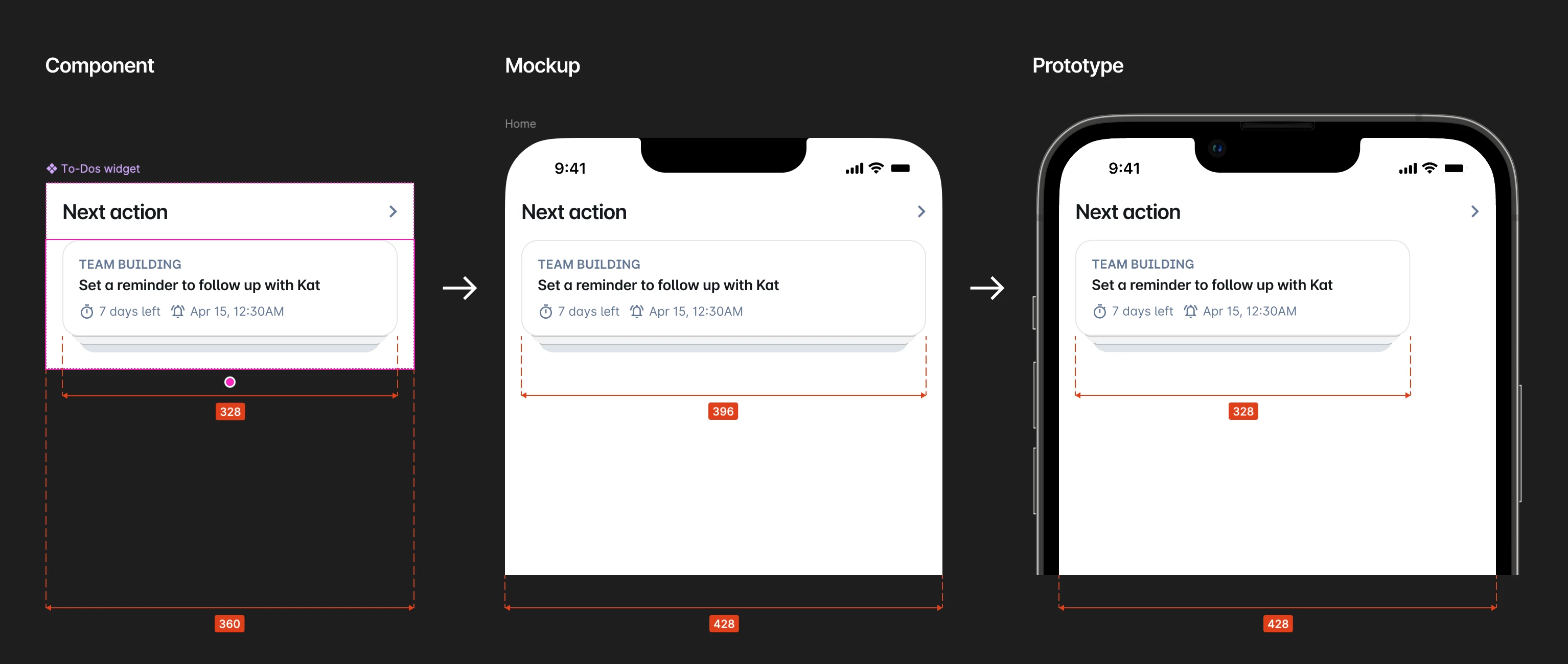
I use a Slot in my Component with default content inside. The content and the whole layout are set to Fill container, and it works as expected in mockups, but in prototypes the Slot’s content is displayed with default dimensions:

 

3 replies

Celyn_L
Figmate
  • Figmate
  • April 23, 2026

Hi ​@Vitalii_Sologub, Celyn from Figma Community Support here.

Thanks for sharing the screenshot and details.

From what you’ve described, it looks like the content renders correctly on the canvas (396) but falls back to its default dimensions (328) in prototype mode.

To help narrow this down, could you share a bit more about your setup?

  • Is the Slot content coming from a nested component or variant?
  • Does the same behavior happen with simpler content (for example, a basic frame set to Fill)?
  • Are you seeing this across different files, or just this one?

As a quick check in the meantime, you could also try:

  • Duplicating the file to Drafts and testing there
  • Replacing the Slot content with a fresh layer set to Fill
  • Testing in both the Desktop app and browser

If you’re able to share a file link here and invite support-share@figma.com with “Can View” access, it will help us reproduce and investigate this more effectively (Note: this won't impact your billing).

Thanks!


Vitalii_Sologub

Hi ​@Celyn_L,
The structure is the next:

  1. Widget template component containing a slot;
  2. Instance of the Widget template component wrapped into a Widget badges and Widget to-dos components with overrides and content placed into their slots.

I’ve recreated the setup from scratch in the new file and tested 3 scenarios in both Chrome browser and Mac Desktop app:

  1. Component instance placed into the slot in the component instance (template) nested in another component;
  2. Non-component elements placed into the slot in the component instance (template) nested in another component;
  3. Non-component element placed into the slot in the component instance (template).

Only the third scenario works as expected, the first two fail to render properly in the prototype:


Please see the file.


Celyn_L
Figmate
  • Figmate
  • April 24, 2026

Thanks for taking the time to recreate this setup and breaking down the three scenarios so clearly - that’s really helpful​ ​@Vitalii_Sologub 🙏 

From what you’ve shared, it looks like the issue shows up specifically when a Slot is used inside a component instance that’s nested within another component, and:

  • Placing a component instance into the Slot doesn’t render correctly in prototype
  • Placing a non-component element into that same nested setup also doesn’t render correctly
  • But placing a non-component element into the Slot without that additional nesting layer works as expected

It’s also helpful to know you’re seeing this consistently across both Chrome and the macOS desktop app.

I’ll share your file and these exact scenarios with the team so they can take a closer look at what’s happening here.

If you notice any other patterns (for example, specific layer types or certain nesting depth that consistently breaks), feel free to share those too.

Really appreciate you putting together such a clear repro, I’ll follow up here as soon as I have any updates.