
Solved

Slack not working properly

  • June 29, 2026
  • 1 reply
  • 25 views

Santiago Barragán

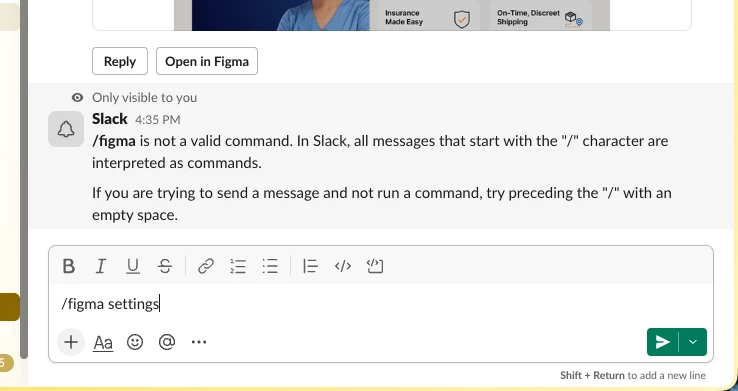
Commands and settings not working in the slack bot. Slack version Version 4.50.143
73a6965fa39af05fd6ab515794b9b874b399aedd@1782743559 (Production). MacOS 26.4 (25E246)
 

Best answer by Tom Reem

Hey ​@Santiago Barragán, thanks for flagging this and sharing those details!

I tested this out on my end and also checked for related reports, though it appears that Figma's Slack app is working as expected for me. That said, I do know that some updates rolled out earlier this month, and that can sometimes require reconnecting apps to pick up the changes properly. When you have a moment, can you try removing and redownloading the Figma app in Slack?

  1. To remove, follow these steps: Get Figma notifications in Slack → Remove Figma from Slack.
  2. To redownload, follow these steps: Get Figma notifications in Slack → Add Figma app to Slack.

Keep me posted on how it goes — if you're still running into that error message after that, let me know and I'll escalate your report for further review. 🙏🏻

1 reply

Tom Reem
Figmate
  • Figmate
  • Answer
  • June 30, 2026

Hey ​@Santiago Barragán, thanks for flagging this and sharing those details!

I tested this out on my end and also checked for related reports, though it appears that Figma's Slack app is working as expected for me. That said, I do know that some updates rolled out earlier this month, and that can sometimes require reconnecting apps to pick up the changes properly. When you have a moment, can you try removing and redownloading the Figma app in Slack?

  1. To remove, follow these steps: Get Figma notifications in Slack → Remove Figma from Slack.
  2. To redownload, follow these steps: Get Figma notifications in Slack → Add Figma app to Slack.

Keep me posted on how it goes — if you're still running into that error message after that, let me know and I'll escalate your report for further review. 🙏🏻

