

iKristy
New Participant
September 16, 2026
Solved

Size variable picker doesn't show up as an option after recent update

How do I get the variable picker to reappear? This was not an issue before. I can only access it for frames that used the variable before but can’t apply size variables anew since the update.
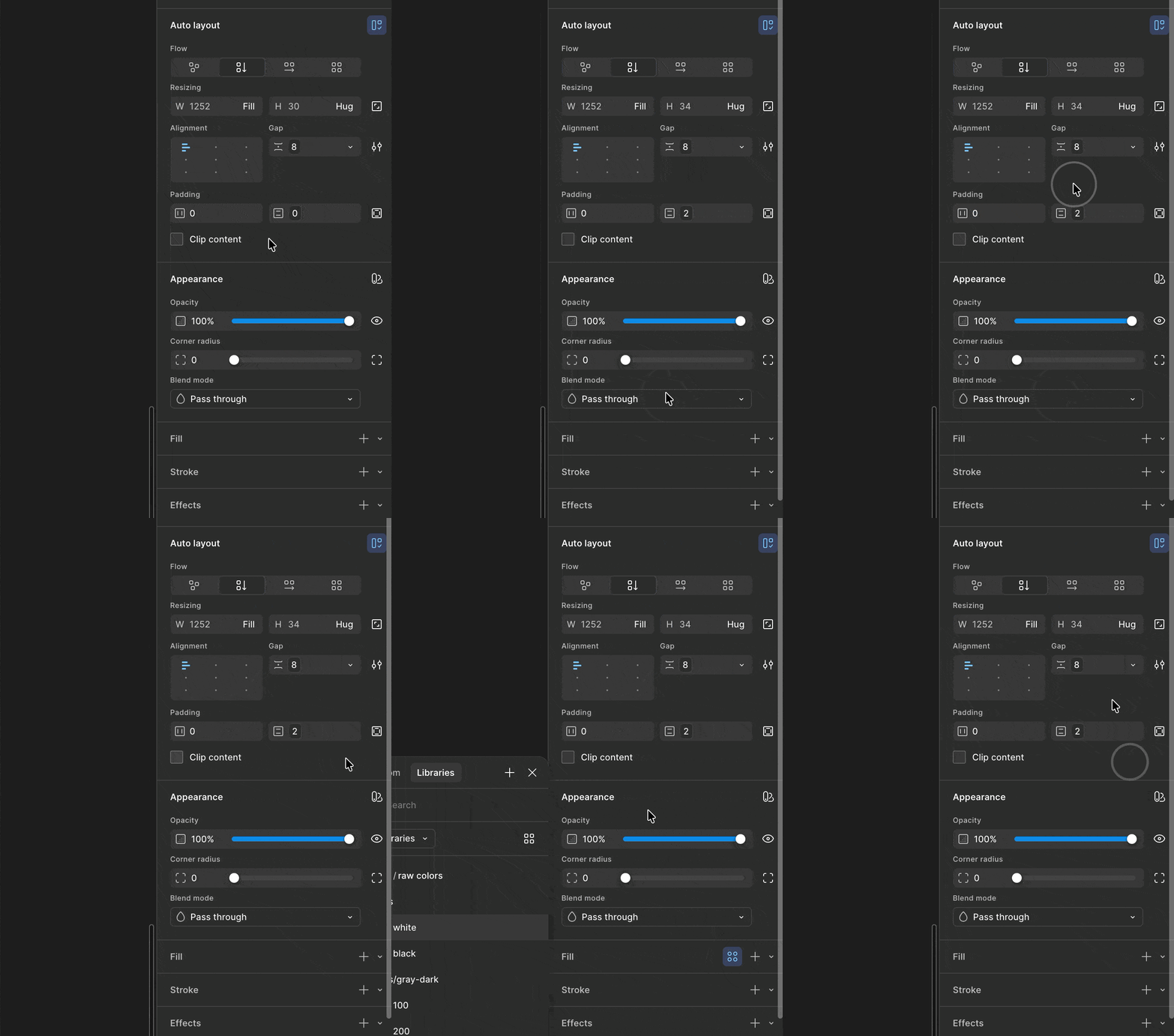
 

Additionally, it feels broken as I can’t click out of the size variable popover like I can do with any other popovers.

iKristy
iKristySolution
New Participant
September 23, 2026

Oh. D’oh!! Ok, so I just figured it out.


For some reason the file was in “Draw” mode and I did not realize it got switched 🙈  So, even though maybe not necessarily a bug per se then, but definitely unexpected that variables don’t work in that mode!

To be honest, I was also confused why the Appearance panel looked different 😅 I thought it was an A/B test or something!

5 replies

Tom Reem
Figmate
Figmate
September 16, 2026

Hey ​@iKristy — welcome to Figma Forum and thanks for flagging this! The GIF is really helpful.

One quick thing to try: Can you click into the property field you're trying to apply the variable to, then press =. That opens the variable picker for any number field, so it's a useful way to tell whether the variables themselves are unavailable or whether it's just the usual entry point that isn't showing up.

Beyond that, two things would help me chase the right thing:

  1. Which field are you trying to apply the variable to? Your GIF looks like Padding and Fill to me, but I want to make sure I’m testing out the right stuff on my end.
  2. Roughly when did you first notice this? A specific date is ideal, but even a general window of time helps a lot.


In addition, if you're able to grab one more recording, please include the layers panel along with the right sidebar. With that, I can see exactly what's selected as you attempt it. It'd also help to see what you're expecting to appear — whether that's an icon on hover, a right-click option, or something else. If you can capture both a frame where it fails and one of the older frames where it still works, that comparison would help clarify the change as well.


Thanks for bearing with these questions — I’ll continue testing on my end and look out for other reports.

iKristy
iKristyAuthor
New Participant
September 23, 2026

Hey Tom, thanks for replying!

So, when I hold `shift` and click into the field, get the variable picker I was looking for. Also `=` works too. I only learned these after the fact looking in docs as I missed having the variable icon!

  1. Yes, I’ve tried all types of fields that the `size` variables would be applied to. So, padding, gap, width, height.
  2. I noticed it after updating to the latest version of Figma, and probably it took me a day or so to report it here.

Some additional notes: I still see the intended behavior in some files but I cannot figure out the differences on why certain files have issues vs. not. They are in the same folder, same permissions, same assets/libraries added. Even creation date is random, as I noticed this in an older file as well as recent ones. I just created a draft and it works there as intended!


Speaking of, working as intended means seeing the little variable icon in the field and being able to click on it. Additionally to have the “Apply variable” option in the resizing fields:


Here’s the exact same in a different file where I’m having the issue. I don’t get the variable icon hint I’ve been using nor the “Apply variable” option in the dropdown. The only way to see the variable picker is through a keyboard shortcut (which doesn’t work in the resizing fields):


Hope these add more context to the issue. Thank you! 🙏

iKristy
iKristyAuthorSolution
New Participant
September 23, 2026

Oh. D’oh!! Ok, so I just figured it out.


For some reason the file was in “Draw” mode and I did not realize it got switched 🙈  So, even though maybe not necessarily a bug per se then, but definitely unexpected that variables don’t work in that mode!

To be honest, I was also confused why the Appearance panel looked different 😅 I thought it was an A/B test or something!

Tom Reem
Figmate
Figmate
September 23, 2026

Aw, shucks! Thanks for letting me know.

This is a great reminder for me to include that more frequently as an initial check point. Your post is really good feedback — we’ll take note of your experience.

I’m going to mark your reply as a best answer so that anyone else who runs into this scenario can find a solution with ease.

Appreciate your patience and being so thorough with troubleshooting. Please don’t hesitate to flag anything else, and let us know if any questions remain. 🙏🏻

iKristy
iKristyAuthor
New Participant
September 23, 2026

Thanks Tom!


One more thing to callout from my initial post: I can’t click out of the size variable picker like I can do with any other variable type pickers. I need to explicitly X out. It’s not a huge thing, but a bit tedious to have to remember that this one is special 😅