tsk25
New Member
February 12, 2026
Solved

Screenshots placed in Figma show strange Rosa and Cyan blocks of color

  • February 12, 2026
  • 18 replies
  • 478 views

Hello,

I'm experiencing a rendering issue with screenshots in Figma that appeared recently without any changes to my settings.

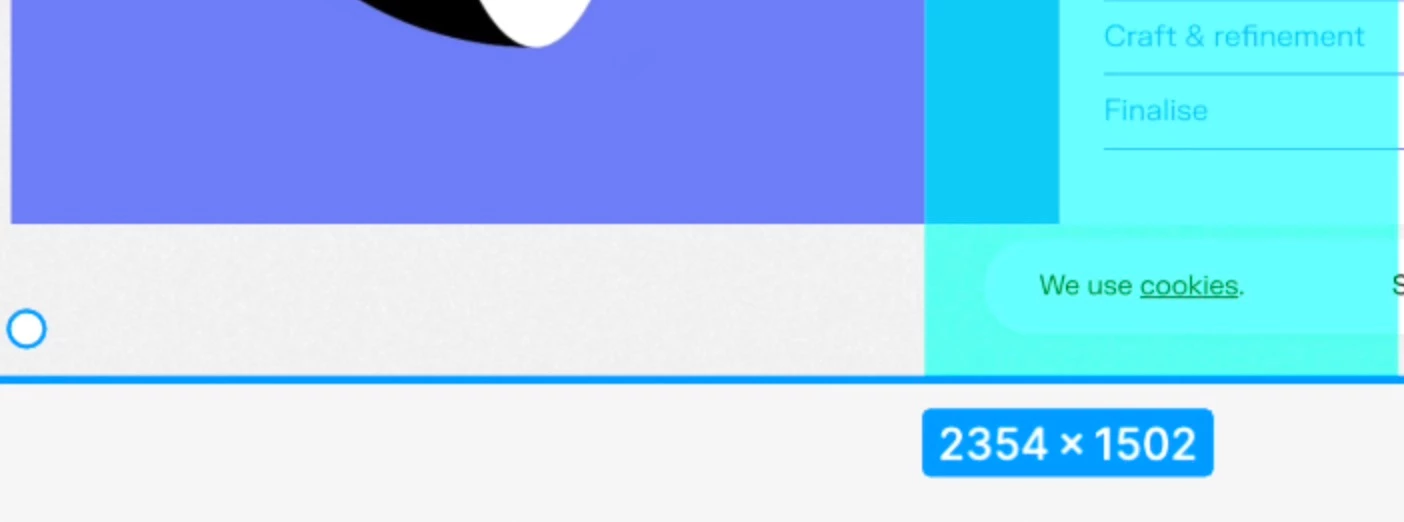
Problem: When I place screenshots in my Figma file, they display with unwanted colored boxes overlaid on them in the editor view. However, these boxes do not appear when I preview the file on Mac or in any other view mode.

Environment:

  • Figma Desktop App on Mac
  • Issue started recently (no intentional setting changes made)

What I've tried:

  • Reloading the file
  • Restarting Figma
  • Changing color profiles—the colored boxes persist regardless of profile settings

Attachments:

  1. Screenshot showing the problem (colored boxes visible)
  2. Screenshot showing the expected result (without colored boxes)

I've attached two screenshots for reference—one showing the issue and one showing how it should appear. The problem occurs consistently when inserting images in Figma.

Could you help me resolve this? Let me know if you need any additional information about my file or setup.

Thank you,
TSK
 

Best answer by Celyn_L

Hi ​@shrekin, Celyn from the Figma Community Support team here.

Thanks for sharing the workaround that resolved the issue for you. 

For anyone else running into this, you may want to try what @shrekin shared:

I ran the command defaults delete com.apple.screencapture in the terminal, after which the files started saving as PNGs again, just like before, so they display correctly in Figma after pasting.

If the issue continues, please submit a bug report so the team can take a closer look at what’s happening in your specific setup. You can do this by:

  • Going to the Support Hub
  • Clicking Start a chat
  • Typing “Report a bug”

Please also include a link to the impacted file when submitting the report, and invite support-share@figma.com with “Can View” access (this won’t impact your billing and will allow us to reproduce the issue and investigate further with Engineering).

Thanks!

18 replies

Clara_Kuntz
New Member
April 22, 2026

Hey ​@Clara_Kuntz, thanks for flagging this! I can help get this looked into with our support team. 

To help narrow this down, a little more information would be really helpful:

  • Is this happening in the browser, the desktop app, or both?
  • If you duplicate the affected file, does the issue still happen in the duplicate?
  • Does it only happen in one specific file, or across multiple/all files?
  • Does it occur with different image formats as well (PNG, JPEG, etc.)?
  • If possible, would you be able to share a screen recording (for example via a Loom link) showing the behaviour?

Once I have a bit more detail, I can help investigate further. Thank you for your help! 

  • Both, app and browser.
  • I think it happens in almost every file, even after duplicating.
  • I tried different formats, had issues with all.
  • I added a recording, I hope that helps :)
Carlos Salazar
New Member
April 28, 2026

Hi! the same thing is happening in my Figma workspaces when I upload a screenshot. It always comes up with the glitch. It happens across different files and with different formats. 

I need help on this ASAP.

Gayani_S
Figmate
Community Support
May 1, 2026

Hey everyone, apologies for the delayed response! Thank you for sharing those details and recordings, that’s really helpful! 

I can see this is affecting multiple users, which definitely isn’t expected. I’ve shared this with the team internally so they can investigate further. I had previously created a support ticket for this, but it was closed due to no follow-up.

The team is now taking a closer look at this thread, and I’ll update you here as soon as I hear back from them.

Really appreciate your patience while we dig into this. We’ll do our best to get clarity as quickly as possible! 

Gayani_S
Figmate
Community Support
May 12, 2026

Hey everyone, could you please reach out to our Support team here so we investigate further? The team will need access to the affected file to properly look into this, so including that in your request would really help speed things up.


In the meantime, it would also be really helpful if you could try reproducing the issue on another device to see whether the same thing happens there as well.

One more thing the team would like to confirm:

  • Are you taking screenshots using the native macOS screenshot tool (for example Cmd + Shift + 4)?
  • Or are you using the get_screenshot tool from the MCP server?

Any additional details would help narrow this down.

shrekin
New Member
May 19, 2026

Hi,

I’d also like to add that I’ve noticed this issue for a few weeks now. The screenshots were taken on a Mac using the native macOS tool (cmd + shift + 4). The files were fine and opened correctly in both Preview and, for example, Photoshop. Please also note that for some time now, the native tool has been saving screenshots in HEIF instead of PNG as I noticed.

Today, however, I ran the command defaults delete com.apple.screencapture in the terminal, after which the files started saving as PNGs again, just like before, so they display correctly in Figma after pasting.

Although this might be more of a quick fix than a solution to the root cause.

Celyn_L
Figmate
Celyn_LAnswer
Figmate
September 10, 2026

Hi ​@shrekin, Celyn from the Figma Community Support team here.

Thanks for sharing the workaround that resolved the issue for you. 

For anyone else running into this, you may want to try what @shrekin shared:

I ran the command defaults delete com.apple.screencapture in the terminal, after which the files started saving as PNGs again, just like before, so they display correctly in Figma after pasting.

If the issue continues, please submit a bug report so the team can take a closer look at what’s happening in your specific setup. You can do this by:

  • Going to the Support Hub
  • Clicking Start a chat
  • Typing “Report a bug”

Please also include a link to the impacted file when submitting the report, and invite support-share@figma.com with “Can View” access (this won’t impact your billing and will allow us to reproduce the issue and investigate further with Engineering).

Thanks!

Krisika
New Member
August 11, 2026

Hi,

I’d also like to add that I’ve noticed this issue for a few weeks now. The screenshots were taken on a Mac using the native macOS tool (cmd + shift + 4). The files were fine and opened correctly in both Preview and, for example, Photoshop. Please also note that for some time now, the native tool has been saving screenshots in HEIF instead of PNG as I noticed.

Today, however, I ran the command defaults delete com.apple.screencapture in the terminal, after which the files started saving as PNGs again, just like before, so they display correctly in Figma after pasting.

Although this might be more of a quick fix than a solution to the root cause.

I tried this out and it fixed the issue, thank you! 

JamesGoogs
New Member
September 10, 2026

This fixed it for me too. This is the answer (for now). Thank you