Answer

Scale tool change in the new UI

  • August 6, 2025
  • 3 replies
  • 90 views

i5otope

A small change I noticed recently.

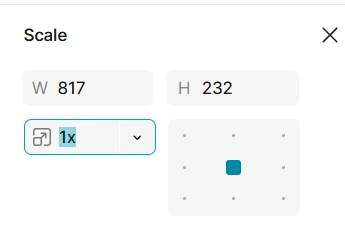
In the old UI when you hit 'K', the input field for the value was automatically highlighted and you could instantly follow with a number on your keyboard.
(e.g. you would hit 'K', then '2', and the item is scaled by x2)

In the new UI however you now have to hit 'K’ twice to get to the same result.
('K’, again 'K', then '2')

I don't see what's the motivation behind this small change? Do other users experience a similar issue?


Best answer by Junko3

Hi ​@i5otope ,


I understand you're noticing that, you need to press ‘K’ twice to focus on the Scale multiplier input field — whereas previously a single press would both activate the tool and highlight the field for immediate input.

Just to confirm, are you seeing this behavior while using Figma Draw, or Figma Design?

I tested on my side and here’s what I observed:

  • Figma Design: Selecting an object and pressing ‘K’ immediately focuses the Scale multiplier input.

  • Figma Draw: Pressing ‘K’ once activates the scale tool, but you need to press ‘K’ again to focus the input field.

If you're in Figma Draw, this behavior might be expected for now. You can switch between Draw and Design using the toggle in the toolbar.
Here’s more info on how Figma Draw works: Explore Figma Draw

If your feedback is that you’d prefer the Scale tool in Draw to behave more like in Design (i.e., focus the input field with a single press), I understand that would be more convenient — I’d be happy to pass that along to our team.

Alternatively, you’re welcome to submit a feedback directly here: Share Your Feedback  Our Product Managers actively review submissions from the community.


Thanks,

3 replies

  • Figmate
  • Answer
  • August 7, 2025

Hi ​@i5otope ,


I understand you're noticing that, you need to press ‘K’ twice to focus on the Scale multiplier input field — whereas previously a single press would both activate the tool and highlight the field for immediate input.

Just to confirm, are you seeing this behavior while using Figma Draw, or Figma Design?

I tested on my side and here’s what I observed:

  • Figma Design: Selecting an object and pressing ‘K’ immediately focuses the Scale multiplier input.

  • Figma Draw: Pressing ‘K’ once activates the scale tool, but you need to press ‘K’ again to focus the input field.

If you're in Figma Draw, this behavior might be expected for now. You can switch between Draw and Design using the toggle in the toolbar.
Here’s more info on how Figma Draw works: Explore Figma Draw

If your feedback is that you’d prefer the Scale tool in Draw to behave more like in Design (i.e., focus the input field with a single press), I understand that would be more convenient — I’d be happy to pass that along to our team.

Alternatively, you’re welcome to submit a feedback directly here: Share Your Feedback  Our Product Managers actively review submissions from the community.


Thanks,

Kohl
  • New Member
  • November 14, 2025

Hey ​@Junko3, is this behavior supposed to be happening on Figma Design as well now? I’ve noticed that for the past few weeks, the scale tool in design mode requires me to hit K twice to select it and I have to manually switch back to the move tool and back to the scale tool if I want to chain scales, I much preferred the old behavior where it would auto select it and switch back to the move tool after I press enter


Jeff Galea
  • New Member
  • November 29, 2025

The recent change to the K (Scale) shortcut has really interrupted the workflow. Previously, pressing K once switched to Scale mode and automatically activated the scale input field, so we could type a percentage immediately.


Now, pressing K does not activate the input. If you type a number, it changes opacity instead — which is easy to miss and causes accidental mistakes. To actually scale, you now have to press K a second time or manually click the field.


On top of that, the scale field no longer clears itself after applying a value, so you can’t quickly apply consecutive scaling (e.g., 90% → then another 90% on the new size) without manually clearing the field.


The previous behaviour was much smoother and faster. It would be great to have that back or at least have an option to restore it.