

Question

Rendering issue with pixelation artifacts in Figma (canvas and exports)

  • April 14, 2026
  • 3 replies
  • 16 views

Sakii

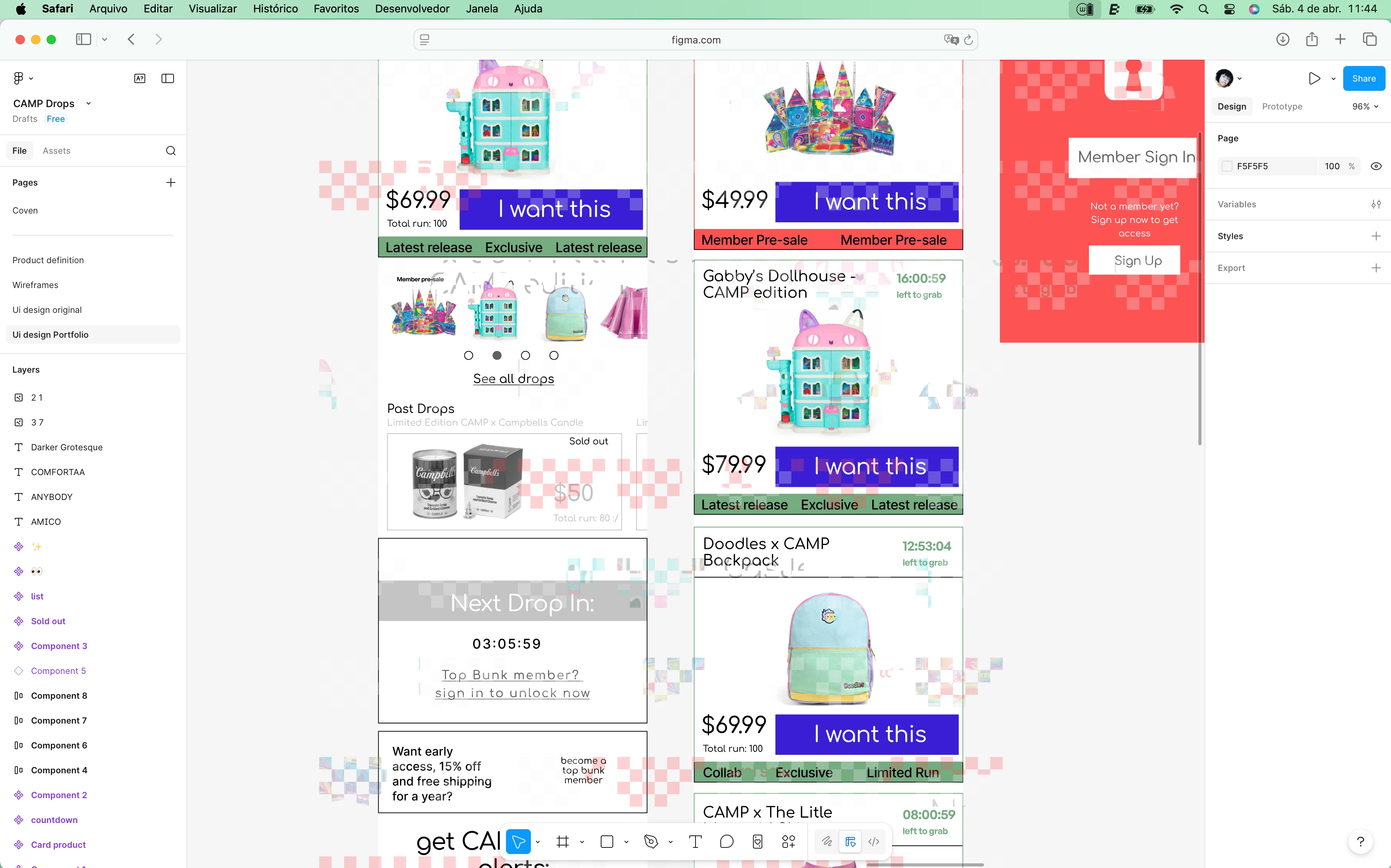
I’m experiencing a persistent rendering issue while using Figma that is affecting both the canvas view and exported files.

Issue description:
Across all Figma files, I’m seeing a pixelated/glitch-like artifact (appears as small square “noise” or serrated patterns) overlaying the interface and design elements. This distortion is not part of the design itself.

Where it happens:

  • On the Figma canvas while editing
  • Across different files and projects (not file-specific)
  • During exports (both PNG and PDF), where the artifacts remain visible in the final output

Additional details:

  • The issue happens consistently, not intermittently
  • It affects all Figma usage (not tied to a specific component or asset)
  • It appears regardless of zoom level
  • I’ve attached a screenshot showing the problem for reference

This is currently impacting my ability to design and export assets with proper quality.

Could you please help investigate what might be causing this and how to resolve it?


3 replies

adamsmasher
Figmate
  • Figmate
  • April 14, 2026

Hi ​@Sakii


Thank you for doing so much troubleshooting on your own and including that information - from the screenshot I can see how this is blocking you.


Do you see this is you switch to a different browser like Google Chrome, or use the desktop app? My initial thoughts are that it sounds a graphics rendering issue, especially since it isn’t unique to any particular file and is present across Figma. These can sometimes be specific to an individual browser, browser version, or even operating system.


What version of Mac OS are you running and is it up-to-date?


Sakii
  • Author
  • New Member
  • April 14, 2026

I tested it on Chrome, Safari, and Arc, and the issue occurs in all of them. I also downloaded the Figma desktop app for MacBook, and it actually looks even worse there. At the moment, I’m using a MacBook Pro 2019 running macOS Sequoia 15.7.5.


adamsmasher
Figmate
  • Figmate
  • April 14, 2026

Thanks for the information, ​@Sakii, and for testing in the app and other browsers.


How long ago did this start - was it within the last 2 weeks? I ask because that version of Sequoia was released about two weeks ago. I’m not sure that this is the cause, but I thought it worth confirming.


If I recall correctly, the 2019 MacBook Pro had two models, one of which has a dedicated graphics card in addition to what the Intel CPU can provide.  Which model of 2019 MacBook Pro do you have?


Our guide on system requirements covers this topic a little bit - just an FYI we can’t help troubleshoot graphics card issues. However, I can help give you some resources to identify and resolve this for yourself. The help article I linked includes some Apple resources which might be helpful.