
Solved

Remove unused seat

  • February 26, 2026
  • 3 replies
  • 55 views

Martin_FM

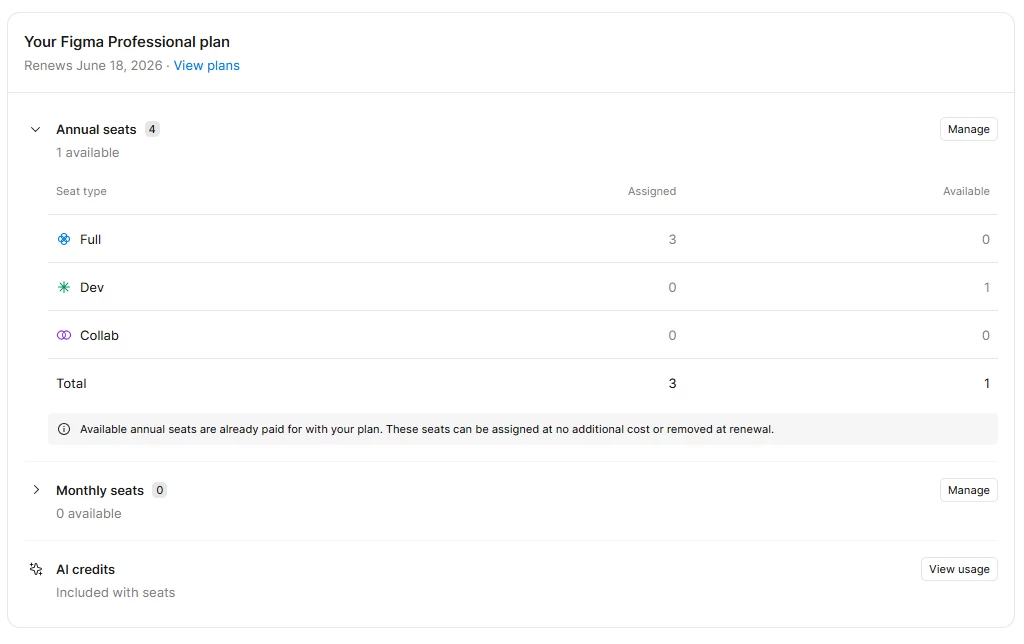
I’m the admin of the desing project account and while I was changing a dev seat to a full seat I added by mistake an unneeded seat. I only need 3 full seats and now i have 3 full seats and 1 dev seat. I’m trying to remove the extra dev seat from the account but i can’t find the option to do so. I can only change the seat of the current users or give the unwanted seat to someone else. It happened a few hours ago and I really don’t need an extra dev seat. Thanks.
 

Best answer by ksn

No worries! Yes — you can assign a monthly seat to someone and remove it later. You can unassign the user or move them to a View seat anytime. Once the seat is unassigned, it becomes unused and won’t renew on the next monthly billing cycle.

Also, just to cover all bases: if the seat is annual, removing the user only frees up the seat for someone else to use. The seat itself stays paid for the rest of the subscription period and can only be reduced at the next annual renewal date. In the meantime, you can assign it to someone on your team so the seat benefits you are entitled to are used.

--

Some pages that are helpful to reference later, if you need them:

Manage Seats

Managing Billing on Monthly or Annual Basis (how it works)

3 replies

ksn
Figmate
  • Community Support
  • February 26, 2026

Hey ​@Martin_FM - happy to get you some help. First thing I noticed was that you have the dev seat billable to you annually, and that your professional plan itself will renew in June -- just to make sure I understand:

You were trying to change an existing dev seat to a full seat, and in between making that change, you accidentally added an additional dev seat. You would like this dev seat now removed from your plan.

Did you receive a prorated charge when you accidentally created the dev seat as well?

Let me know if I’ve misunderstood. Thanks!


Martin_FM
  • Author
  • New Participant
  • March 10, 2026

Hi! ​@ksn I forgot to check this post. That’s what happened, and i got a prorated charge as well. We were in a rush so I ended up giving the full seat to someone else in the team. Now in a related topic, can I give a monthly seat to someone and remove it later? or does the seat gets removed if i unassign it? Thanks.


ksn
Figmate
  • Community Support
  • Answer
  • March 11, 2026

No worries! Yes — you can assign a monthly seat to someone and remove it later. You can unassign the user or move them to a View seat anytime. Once the seat is unassigned, it becomes unused and won’t renew on the next monthly billing cycle.

Also, just to cover all bases: if the seat is annual, removing the user only frees up the seat for someone else to use. The seat itself stays paid for the rest of the subscription period and can only be reduced at the next annual renewal date. In the meantime, you can assign it to someone on your team so the seat benefits you are entitled to are used.

--

Some pages that are helpful to reference later, if you need them:

Manage Seats

Managing Billing on Monthly or Annual Basis (how it works)