

한지민
New Member
October 13, 2026
Solved

Refund request for unexpected seat charges – Invoice S8TCCPLQ-0002

Hello,

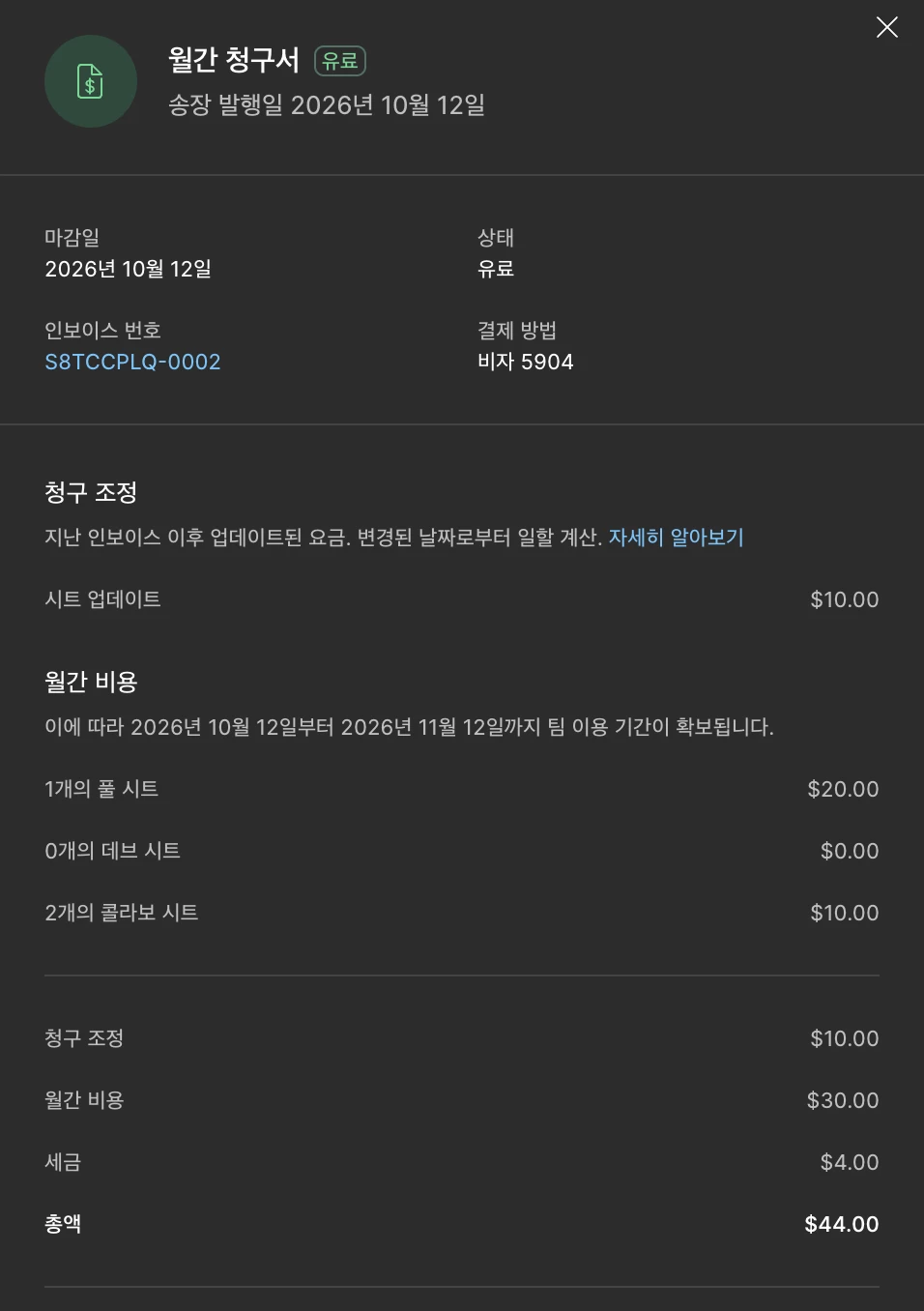
I would like to request a refund for my most recent Figma charge (Invoice S8TCCPLQ-0002, issued October 12, 2026, total $44).

I did not intend to purchase additional paid seats and was not aware that the seat changes would result in these additional charges. I expected my subscription cost to remain similar to the previous month, so the $44 charge was unexpected.

I am a university student and this unexpected charge is a significant financial burden for me. I would greatly appreciate it if you could review the charge and issue a refund, particularly for the unintended additional seat charges.

I would also like to remove any unintended paid seats so that I am not charged for them again next month.

Thank you for your help.
 

This topic has been closed for replies.
Celine_
Celine_Solution
Community Support
October 13, 2026

Hey ​@한지민 , Celine from the Community Support team at Figma here! Thanks for explaining what happened. I understand the unexpected $44 charge is a significant expense for you as a student.

For your information, if new users only need access to paid features for a short period of time, you can keep managing their billing on a monthly cadence. You can then move them to a View seat when their access is no longer needed.

  1. From the file browser, click Admin.
  2. Select the People tab.
  3. Click a person’s seat in the Seat type column.
  4. In the popup modal, select and confirm the View seat.

Unassigned seats will not be renewed for the next month.

Still, I’ll create a support ticket on your behalf so our team can review invoice S8TCCPLQ-0002, your refund request, and also review the unintended paid seats you’d like removed to prevent further charges.

Note that payments are generally non-refundable under our Terms of Service, but our support team can take a closer look at your specific circumstances. (Please reply to the support email with the affected team’s name and which paid seats you intended to keep, if any. I’ll include the invoice details and context you’ve already shared. For reference, your case number is 2191687, sent to your email address: hxxx3@cxxu.axxc.xr.) Thank you for your patience while they review your request!

Update: Good news, the support agent has replied to you and is waiting for your reply for further investigation! Please check your inbox when you can. I am closing the thread here.

1 reply

Celine_
Figmate
Celine_Solution
Community Support
October 13, 2026

Hey ​@한지민 , Celine from the Community Support team at Figma here! Thanks for explaining what happened. I understand the unexpected $44 charge is a significant expense for you as a student.

For your information, if new users only need access to paid features for a short period of time, you can keep managing their billing on a monthly cadence. You can then move them to a View seat when their access is no longer needed.

  1. From the file browser, click Admin.
  2. Select the People tab.
  3. Click a person’s seat in the Seat type column.
  4. In the popup modal, select and confirm the View seat.

Unassigned seats will not be renewed for the next month.

Still, I’ll create a support ticket on your behalf so our team can review invoice S8TCCPLQ-0002, your refund request, and also review the unintended paid seats you’d like removed to prevent further charges.

Note that payments are generally non-refundable under our Terms of Service, but our support team can take a closer look at your specific circumstances. (Please reply to the support email with the affected team’s name and which paid seats you intended to keep, if any. I’ll include the invoice details and context you’ve already shared. For reference, your case number is 2191687, sent to your email address: hxxx3@cxxu.axxc.xr.) Thank you for your patience while they review your request!

Update: Good news, the support agent has replied to you and is waiting for your reply for further investigation! Please check your inbox when you can. I am closing the thread here.
