Radio Buttons on Cards in Create Plugin Modal Are Unusable
Note: I originally created another topic for this, but made a mistake in titling the post, and I could neither edit the title of that post nor delete the post. Please delete that one—this is the corrected version.
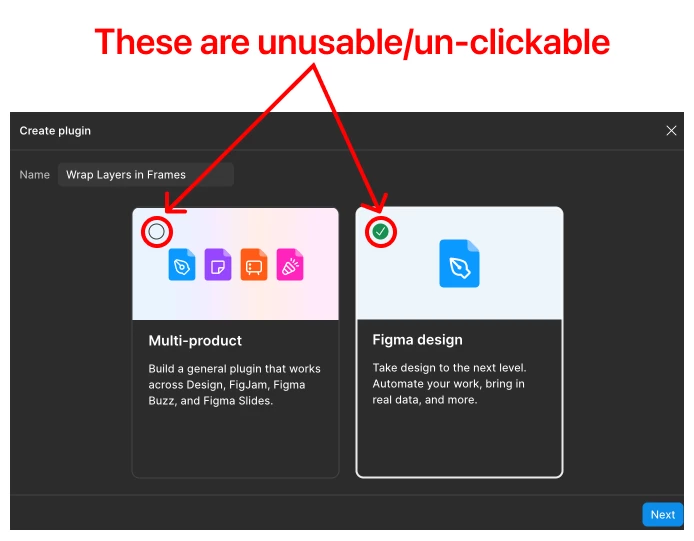
On the “Create plugin” modal that shows up when one chooses “New plugin…” from “Plugins › Development”, there are two choices, represented by two cards: “Multi-product” and “Figma Design”. These are designed as “mega-radio buttons” where the entire card acts as a radio button—clicking on the card will select that option as if it were the radio button itself.
There are also actual radio buttons on these cards, in their upper-left corners, and clicking anywhere on the card toggles these radio buttons to their “selected” state and also wraps the whole card in a thick, higher-contrast border to create a whole-card “selected” state.
The problem is, while the entire card can be clicked to select it, the one part of the card that is the actual radio button that should be the interactive/selectable element is completely unusable and does not allow clicks or do anything when clicked, even though the entire rest of the card around them is clickable. Perhaps they have `pointer-events-none` on them or something. Whatever the issue is, it’s ridiculous that they are not selectable when every other part of the cards is, and the radio button is the one part of each card that should be selectable, of all the other parts. Because the radio button affordance is used on these cards, they deliberately draw users’ attention and clicks—only for them to discover they do nothing.