

Question

Prototypes in Figma slides not working in presentation with notes

  • May 28, 2026
  • 3 replies
  • 87 views

Fredrik Malm

Prototypes looks broken when presenting in Figma slides together with presentation notes. It works fine if you present without notes. Problem happens both with and without external monitor connected.

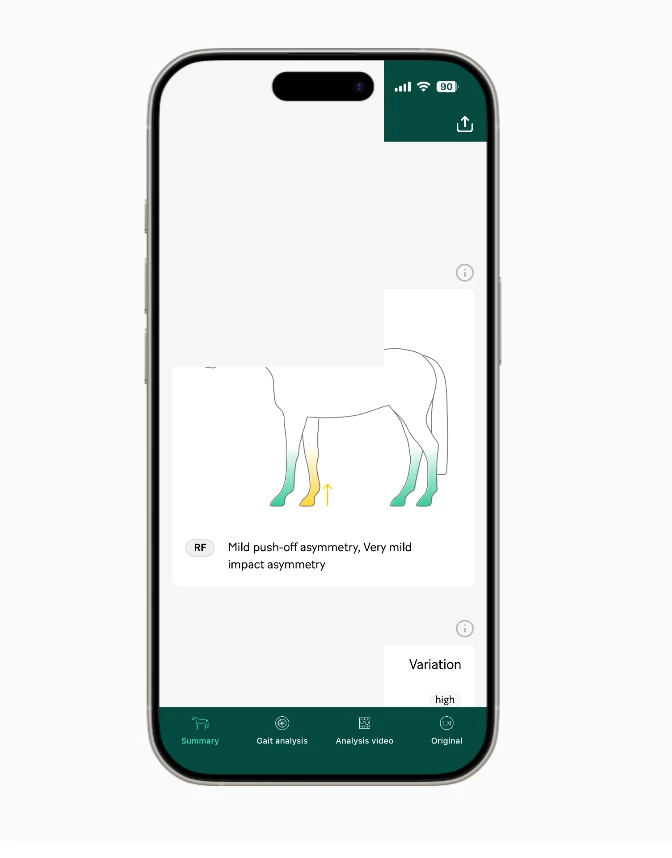
In attached image you see gray squares that appear on top of the prototype (frame background color).

We found this bug in front of a large audience, please look into this! We now have to go back using still images and avoid prototypes completely until it works properly.

Thanks!

Best,
Fredrik
Head of Brand & Design @ Sleip AI


3 replies

Celyn_L
Figmate
  • Figmate
  • May 28, 2026

Hi ​@Fredrik Malm, Celyn from Figma Community Support here.

Thanks for flagging this, and I’m really sorry this happened during a live presentation.

From the screenshot and details you shared, it sounds like prototypes are rendering incorrectly in Figma Slides specifically when presenting with presentation notes enabled, with gray overlay artifacts appearing on top of parts of the embedded prototype. I understand that everything works normally when presenting without notes, and that the same behavior happens both with and without an external monitor connected.

Since the behavior seems tied specifically to presenter notes mode, one thing that may help narrow this down is whether the issue appears in both the audience view window and the presenter notes window, or only one of them. “Present + Notes” opens a separate audience view window alongside the presenter notes view during presentations.

In the meantime, I’ve gone ahead and created a support ticket for you so the team can take a closer look into this. Your ticket number is #1931241.

When you get a chance, it’d be really helpful if you could reply directly to the ticket with:

  • A link to the impacted file/slides deck - please also invite support-share@figma.com with “Can View” access so the team can investigate further (this won’t affect your billing).
  • A short screen recording showing the behavior, if possible
  • Whether this happens in the browser, the Figma Desktop App, or both
  • If you're using the desktop app, could you also confirm whether you're running the latest version?

Really appreciate you taking the time to report this and share the additional context. Someone from the team will be reaching out shortly to help investigate further and follow up with next steps 🙏


Fredrik Malm
  • Author
  • New Member
  • May 28, 2026

Thanks for your quick reply!

I’ve added support-share@figma.com as viewer on a file called Figma Bug investigation

The problem occurs a bit randomly when scrolling around in the app screens (slide 3–4) and when switching back and forth between different iPhone tabs in the first mockup. The prototype both has video in it (video tab) and image screenshots made clickable with empty frames as tap areas.

We’re using the latest Figma desktop app on macOS (Tahoe 26.5) and tested both with and without external monitor connected (cable), with and without making the presentation available offline.

I’ve provided a screen recording in the same file on the last slide and have only been able to reproduce it in the Presentation with notes mode.

Thank you so much for your help!


Celyn_L
Figmate
  • Figmate
  • May 28, 2026

Hi ​@Fredrik Malm, thanks so much for the detailed follow-up and for sharing the investigation file, reproduction details, and screen recording - this is all incredibly helpful. When you have a chance, could you also reply directly to the support ticket with the file link?

In the meantime, I’ve passed everything along to the team on your support ticket so they have the full context needed to investigate this further from here.

Really appreciate the thorough testing on your side, as well as checking across different setups and narrowing down the scenarios where the issue appears.

The team will continue working with you directly on your support ticket to investigate and help resolve this. Thank you again for your collaboration and patience while this is being looked into!