Question

Prototype shows blank screen on all content scales except "Fit width and height"

  • June 19, 2026
  • 6 replies
  • 63 views

Jatin Ahuja

Prototypes for me have started showing a blank/empty screen when using content scales like "Fit width", "Responsive", or "Actual size (100%)". Only "Fit width and height" renders correctly.
 

I found a workaround with Claude. I was using a fill on my Frame which I have always used so the background isn’t blank
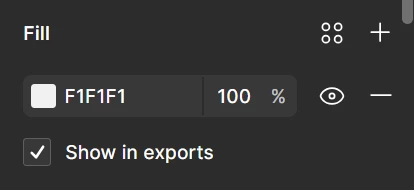

Removing fill from the frame fixes the prototype rendering. However this causes the prototype background color to show through where frame content doesn't reach.

Prototype with Frame Fill


Prototype without Frame Fill​​​​​


6 replies

Jatin Ahuja
  • Author
  • New Member
  • June 19, 2026

Forgot to mention that it’s really annoying and I want it fixed
I have hundreds of files that don’t render anymore because I been using Fill in all Frames


Celine_
Figmate
  • Community Support
  • June 19, 2026

Hey Jatin, thanks for the detailed report and for sharing that workaround! I wasn't able to replicate the issue on my end, so it'll definitely need a closer look.

I was able to locate your ticket and can see the support agent is waiting for some additional information to investigate further. Could you check your inbox and reply there directly? Without access to the file, it's hard to pinpoint the exact cause from here on the Forum. Thanks for your patience while the team looks into this! 🙏


Jatin Ahuja
  • Author
  • New Member
  • June 19, 2026

Thanks Celine. I have replied to the email with a video and the specific details of the issue. It is also not a file specific issue. It has been happening to every single file that I have on this account. The files that rendered perfectly on prototype just 2 days ago - don’t anymore for some reason.


Celine_
Figmate
  • Community Support
  • June 22, 2026

Hey Jatin, thanks for sending over the video and details! I've added a follow-up note to your ticket so the team is aware this is affecting all your files and not just a specific one. That's important context for the investigation. The team will be in touch with you directly soon. Thanks for your patience! 🙏


Update: Your case has been escalated to the Technical Quality team. They are waiting for your response to investigate it further. Please check your inbox when you can, thank you!


Emily Tartanella

FYI this exact same issue is happening to me as well. 


Celine_
Figmate
  • Community Support
  • June 23, 2026

Hey everyone, just sharing a quick update here. ​@Jatin Ahuja  who originally reported this issue has let us know that their prototypes have unexpectedly started working again across all files, though the exact cause is unclear.

@Emily Tartanella: if you're still experiencing the issue, here are a couple of things to try in the meantime:

Clear your desktop app and/or browser cache (close Figma completely, then clear your cache using the steps for your browser):

If the issue persists after trying this, please submit a bug report via the the Support Hub / Click Start a chat / Type “Report a bug” and follow the prompts.

Please also make sure to include the URL of the affected file and grant "can view" access to support-share@figma.com  (our official Support account) so our support team can take a closer look. You won’t be billed for this access, thank you 🙏