

PM GCC
New Member
September 30, 2026
Solved

Prototype Sharing Issue

Step 1: I give prototype sharing as “Anyone” for a Figma file and the user is able to access it without logging into any account of Figma

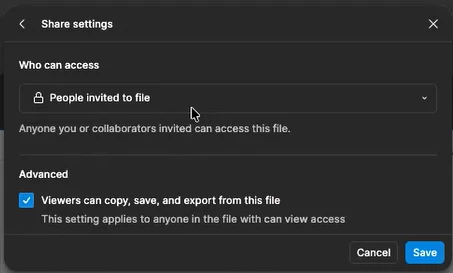
Step 2: I go to the “Editor” mode and restrict it as shown in the screenshot below.

Step 3: I try the earlier prototype link and I could still access it even though I am not invited to that file. 

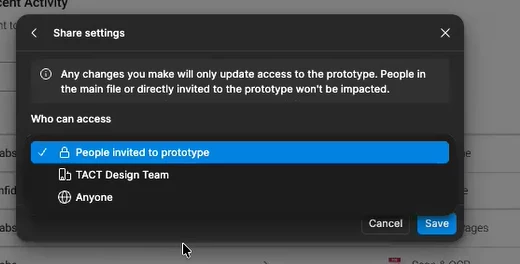
Step 4: I go to Prototype view and edit the permission to restrict the access for invitees only and then the restriction is applied


Why is that the restriction applied from Editor mode for the same file NOT reflected for Prototype? Shouldn’t it be cascaded? What is the rule here?


adamsmasher
adamsmasherSolution
Figmate
October 1, 2026

Hey ​@PM GCC! Thanks for your post, and I can understand why you’d expect that change to apply to both views of the same file.


The reason design-file and prototype link sharing are separate is so you can share a prototype while keeping the full design file restricted. It’s not uncommon to only want to provide access to one or the other, so this preserves that level of control. 


In your example, changing the editor’s sharing setting restricts the design file, while the prototype’s existing “Anyone” setting remains active. To restrict both, set “Only invited people” in the file’s Share dialog and in Present > Share prototype, as you did in step 4. For reference, we cover this more in our sharing guide under “Share a prototype only”.

1 reply

adamsmasher
Figmate
adamsmasherSolution
Figmate
October 1, 2026

Hey ​@PM GCC! Thanks for your post, and I can understand why you’d expect that change to apply to both views of the same file.


The reason design-file and prototype link sharing are separate is so you can share a prototype while keeping the full design file restricted. It’s not uncommon to only want to provide access to one or the other, so this preserves that level of control. 


In your example, changing the editor’s sharing setting restricts the design file, while the prototype’s existing “Anyone” setting remains active. To restrict both, set “Only invited people” in the file’s Share dialog and in Present > Share prototype, as you did in step 4. For reference, we cover this more in our sharing guide under “Share a prototype only”.
