

Prototype interaction areas are misaligned and moving away from their linked elements
I’m experiencing a prototype interaction bug across multiple Figma files.
The visual elements remain in their correct positions, but their interactive/click areas are being automatically displaced or repositioned, causing the hit areas to appear somewhere else on the canvas.
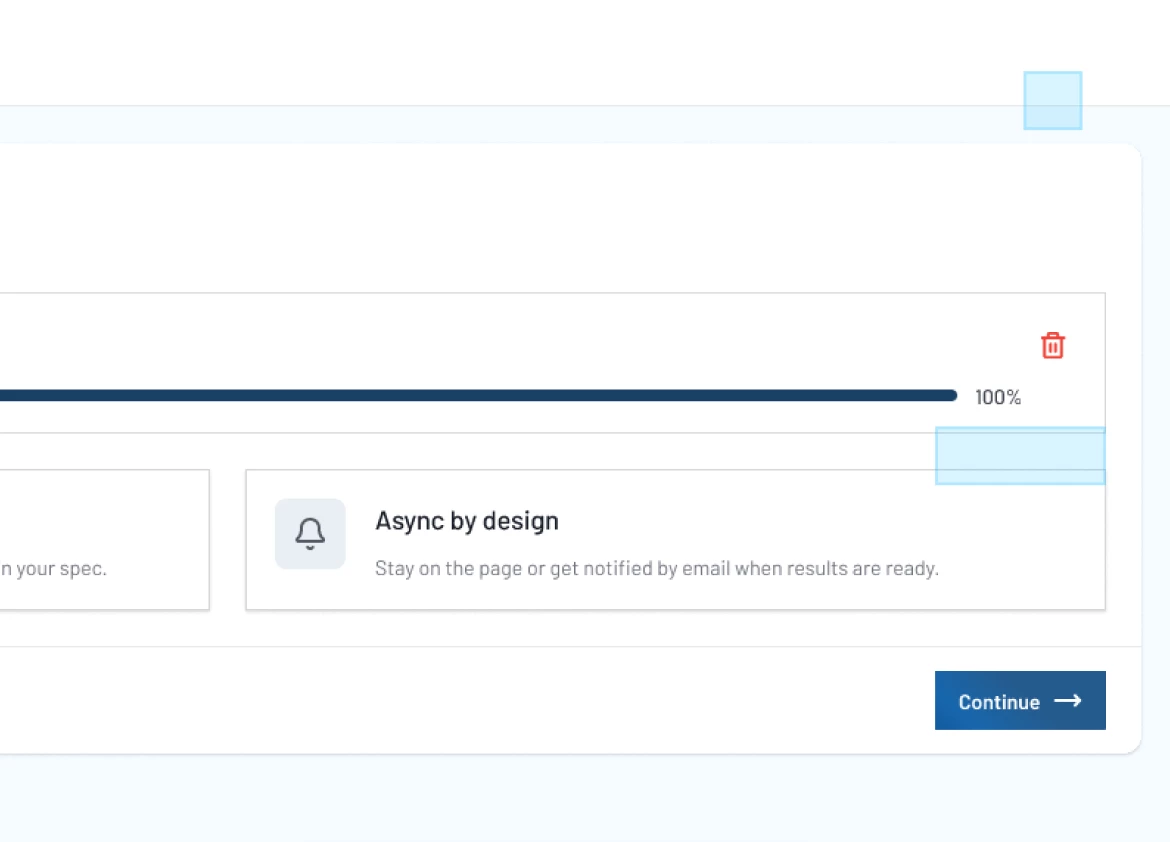
For example, in the attached screenshot, the Delete icon and Continue button are visually positioned correctly, but their corresponding blue interaction areas are significantly offset from the actual elements.
This seems to happen with elements that have prototype interactions linking to another page/frame. The interaction areas appear to move or scroll independently from the elements they are supposed to be attached to.
Expected behavior:
The interaction/click area should remain aligned with the corresponding element and move together with it.
Actual behavior:
The interaction area becomes displaced from the visual element, sometimes appearing in a completely different position within the frame.
This issue is occurring across multiple files, so it does not appear to be isolated to a single prototype or file.
Example:
The screenshot shows the visual position of the Delete and Continue elements versus their displaced interaction areas.
Could you please investigate whether there is currently an issue with prototype interaction/hit-area positioning or scrolling behavior?