

Kristian_Larsen
March 24, 2021
Question

Prototype freezing - removing mouse enter variant change resolved the issue

  • March 24, 2021
  • 41 replies
  • 5765 views

Suddenly today I noticed that my prototypes started freezing.
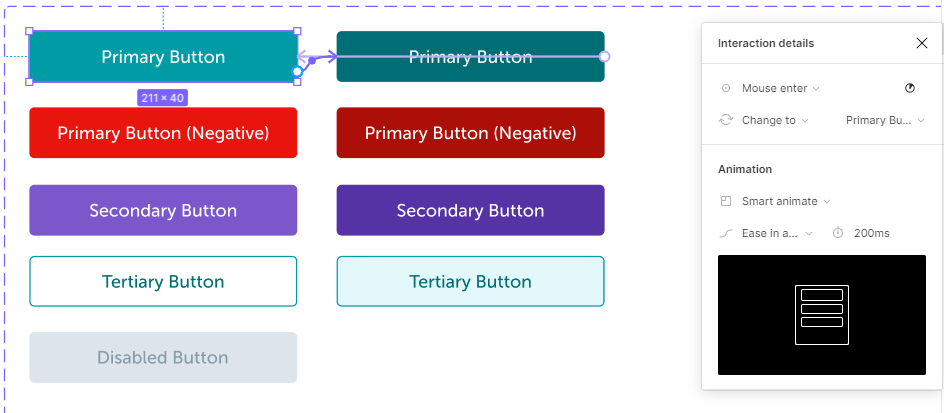
After some investigation I found that by removing the “Mouse Enter” variant change that I used for the hover effect on my buttons, the prototypes started working correctly again.

I’m not sure if this was the cause but it did resolve the issue. (note these had been previously working)

Image below to show how I had the buttons setup using the “Mouse Enter” and Mouse Leave" triggers to switch between the two variants.
This topic has been closed for replies.

41 replies

Mike_Tshimanga
June 23, 2021

@Andrew_Chan The hover bug doesn’t occur anymore. Thanks for your help; I really appreciate it.

Henrique_Barcelos
October 1, 2021

Same problem in October. The prototype runs nicely until I start interacting with any of the interactive components. The buggy component has “hover”, “on click” and “mouse leave” states.

Apparently if I remove them from my DS library they starts working again.

David_Santoro
October 8, 2021

I was working on a prototype when I had a freeze on the mouse enter action, what caught my attention the most is that only one screen out of several that use the same components was freezing, so I started to remove all screen components and went moving to a new screen, until I found the problem, in a component inside the screen, I had added the mouse enter and mouse leave action in the same component, that is, the action happened in all frames of the simulation and therefore, all the other simulations didn’t happen. 🙂

Hint: it would be nice if it were impossible to add a 1ms mouse enter along with a 1ms mouse leave, it causes all screen components to freeze. 🙂

Edit: Sorry about my english, i’m from Brazil. 😃

Louis5
January 10, 2022

Hey folks, I’m running into a freezing issue that is similar in a lot of ways to what is described here, which the exception of a solution.

I have a set of button variables with different states (hover, pressed, natural) that have interactive components that was working just fine the other day in a prototype.

Today it starts freezing without any changes made, and after hours of digging and rebuilding the component interactions, I found that when my interactive components are within other larger organisms, they freeze midway and stop working. The moment I isolate them, and more importantly keep that on the “front” of whatever I’m designing, they work. If there is a fix for this I would love to here it. I’m hoping this is just some temporary instability with figma’s prototyping tools.

Garret_Bodette
April 22, 2022

@Andrew_Chan I’m having the same issue now — seems to have started yesterday and hasn’t resolved with the latest update, refreshing, or restarting.

I do have quite a few complex component interactions (i.e. component interactions within component interactions), but they were all working seamlessly for months prior to yesterday. Even some older files that previously had no freezing issues are freezing now.

zahra_elahi_amin
April 22, 2022

I have the exact same problem since yesterday, before that all my prototypes were functioning well, but since yesterday prototype page freezes every time and I have to close and reopen the prototype every time.
I tried removing most of the mouse enter/mouse leave prototypes, but didn’t help

Claudia15
December 6, 2022

Hey, my prototype freezes too. I don’t know how to solve it. Restart does not work…

Claudia15
December 8, 2022

Some help, please!

Claudia15
December 8, 2022

Also, when I remove all interactions and add just one interaction later, it does super weird stuff. Suddenly the button I used for interactions directs me to the top of the page although I told it to: hover and then navigate to an orange button. It’s really distressing.
@Andrew_Chan

Fred_Tinsel
Active Member
October 10, 2023

😡 The bug is still here !
I encounter it at the moment…
The whole prototype is freezing after approximately 15 sec (scroll, interactions…)
If I remove the mouse enter or mouse leave actions… everything is ok.
I need them because I’ve got a component action on hover

☎ > Allo @figma_tutor