Problem with instance properties synchronisation (variant, boolean, text) across files
Dear Figma Team,
I recently noticed that the properties of an instance used in different files are behaving incorrectly. This affects both the design view and the prototype view.
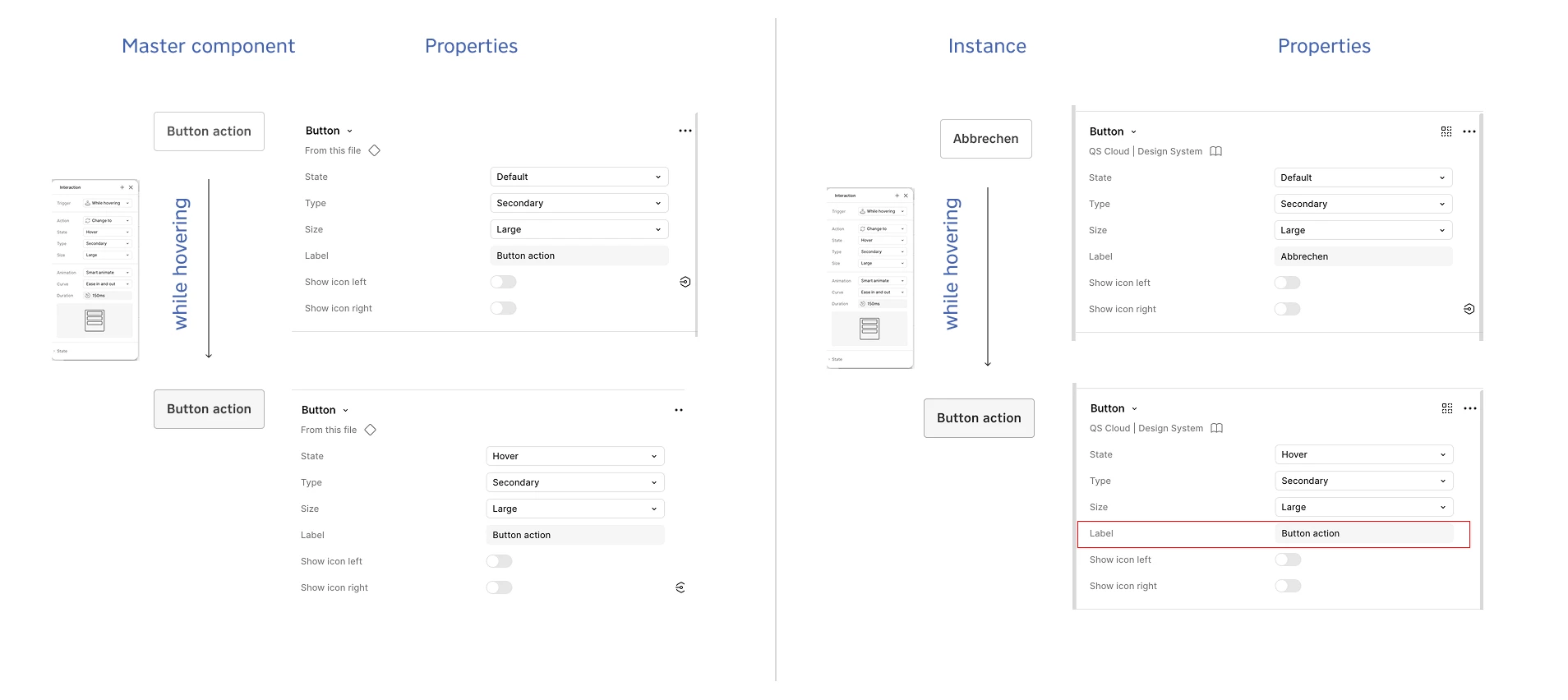
The master component was created with various properties:
· Enter a certain text
· Display icon or not
· Interaction from default state to hover, etc.
This master component is part of a component library that is used consistently in other Figma files. As soon as changes were made to the library, they were published and subsequently also applied to the files in which they were used. This ensured that they were always synchronized.
Until now, there were no problems when, for example, text was adjusted or icons were shown or hidden within the instance in the file used.
However, this is no longer the case, and when changing the state, for example, the corresponding state of the master component from the library is displayed instead of the previously adjusted instance state.
Apparently, you can correct the state again using “reset instance,” and after a few seconds, the adjusted properties are also applied.
However, it would be very time-consuming to find all the relevant components where the error occurs, especially in multiple files with a large number of screens. And to reset them all manually in order to have a functioning component. At this point, I cannot say whether this action works everywhere.
As an example, I am including a simple context that illustrates the problem. I would appreciate any suggestions for a solution.
Kind regards, M Walther