

Alisha_Kurtz
New Participant
April 30, 2024
Question

Open Sans Italic is displaying incorrectly

  • April 30, 2024
  • 3 replies
  • 437 views

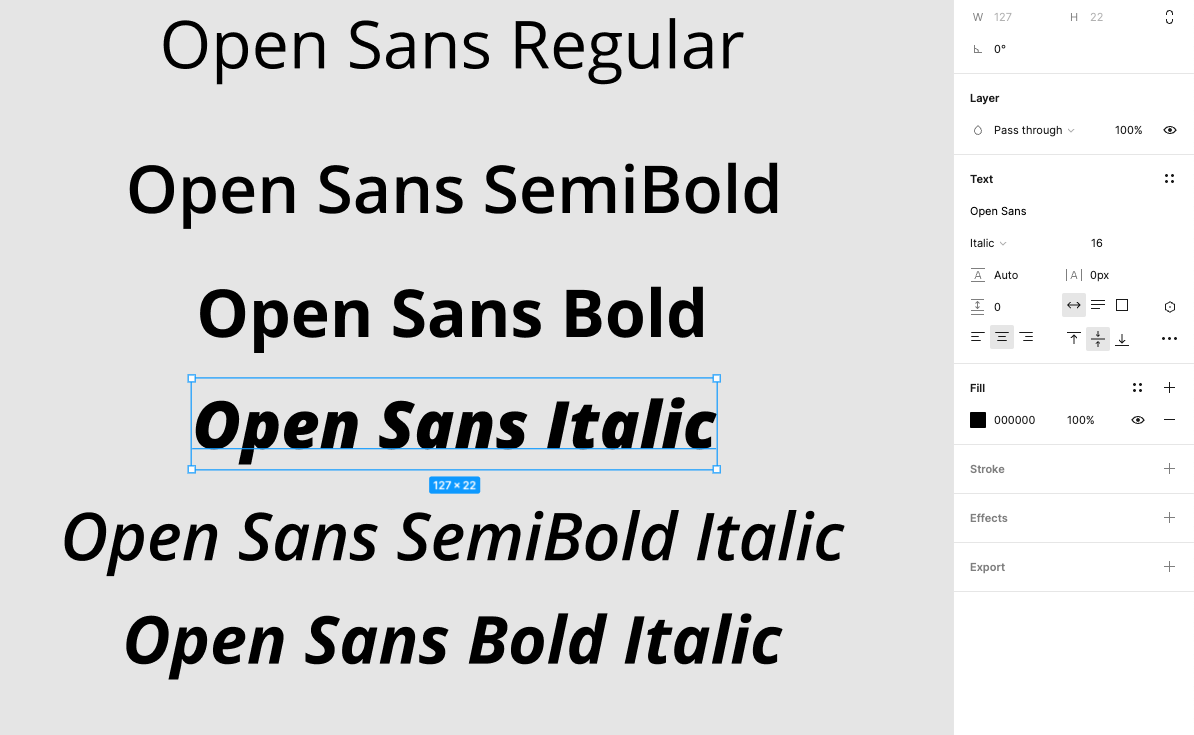
There appears to be a bug with Open Sans Italic. It’s displaying as super bold - even bolder than Bold Italic. This is a Google Font so it’s a default font in Figma, we didn’t upload it ourselves. Anyone else having this issue?
This topic has been closed for replies.

3 replies

y_toku
Figmate
Community Support
May 1, 2024

Hi there,

Thanks for reaching out. It looks strange! The font weights are looking fine on my end:

If you have access to Developer Mode, could you please check if the font weights are accurately reflecting each setting? If not, could you reach out directly to the support team with a copy of your file: https://help.figma.com/hc/en-us/requests/new?

Please make sure you use the email associated with your Figma account, include links to the file in question, and share access with support-share@figma.com. Don’t worry, inviting us to view your file won’t impact your billing.

Thanks,
Toku

Alisha_Kurtz
New Participant
May 1, 2024

Thank you for the response! It turns out, I was not aware but we DID have an uploaded version of the Open Sans typeface which was causing this issue. We’ve deleted the uploaded font and now it’s displaying correctly.

y_toku
Figmate
Community Support
May 10, 2024

Thanks for sharing how to solve the issue! Glad to know it’s displaying correctly again!