

keeeel
New Member
August 12, 2026
Solved

Odd Ctrl + Click behavior when trying to open layer menu

  • August 12, 2026
  • 6 replies
  • 114 views

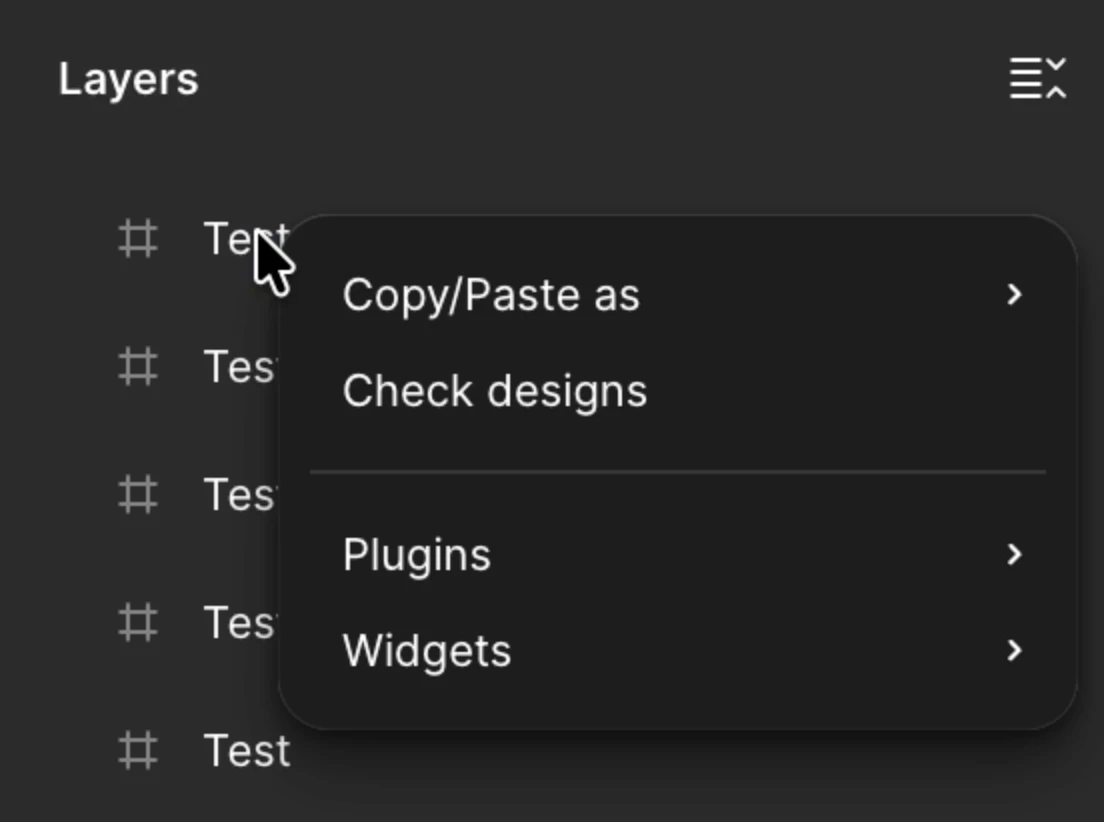
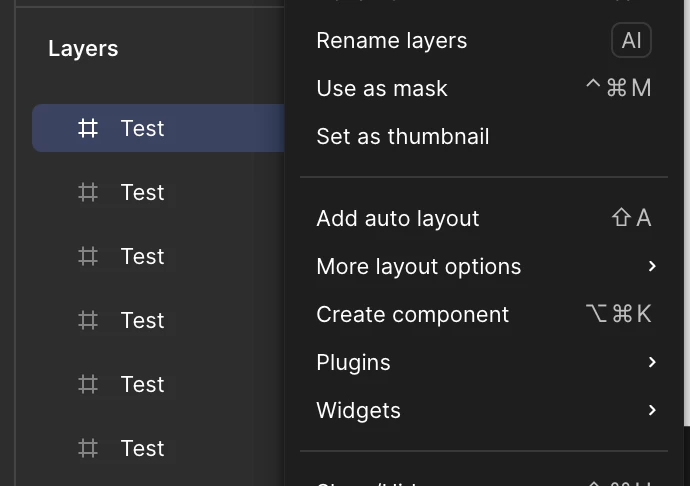
When I try to right click (ctrl + click) on a layer on my Mac, it doesn’t open the default layer menu. It usually works again on second attempt. I have the “ctrl + click opens right click menus” option enabled.

Interaction I am seeing when I ctrl + click:
Expected interaction:
 

    Best answer by adamsmasher

    Hey again, ​@keeeel! We released a fix for this, so CTRL-click on a layer should just open up the right-click menu right away. Be sure to update the desktop app to the newest version, clear browser cache, reload, etc, and let me know if you still have trouble.


    Cheers!

    6 replies

    adamsmasher
    Figmate
    Figmate
    August 12, 2026

    Hey, ​@keeeel! Thanks so much for your post and for the video - I can understand your confusion here. 


    This is actually the expected behavior when you have the Ctrl + click opens right click menu option enabled. The first click opens that setting’s own menu, and then the next time opens the actual context menu. As you’d expect, disabling the setting will get you the behavior you were expecting. Let me know if disabling the option doesn’t alter this behavior, or if you have other questions!

    keeeel
    keeeelAuthor
    New Member
    August 12, 2026

    Hi ​@adamsmasher, appreciate your reply-- I was actually seeing this behavior with the menu option turned off and on. I’ll continue testing.

    keeeel
    keeeelAuthor
    New Member
    August 13, 2026

    @adamsmasher I’ve confirmed that this behavior occurs if the layer is already selected (video attached). Is that expected?

    Ctrl + Click on unselected layer = opens context menu

    Ctrl + Click on selected layer = opens alternate menu

    adamsmasher
    Figmate
    Figmate
    August 13, 2026

    Thanks for the video! That’s expected, albeit also unexpected - I would expect the first click to open the contextual menu, but it actually deselects the layer which then makes the next CTRL-click work as you’d expect. I’m asking our team about this to see what is expected here - I’ll post back once I’ve got info to share.

    keeeel
    keeeelAuthor
    New Member
    August 13, 2026

    Amazing, thank you! I believe I started seeing this behavior around 1-2 months ago. 

    adamsmasher
    Figmate
    Figmate
    August 26, 2026

    Hey again, ​@keeeel! We released a fix for this, so CTRL-click on a layer should just open up the right-click menu right away. Be sure to update the desktop app to the newest version, clear browser cache, reload, etc, and let me know if you still have trouble.


    Cheers!
