

Question

Nested instances inside components not showing properly in DEV mode after rename

  • June 8, 2026
  • 1 reply
  • 8 views

Vojtech Petrasek

Hi,
for some time we were renaming nested instances in Outline to make them more clear in component properties panel - great example are icons. We have Icon component with multiple size options, when used in another components, we’ve often renamed instance of it to e.g. “Left Icon” to make it more clear.

Last week it stopped working in DEV mode (explore component behavior) - in this case icon is not showing at all and dropdown with icon sizes is not showing any other options which is currently game breaking bug for us.
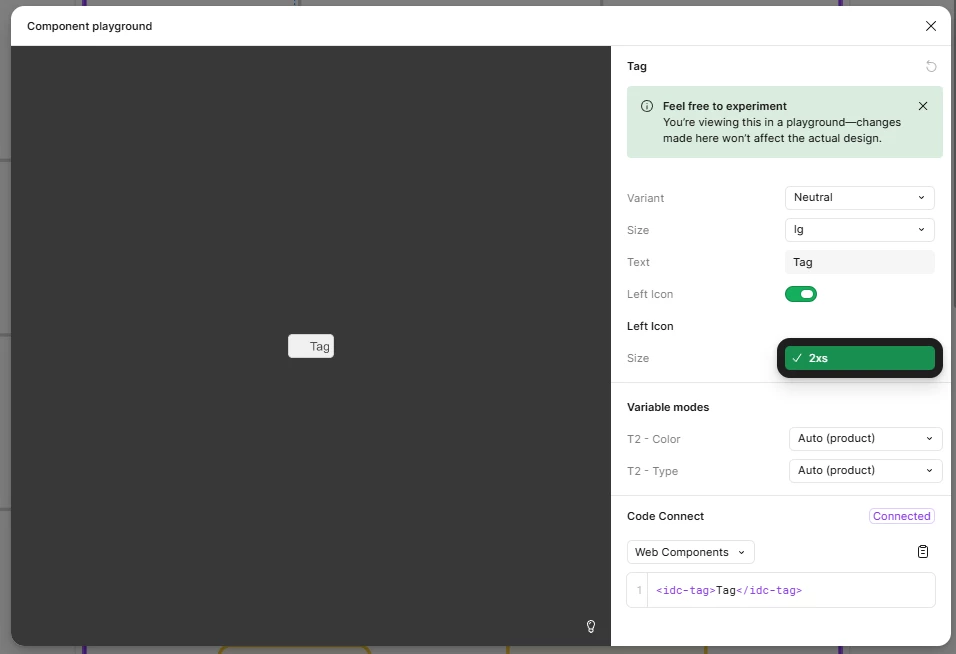

 

1 reply

Celine_
Figmate
  • Community Support
  • June 8, 2026

Hey ​@Vojtech Petrasek , thanks for the detailed report and screenshot! I tried reproducing this on my end, but I wasn't able to trigger the same behavior. Since this sounds like it could be specific to how renamed nested instances are resolved in Dev Mode, I'd love for our team to take a closer look if the issue is still happening

A couple of quick questions in the meantime:

  • Is this happening across multiple components/libraries, or only with a specific component?
  • If you rename the nested instance back to its original name, does it appear correctly again in Dev Mode?

If the issue persists, please submit a bug report to our Technical Quality team via the Support Hub → Click Start a chat → Type "Report a bug" → Press Enter and follow the prompts.

When submitting, please include:

  • A link to the affected component/library and View access granted to support-share@figma.com
  • A screen recording of the issue
  • Steps to reproduce

This will help the team investigate directly. Thanks for your patience! 🙏