

Question

Nested icon does not visually resize after changing size in an overridden instance

  • August 27, 2026
  • 2 replies
  • 15 views

Wind

When an Icon component is nested inside an Icon Button component, changing the icon size on an instance does not update the visual size of the icon.

The size shown in the properties panel updates correctly (e.g. from 16×16 to 20×20), but the actual icon/vector remains visually at 16×16.

This seems to happen when the nested Icon has already been overridden in the Icon Button instance.

Steps to reproduce

  1. Create an Icon component containing a vector icon.

  2. Place the Icon component inside an Icon Button component.

  3. Create an instance of Icon Button.

  4. Override/swap the nested icon to another icon.

  5. Change the nested Icon size from 16×16 to 20×20.

  6. Check the icon visually and compare it with the W/H values in the properties panel.

Actual result

The Icon frame/property updates to 20×20, but the vector inside remains visually at approximately 16×16.

The UI therefore reports the new size correctly, while the rendered icon does not reflect that size.

Expected result

When the nested Icon size changes from 16×16 to 20×20, the icon/vector should resize accordingly and visually render at 20×20.

Additional observation

The issue appears to be related to nested component overrides. The nested Icon has been overridden/swapped inside an Icon Button instance before its size is changed.

This may be related to previously reported issues around nested component sizing and instance overrides.

Example

Before: Icon = 16×16 → visual = 16×16
After: Icon = 20×20 → properties panel = 20×20, but visual remains ≈16×16

Detaching/resetting the nested instance may cause the sizing to behave differently.
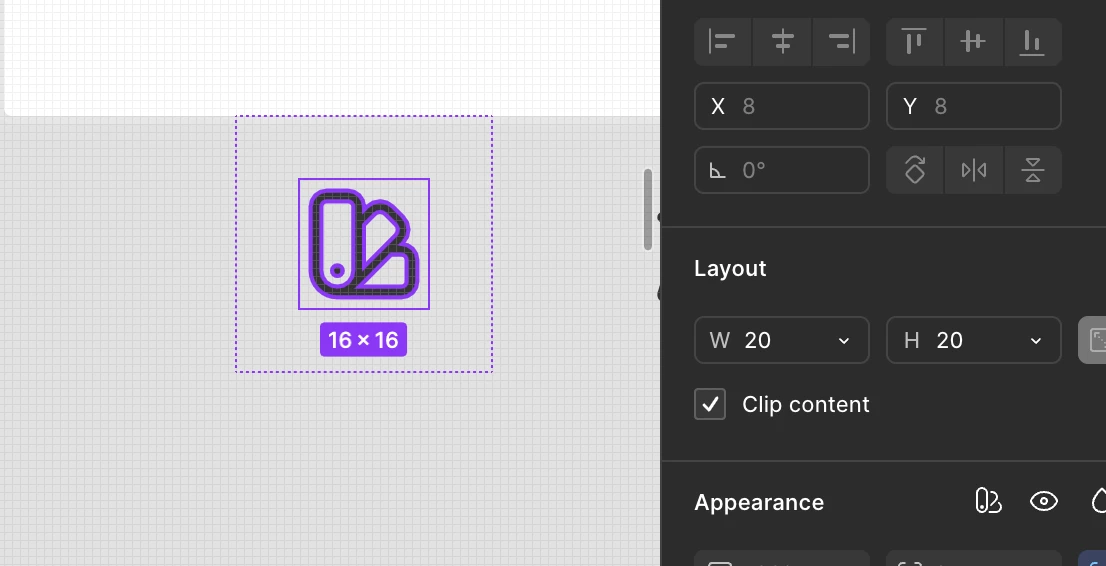
 

2 replies

Celyn_L
Figmate
  • Figmate
  • August 27, 2026

Hi ​@Wind, Celyn from the Figma Community Support team here. Thanks for sharing these detailed steps and screenshots!

I understand that after swapping or overriding a nested icon, changing its dimensions updates the values shown in the properties panel, but the icon itself does not visually resize.

I’ve gone ahead and created a support ticket for you so the team can take a closer look. Your ticket number is #2096132.

It will be really helpful if you could reply directly to the ticket with a link to the impacted file, and invite support-share@figma.com with “Can View” access (this won’t impact your billing and will allow us to reproduce the issue and investigate further with Engineering).

Someone from the team will be reaching out via your ticket soon, so please keep an eye on your inbox. Thanks again for taking the time to document this so clearly!


Wind
  • Author
  • New Member
  • August 28, 2026

Hi ​@Celyn_L ,

Thanks for creating the support ticket.

I've created a reproduction file that demonstrates the issue. I've also invited support-share@figma.com with Can View access.

Reproduction file: 

Figma file link

The issue only occurs when the icon size is controlled by a Figma Variable.

In the Icon Button component, the width and height of the nested Icon are bound to a size variable. For example:

Icon size → Variable: 20

In an instance of the Icon Button, after the nested icon has been swapped/overridden, I change the size variable from:

20 → 16

The properties panel correctly shows the new dimensions as 16×16, but visually the icon remains at approximately 20×20.

However, if I remove the variable binding and use raw numeric values for the icon dimensions instead (e.g. manually changing W/H from 20 to 16), the icon resizes correctly.

So the issue appears specifically related to the combination of:

Nested Icon instance + Icon override/swap + W/H bound to Variables

With Variable

20×20 variable → 16×16 variable
→ Properties show 16×16
→ Visual remains 20×20 ❌

With raw values

20×20 → 16×16
→ Properties show 16x16
→ Visual becomes 16x16 ✅

This makes me think the nested overridden instance may not be visually recomputed/resized when the bound variable value changes, even though the resulting W/H values are updated correctly in the properties panel.

I hope this additional detail helps narrow down the issue. Please let me know if you need a separate reproduction demonstrating the variable-bound and raw-value behaviors side by side.

Thanks!