

Question

Need help to reduce the number of full seats at renewals (organization plan)

  • March 31, 2026
  • 2 replies
  • 22 views

Leonardo Lenzi
Dear Figma Team,

I am an administrator for the "RGI SpA admin" organization. I am contacting you to request assistance with setting the number of seats for the annual renewal.

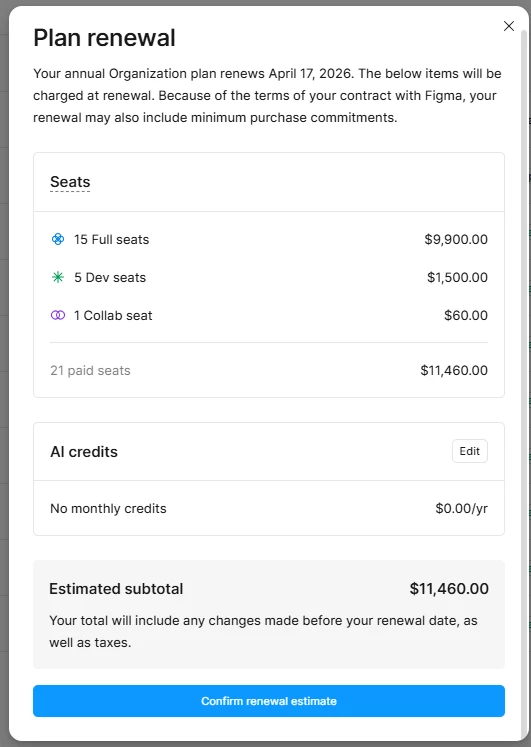
On April 17, 2025, we purchased 15 Full seats and 5 Dev seats for the annual period April 17, 2025 - April 17, 2026 with an organization plan.
We later determined that the number of "full seats" was redundant: we are only using 10 full seats, while the other 5 have been in status “available” for long time.
Therefore, we would like to downgrade the number of seats for the next renewal.
Specifically, we would like to purchase only 10 Full seats and 5 Dev seats for the renewal on April 17, 2026.

However, by clicking on the "preview renewals" tab, it is not possible to reduce the number of seats; I can only click on the "confirm renewal estimate" button.
Can you help me remove the 5 unused full seats and renew only 10 full seats (in addition to the 5 dev seats which are already correct) ?

Best regards,
Leonardo Lenzi

2 replies

djv
Figmate
  • Community Support
  • March 31, 2026

Hi ​@Leonardo Lenzi, thanks for reaching out! 

I completely understand why you want to remove your unused seats before your renewal date. Please note that you can only remove any unused seats from your account from your Billing overview page not the preview renewals tab. Thirty days before your annual renewal date (March 17th), you should have seen a Review seats banner in your Admin dashboard.

Since it sounds like you may have already clicked the banner, you can still access the modal from your Admin > Billing page. Click Review seats to adjust the total number of paid seats for the next term/date of renewal (April 17th). Hope this helps clarify! 

More information about Managing billing on the Organization plan is available here: https://help.figma.com/hc/en-us/articles/360040328293-Manage-billing-on-the-Organization-and-Enterprise-plans#adjust-seats-at-renewal


Leonardo Lenzi

Hi ​@djv 

thank you for the quick reply.

However, when I access the renewal banner, either from the home page or from the Admin > Billing page, I don't see a "review seat" button...
I've attached a screenshot: Clicking the "manage" button takes me to the "people" page.


However, the renewal banner doesn't have an "edit" button in the top right, as reported on the page you linked.

Furthermore, the renewal banner doesn't have the "edit" button for adjusting seats in the top right, as shown on the page you linked.


Could you help me figure out if I'm doing something wrong or if it's an issue with the admin console?

Best regards,
Leonardo Lenzi