

Question

My Team members with Full Access under Professional plan are unable to use Figma Skills under Agent - Beta

  • August 18, 2026
  • 3 replies
  • 46 views

Varundev Vasudevan

Hi @Figma Support team,


I am writing to report an issue regarding access to Figma Agent - Skills (Beta) for my team members on our Professional plan.

Although all team members have paid, full-access Professional seats, they are unable to view or access the Skills feature under Figma Agent.

For reference:

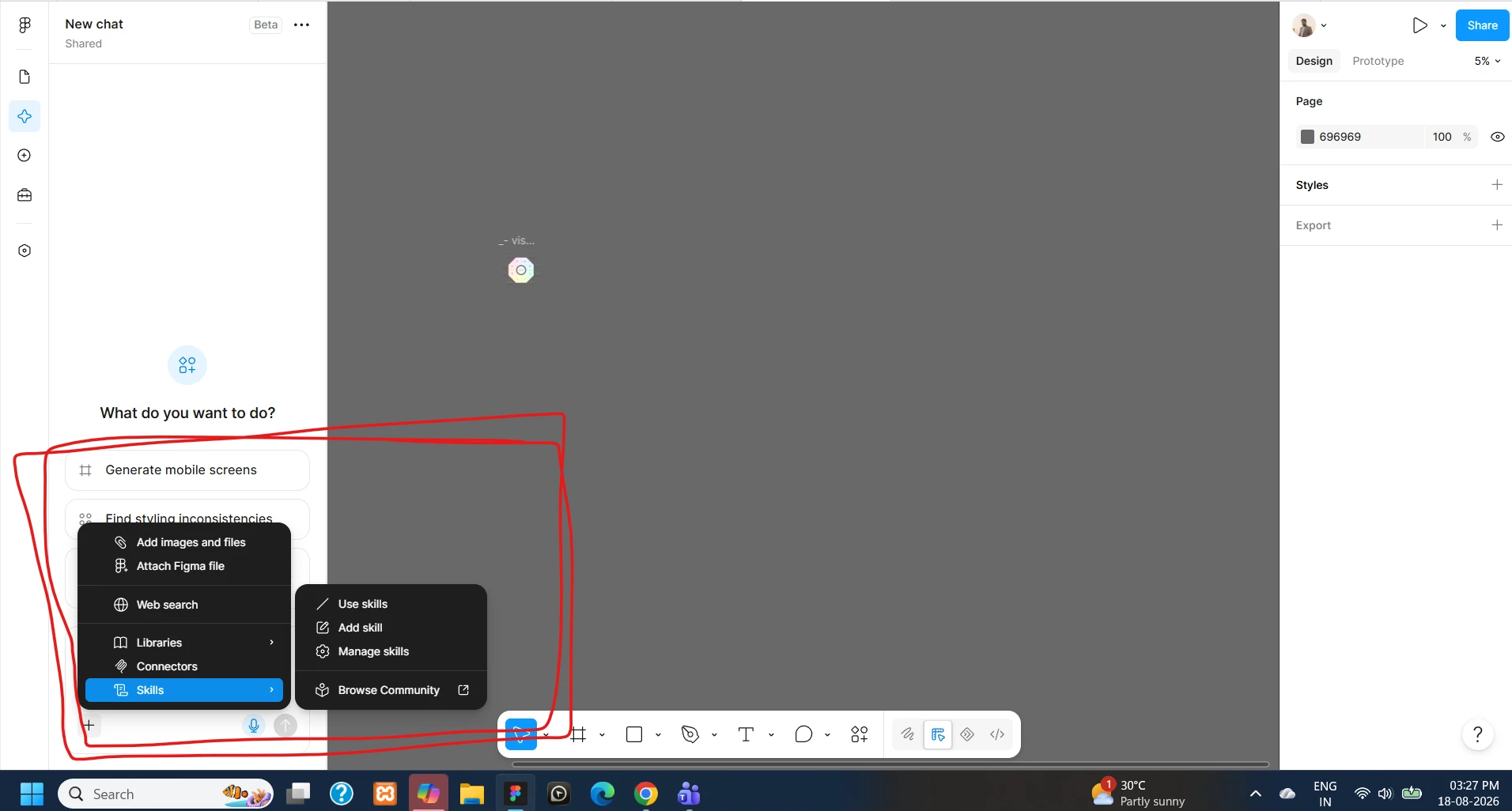
  • Image 01 (Admin view): Shows the "Agent - Skills" option visible and fully accessible.

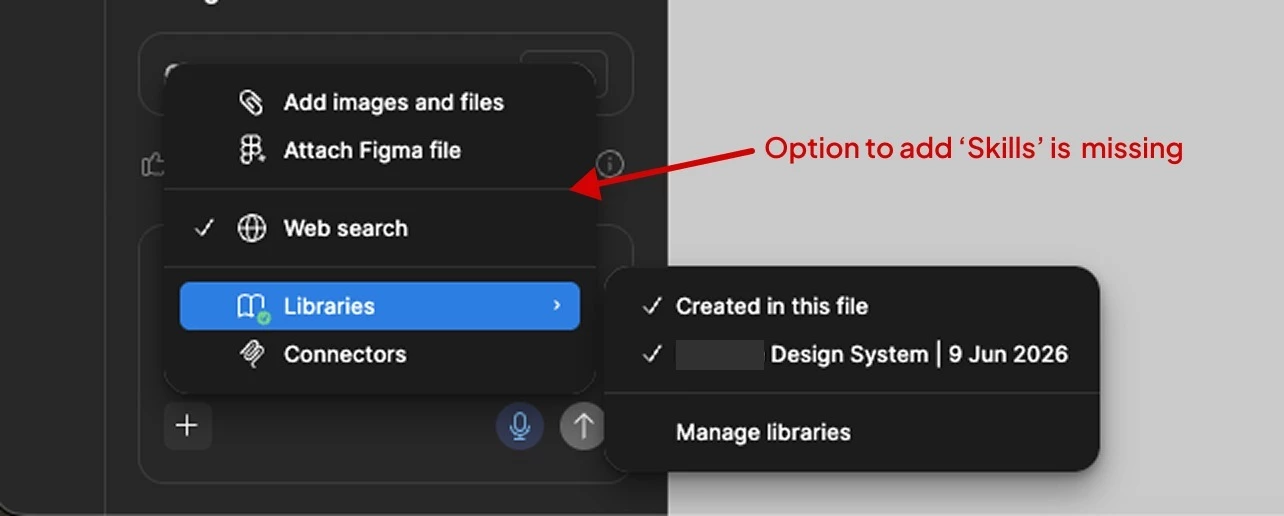
  • Image 02 (Team member view): Shows that the option is missing entirely, despite the user having full access permissions.

To troubleshoot, I created and published a custom skill directly to our team space to see if it would trigger access for them. However, they are still unable to see or use the published skill.

Could you please assist in resolving this permission issue so our team members can access the Figma Agent Skills feature?


Img - 01 (Admin Account)
 

Img - 02 (Team account)


Thanks in advance!

Varun

3 replies

Gayani_S
Figmate
  • Community Support
  • August 18, 2026

Hey ​@Varundev Vasudevan, thanks for reaching out and sharing the screenshots! 

Custom skills in the Figma agent are available to anyone with a Full seat on a paid plan (Professional, Organization, or Enterprise), with edit access to the file they're working in. Since your team members already have full-access Professional seats, they should meet those requirements.

From your screenshots, it's clear the agent itself is already working for them. Web search, Libraries, and Connectors are all showing up and functioning normally. 

Could you have your team members refresh the page (or fully quit and reopen the desktop app), then check the "+" menu again? Worth ruling out first since it's the fastest fix if that's all it is.


If Skills still isn't there after that, this comes down to checking their specific accounts on our end. Could you open a request with our customer support team through our Support hub and include the emails of the affected team members? We'll take a look directly.


In the meantime, here's more on how skills work: Custom skills for the Figma agent and Figma Make.


Let us know how the refresh goes!


Varundev Vasudevan

Hi ​@Gayani_S , I hope my concern is clear from the definition I provided above. Its not related to the “+” Menu, it is more to the option missing called “Skills” from the “Add context (+)” menu option for my team. As informed they are having Full access to the Figma under Pro account. The file is created by them so they have edit access as well. Still this option is missing for them in Figma Agent, at the same time, Am handling the Admin, for my Admin account in Figma I could see this option. Why is there such issue to access same options for our Figma Pro users. The same issue has been posted by many other Pro users as well in this community and for all your reply is the same. Am not sure if Figma will address this with more in-depth understanding and clarifications on the issue.


Jaycee Lewis
Figmate
  • Figmate
  • August 21, 2026

Hi ​@Varundev Vasudevan 👋 Picking this one up for ​@Gayani_S 😊 

I opened a support ticket for this. The ID is 2085611 and the email subject line is Skills option missing from Add context menu in Figma agent for Full-seat members on Professional plan. Please keep an eye on your email (and spam folder if necessary) for the email and any replies from our team. I attached your screenshots and added a few questions for you to help support investigate.Thanks again! — Jaycee