

Question

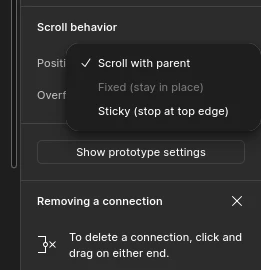
My "Fixed (stay in place)" option isn't availabel

  • July 31, 2026
  • 1 reply
  • 6 views

Soall

Hi, I don't know why, but I can't use the "Fixed (stay in place)" option.


It doesn't work with anything, whether it's components, images, frames, or text. I've tried looking for a solution, but I couldn't find anything. In the tutorials I've watched on how to use this option, it was always available. I don't know what I might be doing wrong, so I came here to ask for help.


Does anyone know what I can do?
 

1 reply

Jaycee Lewis
Figmate

Hey hey ​@Soall 🤩 Great question. Thanks for including the screenshot — that made this much easier to nderstand.

Question for you — Is the frame that layer sits in using auto layout? A layer that's part of the auto layout flow can't be set to Fixed — Sticky is still allowed, which is why Sticky is selectable for you while Fixed is greyed out.

I set up a quick test file to confirm it. Same layer, same frame, only the layout condition changing:


Two ways to get Fixed back:

  • Select the layer and turn on Ignore auto layout — the icon just right of the Position header in the right sidebar. The layer stays inside the frame but steps out of the auto layout flow
  • Or remove auto layout from the parent frame altogether, if you don't need it there

The articles I used for my test:

If the parent frame isn't using auto layout, let me know. I’m always happy to help — Jaycee