

Question

Multi keyframe property in motion timeline
  • July 21, 2026
  • 1 reply
  • 13 views

Hamed Moodi

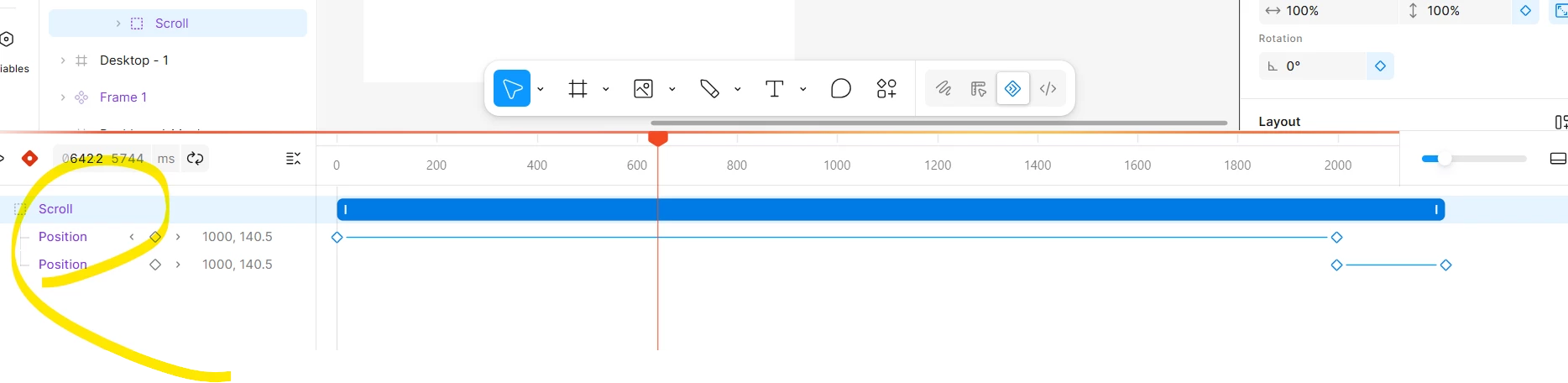
When i try to add key frame for existing position keyframe line, added another same propery in new keyfame line!

i try to add auto, property panel and timeline, but all way create extra propery in time line

1 reply

Jaycee Lewis
Figmate

Hey hey ​@Hamed Moodi 👋 Thanks for flagging this!

One important detail up front — when adding a second keyframe to an existing Position property, the intended flow is to:

  • Move the playhead to the new time 
  • Change the X or Y value in the right sidebar
  • (Clicking Add keyframe a second time can sometimes create a separate track instead)

When you have a minute, could you try this quick test?

  • Move the playhead to time zero and click Add keyframe on Position

  • Move the playhead to a later time (e.g., 1000 ms)

  • Change the X or Y value in the right sidebar—without clicking Add keyframe again

That should connect a second keyframe on the same row. (Check out the Motion help center doc for a full breakdown.)

If this still makes a duplicate track (or if you notice a second layer selected on the timeline), that’s something we need to dig into. A short screen recording showing your full timeline and layers panel would be super helpful.

Thanks for testing this out 🤩 — Jaycee