

Question

Motion component looping instead of playing once

  • July 2, 2026
  • 6 replies
  • 96 views

Iris Hofman

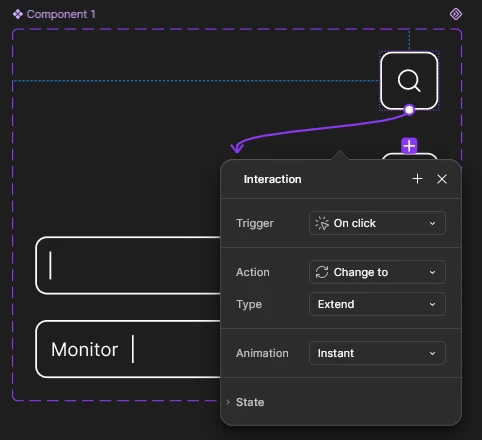
When I create a component set from a motion frame it does not behave correctly anymore and starts to loop even though the components are all set to play once.
It only has an on click tigger to go to the next motion component.



6 replies

Gayani_S
Figmate
  • Community Support
  • July 2, 2026

Hey ​@Iris Hofman, thanks for reaching out, and sorry for the trouble with your motion component set!

To help our team take a closer look, could you share a few more details:

  1. The URL of the main component, and the URL of the instance(s) that are looping instead of playing once
  2. Where the animation itself lives, on the main component, the instance, or a nested layer within the set
  3. Whether this happens in Design mode too, or only when you're working in Figma Motion
  4. Whether it happens every time, or just with this particular file

The screen recording and timeline screenshot you included are really helpful, thank you for that. If you're able to share the file directly, you can send it to support-share@figma.com with "Can view" access so we can dig in further on our end.

In the meantime, this article on using the Figma Motion timeline covers how playback settings (once, loop, ping-pong) are meant to work, in case it's a helpful reference while we look into this.

We'll follow up as soon as we hear back!


Iris Hofman
  • Author
  • New Participant
  • July 2, 2026

I think I've invited support-share@figma.com to the file with can view privileges.


This happens in present mode. In motion mode it works properly.


It happens in this file. I have not tried it in other files yet.


https://www.figma.com/design/y7TsMxeV7zAwg8iSDYWunj/HardwareInsight?node-id=3525-48016&t=z1SjfmeUH8WefeNW-4


Iris Hofman
  • Author
  • New Participant
  • July 3, 2026

The earlier link did not work. This is the link to the component:


adamsmasher
Figmate
  • Figmate
  • July 5, 2026

Thanks for sharing that, ​@Iris Hofman! Stepping in for ​@Gayani_S


I can definitely see why this isn’t your expectation, and after checking with the team it looks like this is currently not supported. However, the good news is we are working on it! I don’t have an ETA or other information beyond that, though, so stay tuned and thank you for your patience. Let us know if you have more questions or run into other issues - cheers!


Iris Hofman
  • Author
  • New Participant
  • July 5, 2026

Thanks for sharing that, ​@Iris Hofman! Stepping in for ​@Gayani_S


I can definitely see why this isn’t your expectation, and after checking with the team it looks like this is currently not supported. However, the good news is we are working on it! I don’t have an ETA or other information beyond that, though, so stay tuned and thank you for your patience. Let us know if you have more questions or run into other issues - cheers!

Thanks for sharing that, ​@Iris Hofman! Stepping in for ​@Gayani_S


I can definitely see why this isn’t your expectation, and after checking with the team it looks like this is currently not supported. However, the good news is we are working on it! I don’t have an ETA or other information beyond that, though, so stay tuned and thank you for your patience. Let us know if you have more questions or run into other issues - cheers!


It would be nice to be able to read somewhere what the limitations are of this beta feature so that I know beforehand to not implement this feature in to my design system as I now spend time implementing it whilst it doesn't actually work properly yet with what I need it for.


adamsmasher
Figmate
  • Figmate
  • July 5, 2026

That’s understandable, ​@Iris Hofman, and I can see why it would be frustrating working toward something without knowing that there’s a limitation blocking you. It’s not quite the same as you’re asking, but the Figma Motion help articles show you what you can do, so if you don’t see something called out specifically there then you could take that into account. Hopefully this particular limitation is something we’ll have updated soon so you can see your work in action the way you intended it.