MISSING "Apply Variable" GEAR ICON IN THE NEW UPDATE

  • July 9, 2026
  • 9 replies
  • 100 views

Utdorm Em

Hey everyone,

I need to vent because I’m genuinely at my wits' end with the recent updates. It feels like Figma is getting worse day by day, and basic, foundational features are being completely ruined or hidden in the name of "sleek redesigns."

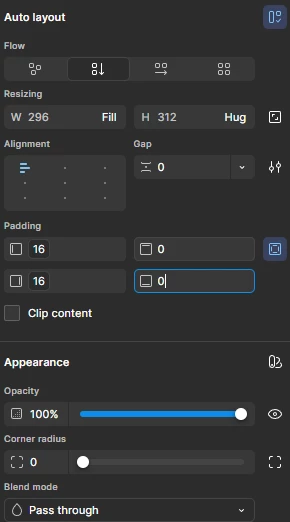
Out of nowhere today, the "Apply Variable" gear icons have completely vanished from my properties panels. I’m trying to link padding, gap spacing, and border radiuses to our design tokens, but the contextual hover icons just aren't appearing on the settings inputs anymore. 

Please fix this ASAP, Figma. Stop breaking core functionality for things we use every single minute of our workflows.😡 


9 replies

adamsmasher
Figmate

Hi, ​@Utdorm Em. Thanks for your post - I understand how frustrating it is for you when the variable icon is missing so you can’t utilize your design system tokens.


I’m sure you’ve already checked this, but the file you are working with does have variables, either directly or via a library, right? I just want to make sure that this isn’t a new file where you might have needed to import a design system in. I just did a quick check in a test file of my own and the variable option shows for me:


Are you using the desktop app or a browser? If it’s the desktop app, check to see if there are any updates available, and if you’re up-to-date, have it reload your tabs for you. If you’re using a browser, make sure that you’re using the newest version and then clear your cache and reload. 


Utdorm Em
  • Author
  • New Member
  • July 10, 2026

Hi ​@adamsmasher  Thank you for your response. My desktop Figma app UI is the new one. Currently up-to-date Figma and I already reloaded the Figma app. The icon is still missing. The library is available in my file, and I can access the variable if it has already been applied. However, I can't find the icon or add it to other elements.


Utdorm Em
  • Author
  • New Member
  • July 10, 2026

After few hours of frustration, I noticed the “Absolute” position button is also missing.


adamsmasher
Figmate
  • Figmate
  • July 10, 2026

Thanks for the screenshot! Just to clarify what I’m seeing, you’re showing that you have variables applied to two of the padding fields, but the variable icon does not show for the other two fields for the same layer, right? Just to confirm, does this also happen in a web browser, and is it also like this for anyone else who has edit access?


Regarding absolute positioning, this is now an “ignore auto-layout” button at the top right of the Position section of the properties panel:


Chloe Wood
  • New Member
  • July 10, 2026

I am also experiencing this. It was there before I updated today and after I reopened Figma, the variable button is gone. I am using Windows 11 and the Desktop application. In the Web browser on Firefox the button is still present.


adamsmasher
Figmate
  • Figmate
  • July 10, 2026

Thanks for your reply, ​@Chloe Wood; it’s unfortunate that you’re also experiencing this - I appreciate you calling out what operating system you use. ​@Utdorm Em, in addition to letting me know if this works in the browser, can you also let me know what operating system you use? I’m personally using Mac OS Tahoe.


A question for both of you: once you see this happening with a field, if you switch to a different layer is it still missing or does it seem isolated to just that layer?


MMGGEE
  • New Member
  • July 15, 2026

I think I have found the issue ​@Chloe Wood , ​@Utdorm Em , ​@adamsmasher,  I was experiencing the same issue not finding the hexagonal variables icon, nor the renamed absolute position, ‘ignore autolayout’ button. 

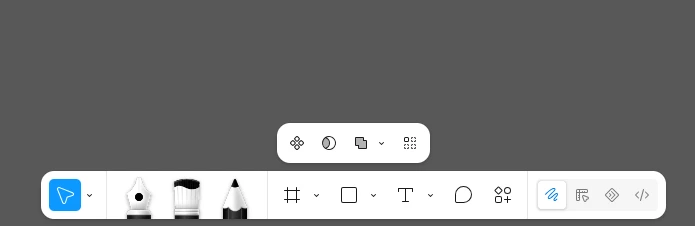
It turns out that I had changed into ‘draw’ mode inadvertently, slightly changing the properties panel’s options.


It is SUPER confusing, I think there should be extra affordances to let you know you’re in a different mode, the floating menu sometimes becomes background ‘noise’ and you forget about it. I’ve also had issues when I change to dev mode, and then some pages disappear and options go away 😂

@Utdorm Em I can see in some of your screenshots you have the ‘radial’ icon on the top right corner of the properties panel, that is an indicator that you had changed to ‘draw’ mode.


adamsmasher
Figmate
  • Figmate
  • July 15, 2026

Ahh, something so simple but easy to miss, ​@MMGGEE - thank you so much for sharing that. ​@Chloe Wood and ​@Utdorm Em - let me know if you still are seeing this in Design mode.


Thank you again, ​@MMGGEE! Really great catch. 😊


Chloe Wood
  • New Member
  • July 16, 2026

That did the trick! I rarely ever touch the mode settings so I am not sure if with the update something changed between things but we are now back in business! Thank you ​@MMGGEE