

Vladimir14
New Member
October 15, 2026
Question

Metric font displays incorrect when vertical trim is turned on

Hello,

In our company, we decided to use new text style specifically for buttons and similar components. This style has vertical trim set to “cap height to baseline”. All of a sudden, text’s line height gets squished:
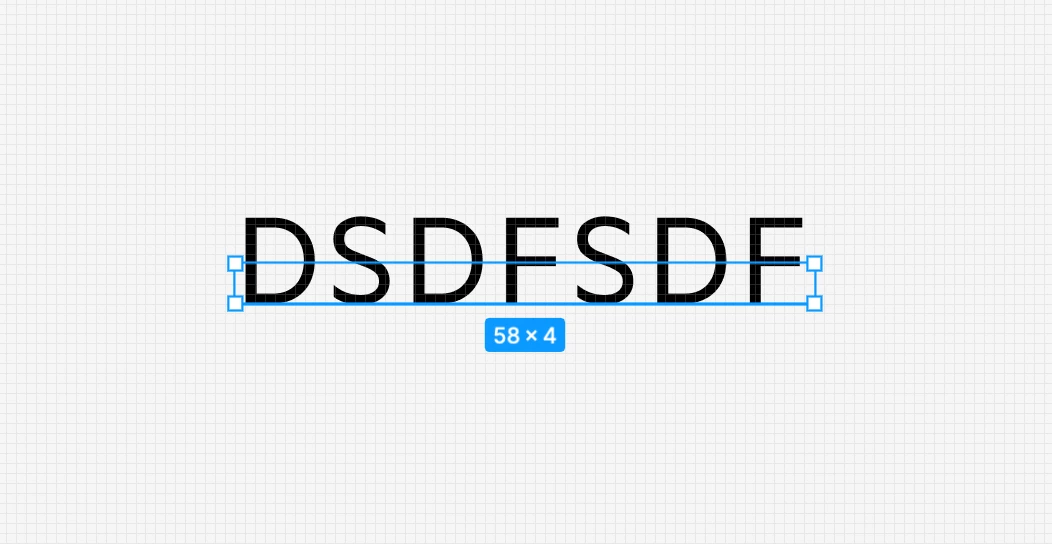


I tried re-installing Metric font from several different sources but nothing helped. I’m currently on MacOS, on my private computer (PC/Windows 11) everything works fine. Thank you

1 reply

adamsmasher
Figmate
Figmate
October 17, 2026

Thanks for your post, ​@Vladimir14. This is definitely unexpected, and interesting to note that you’re only seeing this in macOS. 


Were you using the same font with the old text style, or did the switch to the new style include switching to Metric? Does this happen in both the desktop app and web browser, or just one? I wasn’t sure if this was a font uploaded to your org or account, or just one you’re using locally. I’ve seen similar issues before with certain fonts where the cap height is set shorter - it’s possible that Metric’s height is set to match lowercase letters.


One solution you could try in the meantime is setting the vertical trim back to Standard, provided it doesn’t affect your designs.