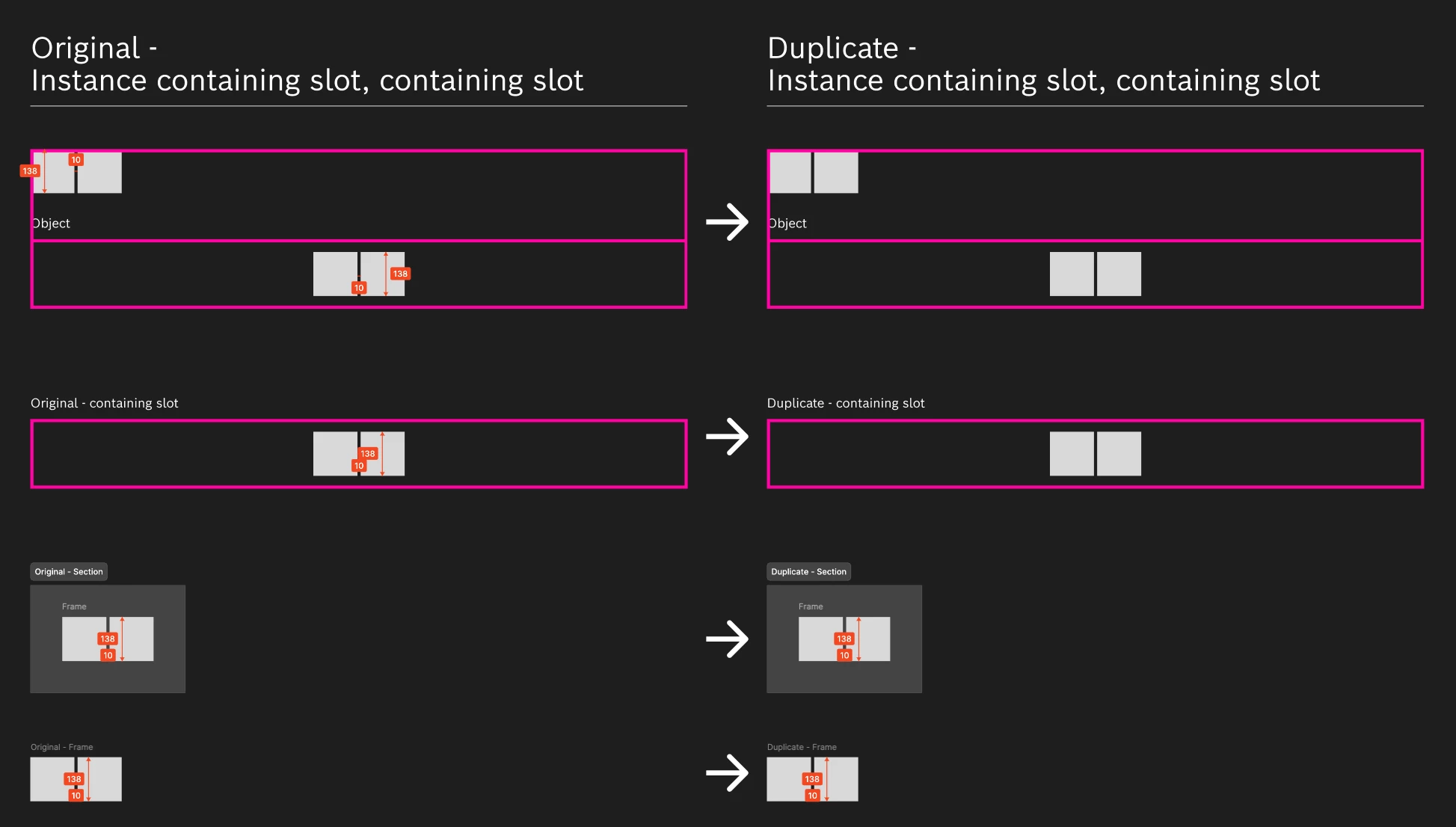
Measurements on slot contents are not copied when duplicating the slot or parent frame
The measurements are not duplicated along with the contents.
When elements placed inside a Slot container are measured using Figma’s Measure Tool, duplicating the Slot with all its content or parent frame/component containing the Slot results in the duplicated object losing all measurements.
Steps to Reproduce
- Create a Component containing a Slot.
- Place an element inside the Slot.
- Use Figma's Measure Tool to add measurements directly to the element/frame inside the Slot (Shift+M).
- Duplicate the parent Frame, Component Instance, or the Slot itself (via Cmd/Ctrl + D or Alt + Drag).
- Check the duplicated Frame or Slot.
Expected Behavior
The measurements attached to the objects inside the slot should be duplicated along with the slot/frame contents and remain visible on the duplicate.
Actual Behavior
The objects inside the slot are duplicated, but all attached measurements vanish / are not duplicated. The duplicated frame or slot appears without any measurement annotations.
Works only in Frames or Sections.
Context & System Information
Figma Version: Desktop App
OS: macOS
Impact: High – disrupts redlining, documentation, and handoff workflows where variants or screens using component slots are duplicated.