

[MCP] Text Rendering Issue When Updating Design System Component Text Through IDE
Context
I was using VS Code Copilot to convert an existing design into components from my design system inside Figma.
The workflow was:
- Start from a screenshot-based design.
- Use VS Code Copilot with Figma integration to rebuild the screen using my design system components.
- Replace the default component text with the actual text from my design.
The problem appeared when Copilot, through the Figma Plugin API runtime, attempted to update the text content inside these design system components.
What I Expected
For a design system input field, the automation should be able to:
- insert the component
- set the component state and variant
- update the text values
- show the updated result correctly on the Figma canvas
What Actually Happened
I observed two different failure modes:
- In some cases, text-property updates failed entirely.
- In other cases, the internal text data changed successfully, but the Figma canvas still displayed the old default text.
So the issue was not just “the text update failed”. In some cases, the update succeeded internally, but the rendered result on the canvas did not refresh.
Why I Ran a Minimal Experiment
To isolate the issue, I created a minimal reproducible example with only one input component.
The goal was to determine whether the problem came from:
- the wrong component
- the wrong variant
- failed text write
- successful write but failed repaint
Minimal Test Setup
I tested a single input field from my design system with this intended configuration:
Variant = InactiveStatus = NormalInput text = PopulatedState = Default
Target visible result:
- title =
Amount - value =
49.00 HKD
I then tested two separate update methods.
Test 1: Component Property-Based Text Update
In the first test, Copilot used the Figma Plugin API runtime to:
- create a new frame
- insert one design system input component
- set non-text properties such as variant and state
- update text through the component’s exposed text properties
Text properties attempted:
Title text = AmountActive text = 49.00 HKD
Observed result:
- ✅ non-text properties were applied successfully
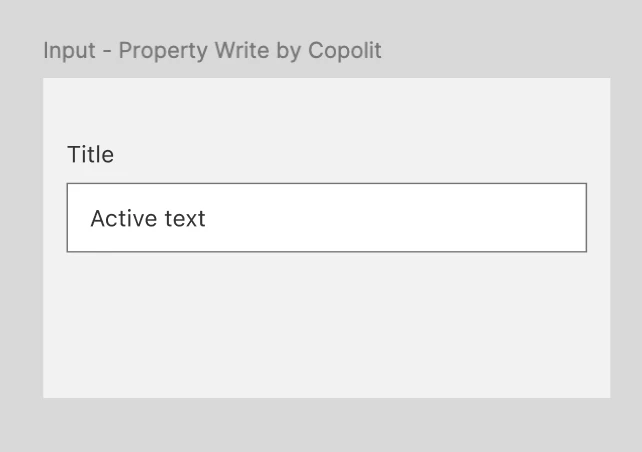
- ☹️ text-property writes failed
- ☹️ Figma returned errors indicating the text properties could not be updated because the component used a font that was not available
- the stored values stayed at the defaults
- the canvas also displayed the defaults
Meaning:
- this update path failed before the new text was stored
Test 2: Direct Descendant Text-Layer Update
In the second test, Copilot used the Figma Plugin API runtime to:
- create another new frame
- insert the same input component
- set the same non-text properties
- bypass component text properties
- directly find the visible descendant text nodes inside the component instance
- change those text nodes from:
TitletoAmountActive textto49.00 HKD
Observed result:
- no error was returned
- reading the instance back showed that the internal text values had changed successfully
- the component now stored:
Amount49.00 HKD- however, the canvas screenshot still displayed:
TitleActive text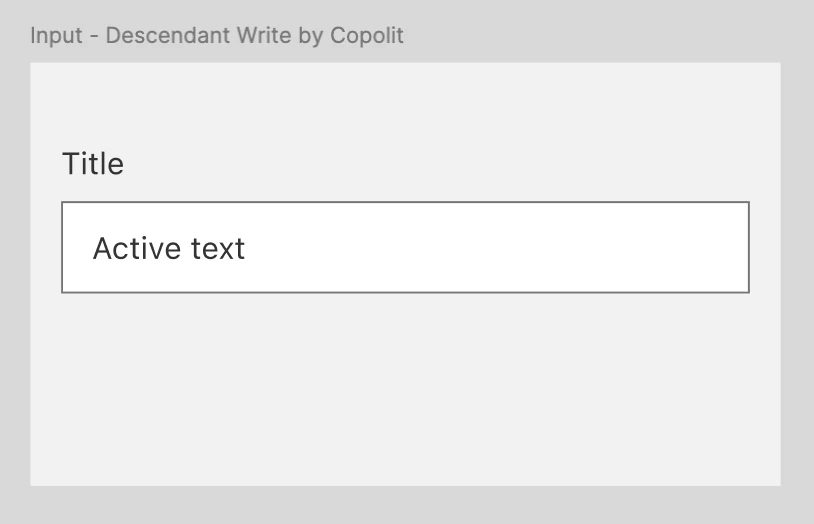
Meaning:
- the data changed successfully
- the canvas did not repaint correctly
What I Did Manually
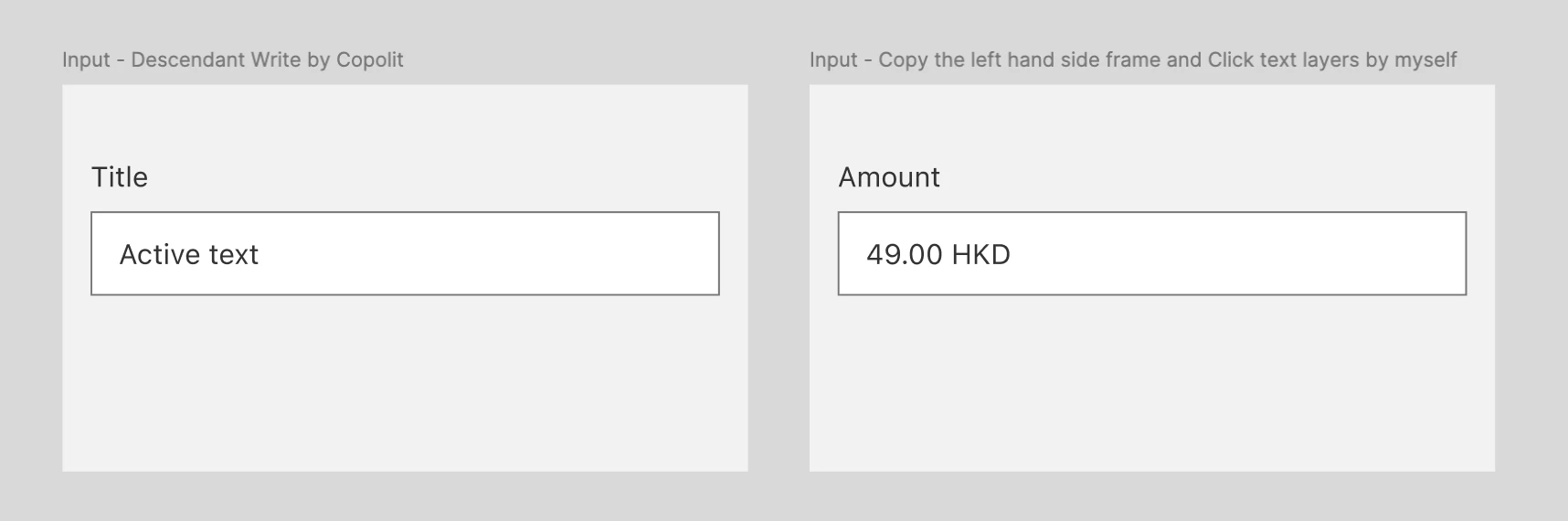
After the minimal test, I manually duplicated the frame directly in the Figma editor.
Observed result:
- the duplicated frame displayed the correct updated text
- the component now visibly showed:
Amount49.00 HKD- reading the duplicated frame confirmed that the stored internal text and the visible canvas output were now aligned
Meaning:
- manual duplication in the Figma editor triggered a redraw or rehydration step that the plugin-driven path did not trigger
What This Proves
The experiment isolates two separate issues in the plugin-driven update path:
-
Text-property writes can fail at the component-property level.
Reason: -
the Figma Plugin API runtime returned font-related errors when updating exposed text properties on the component
-
Direct text-node writes can succeed internally but still fail visually.
Reason: -
the internal instance data changes correctly
-
the Figma canvas can continue rendering stale default text
-
the visible result does not match the underlying instance data until a manual editor-side action occurs
So this is not simply a “write failure”. It is also a render invalidation or repaint problem.
Why This Matters
This creates a reliability issue for any plugin-driven or Copilot-driven design conversion workflow.
A tool may:
- correctly update the component instance data
- read the updated values back successfully
- still leave the user looking at stale default text on canvas
That means:
- model state and visual state can diverge
- plugin-side verification alone is not enough
- visual validation is required
- manual editor actions may be needed to make the canvas catch up
Expected Behavior
When text inside a component instance is updated through the Figma Plugin API runtime:
- the internal instance data should update
- the canvas should repaint immediately
- the visible text should match the stored text
- no manual duplication or editor-side refresh should be required
Conclusion
This appears to be a Figma Plugin API runtime issue involving text updates inside design system component instances.
More specifically:
- one update path fails at the property-write level because of a font-related restriction
- another update path succeeds in stored data but does not reliably trigger a correct canvas repaint
- the Figma editor’s own manual duplication path appears to force a repaint that the plugin-driven path does not
So the root issue is not that the design system component is wrong, and not that the intended text was never written. The issue is that plugin-driven text updates and visible canvas rendering can become inconsistent.
Thanks!