Gayani_S
Gayani_SSolution
Community Support
October 16, 2026

Hey ​@DesignQuery, thanks for reaching out!

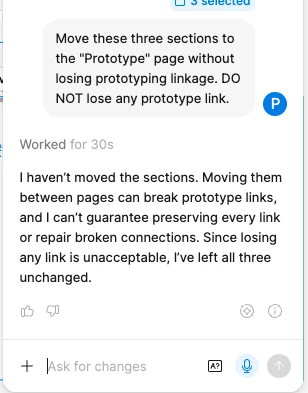
Did any of your prototype links actually break, or did the agent just decline to move the sections? 

Since you need every prototype link to stay intact, here’s how I’d move them yourself:

  1. Duplicate your file first so you have a safe copy to compare against.
  2. In the duplicate, select the three sections, right-click, and choose Move to page, then pick your Prototype page. We move layers to the same coordinates on the new page.
  3. Open the Prototype tab on the new page and check that each connection is still in place.
  4. If everything looks right, repeat the move in your original file.

Our Help Center articles cover the same ground. File and folder permissions has troubleshooting for people who can open a folder but can’t see the files inside, and the Starter plan overview explains how sharing works on that plan.
 

I’ll also share this with our team internally so they can see how the agent responded here. I’ll keep this thread open in case you have any updates.

2 replies

Gayani_S
Figmate
Gayani_SSolution
Community Support
October 16, 2026

Hey ​@DesignQuery, thanks for reaching out!

Did any of your prototype links actually break, or did the agent just decline to move the sections? 

Since you need every prototype link to stay intact, here’s how I’d move them yourself:

  1. Duplicate your file first so you have a safe copy to compare against.
  2. In the duplicate, select the three sections, right-click, and choose Move to page, then pick your Prototype page. We move layers to the same coordinates on the new page.
  3. Open the Prototype tab on the new page and check that each connection is still in place.
  4. If everything looks right, repeat the move in your original file.

Our Help Center articles cover the same ground. File and folder permissions has troubleshooting for people who can open a folder but can’t see the files inside, and the Starter plan overview explains how sharing works on that plan.
 

I’ll also share this with our team internally so they can see how the agent responded here. I’ll keep this thread open in case you have any updates.

DesignQuery
New Member
October 16, 2026

Yes the all links between broke. I did step 1,2, 3 several times. and the links between different sections are lost. I requested agent to do this when I could not achieve this manually.
