

Question

Local variables missing in education account
  • June 18, 2026
  • 10 replies
  • 81 views

Abhinay2

I have an educational Figma account, and I'm experiencing an issue where variables aren't appearing in either my drafts or team projects. Interestingly, on my separate free account, variables are visible in both drafts and team projects without any issues.

10 replies

Gayani_S
Figmate
  • Community Support
  • June 18, 2026

Hey ​@Abhinay2, thanks for reaching out!

Variables aren't available on the Starter plan, so if your Education plan has lapsed or your team was downgraded, that would explain exactly what you're seeing. 

Last year, Figma introduced a reverification process for Education accounts. If your Education team wasn't reverified by then, it may have been downgraded to Starter, which doesn't include variables.

Here's how to check your current plan status:

  1. Head to your Education team and scroll to the bottom of the projects page
  2. If there's a banner saying "This team is for Education users only. New users will be required to verify their Education status", you're still active on the Education plan
  3. If you don't see that banner, your team has likely been downgraded

The Figma for Education article covers how to check your status and reverify if needed.


Let me know what you find, happy to help from there!


Abhinay2
  • Author
  • New Participant
  • June 18, 2026
  1. If there's a banner saying "This team is for Education users only. New users will be required to verify their Education status", you're still active on the Education plan

    the banner is there, but i am unable to use local variables.

Abhinay2
  • Author
  • New Participant
  • June 20, 2026

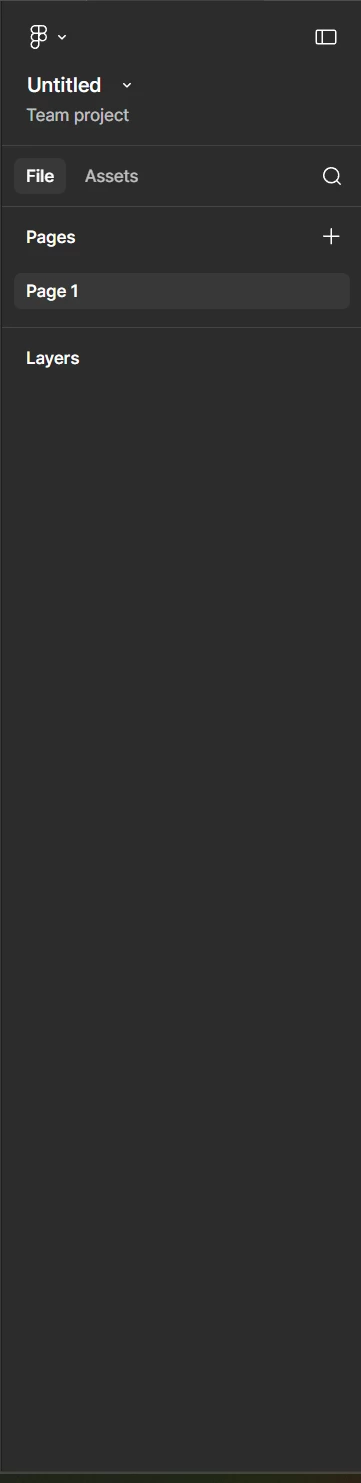
Hey ​@Gayani_S I re-checked it, here’s the updated screenshot

As you can see I am in the educational plan and I tried making a team file, but there’s also no variables are showing up in the left panel. What to do?


Tom Reem
Figmate
  • Figmate
  • June 20, 2026

Hey ​@Abhinay2, Tom here — stepping in for ​@Gayani_S today.

Thanks for your reply and for sharing those screenshots. Before we dig further into the account side of things, it's worth a quick check on the variables entry point. Currently, the modal can be hidden if you have a layer selected. Try pressing Esc to deselect everything on the canvas, then look for the Variables section in the right sidebar. This guide walks through how to access it: Create and manage variables and collections → Access the Variables modal. We are in the process of rolling out the new left navigation bar, which may explain the discrepancy you’re seeing between your accounts.

If this doesn’t clear things up, could you let us know if you've already gone through the Figma for Education verification process? That'll help us point you in the right direction from here. If you haven't yet, here are the requirements and where to start: Figma for Education → Verify your education status.

Please keep us posted on how it goes. 🙏🏻


Abhinay2
  • Author
  • New Participant
  • June 21, 2026

@Tom Reem ​@Gayani_S 

[image redacted by moderator to remove personal information]

My account is verified through the proper educational verification process, with my email linked as an educational account. I've also deselected all elements on the canvas, but local variables still aren't appearing in the left sidebar. As a test, I created the same project under a free account, where local variables did show up correctly. I then imported that project into my educational account, expecting the variables to carry over and display—but the issue still persists.


Abhinay2
  • Author
  • New Participant
  • June 21, 2026

@Gayani_S ​@Tom Reem 

Additionally, I'm able to publish the library without issue, and the variable connections—Brand, Alias, Mapped, and Responsive—are showing up correctly there. However, despite this, I still can't access variables in the left sidebar.


Tom Reem
Figmate
  • Figmate
  • June 21, 2026

Hey ​@Abhinay2 — thanks for confirming and for digging further into this.

I looked through the screenshots you provided. This may be related to the navigation update currently rolling out across accounts, though I want to have Product Support confirm the specific cause on your account. I've opened a ticket with that team, since some of the settings they'll need to check aren’t things we can share in a public forum. Here’s your case number: 1973516.

Also removed one of your screenshots — it contained personal information, so I pulled it down to protect your account's security. Thanks for your understanding.

Please keep watch the email inbox tied to your Figma account for next steps.


Tom Reem
Figmate
  • Figmate
  • July 1, 2026

Hi ​@Abhinay2 — quick update on this. Your ticket has been escalated to our Technical Quality team for a deeper look. Please check your inbox for their follow-ups on: 1973516.


Abhinay2
  • Author
  • New Participant
  • July 1, 2026

@Tom Reem Thanks for the update. I just checked my Figma account, and thanks to your team, the new update is working fine. Everything looks good, and the variables are now displayed in the left sidebar.


Tom Reem
Figmate
  • Figmate
  • July 15, 2026

Awesome, glad to hear it ​@Abhinay2 — thanks for confirming! 🙌🏻