Solved

Local Figma MCP server doesn't integrate with Claude Desktop even though everything is connected on Claude's side

  • August 11, 2026
  • 3 replies
  • 79 views

Danial Sabunchi


Everything on the Claude Desktop side is properly installed and shows as connected — the Figma connector/MCP server is active in Claude Desktop's settings.

But the local Dev Mode MCP server in Figma never actually integrates with Claude Desktop. Figma just doesn't pick up the connection — no session starts, nothing happens, even though Claude reports it as connected.
 

Has anyone else run into Figma simply not integrating with Claude Desktop despite the connection showing as active?


Best answer by Danial Sabunchi

Hi Celyn, following up to confirm this is resolved now — here's exactly where the problem was, in case it helps other users hitting the same thing:

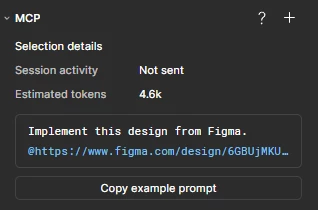
Root cause: The "Enable desktop MCP server" toggle in Figma was never turned on. It's not easy to find — it isn't in the regular visible Preferences menu. I had to open Quick Actions (Ctrl+/) and search "MCP" to find "Enable desktop MCP server" as a checkbox item. Since it was off, nothing was ever listening on 127.0.0.1:3845, which is exactly why Session activity showed "Not sent" — there was no local server to receive anything.

Fix:

Opened Quick Actions (Ctrl+/), searched "MCP", checked "Enable desktop MCP server". Figma confirmed with a toast: "MCP server enabled on http://127.0.0.1:3845/mcp".
Fully restarted Claude Desktop (quit completely, not just closed the window).
That's it — I didn't need to manually add any connector or URL on the Claude Desktop side. After the restart, it picked up the local server on its own.
Verification: I asked Claude to read whatever frame I currently had selected in Figma, and it correctly returned that exact frame in real time. Right after that, the Session activity panel updated from "Not sent" to "Sent just now".

One thing worth flagging for your docs: checking claude mcp list isn't a reliable way to confirm the local connection is working — the entry can still show the mcp.figma.com remote URL even when it's actually relaying to my live local desktop session once Dev Mode MCP Server is enabled. The only reliable confirmation is watching Session activity flip to "Sent" after an actual request. Thanks for the help narrowing this down!


3 replies

Celyn_L
Figmate
  • Figmate
  • August 11, 2026

Hi ​@Danial Sabunchi, Celyn from the Figma Community Support team here.

Thanks for reaching out and for sharing the screenshots. I understand that Claude Desktop is showing the Figma MCP connection as active, but the MCP panel in Figma continues to show “Session activity: Not sent” and no session appears to be starting.

To help narrow this down, could you confirm a few things?

  1. In the Figma desktop app, when you enable the desktop MCP server in Dev Mode, do you see a confirmation that the server is enabled and running?
  2. Could you confirm that the MCP client is configured to use the local server URL http://127.0.0.1:3845/mcp? If possible, please share a screenshot of the Figma MCP server entry in Claude Desktop so we can confirm the configuration.
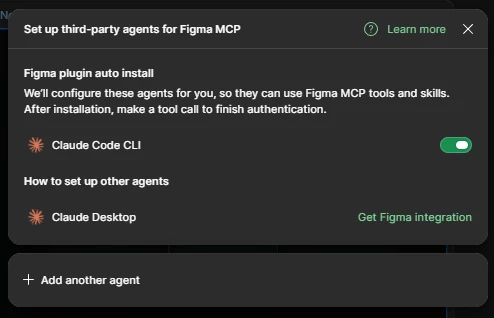
  3. If you have Claude Code available, could you try connecting to the same local server there and run claude mcp list to check whether the Figma desktop MCP server is listed? This can help us narrow down the connection issue.

You can also double-check your setup against our Set up the desktop server guide to make sure everything is configured as expected.

If everything is configured correctly and you're still seeing “Session activity: Not sent,” could you also share the URL of the affected Figma file, along with the approximate time and time zone of your latest failed attempt? This will help us take a closer look.

Thanks for helping us gather these details!


Danial Sabunchi
  • Author
  • New Member
  • Answer
  • August 11, 2026

Hi Celyn, following up to confirm this is resolved now — here's exactly where the problem was, in case it helps other users hitting the same thing:

Root cause: The "Enable desktop MCP server" toggle in Figma was never turned on. It's not easy to find — it isn't in the regular visible Preferences menu. I had to open Quick Actions (Ctrl+/) and search "MCP" to find "Enable desktop MCP server" as a checkbox item. Since it was off, nothing was ever listening on 127.0.0.1:3845, which is exactly why Session activity showed "Not sent" — there was no local server to receive anything.

Fix:

Opened Quick Actions (Ctrl+/), searched "MCP", checked "Enable desktop MCP server". Figma confirmed with a toast: "MCP server enabled on http://127.0.0.1:3845/mcp".
Fully restarted Claude Desktop (quit completely, not just closed the window).
That's it — I didn't need to manually add any connector or URL on the Claude Desktop side. After the restart, it picked up the local server on its own.
Verification: I asked Claude to read whatever frame I currently had selected in Figma, and it correctly returned that exact frame in real time. Right after that, the Session activity panel updated from "Not sent" to "Sent just now".

One thing worth flagging for your docs: checking claude mcp list isn't a reliable way to confirm the local connection is working — the entry can still show the mcp.figma.com remote URL even when it's actually relaying to my live local desktop session once Dev Mode MCP Server is enabled. The only reliable confirmation is watching Session activity flip to "Sent" after an actual request. Thanks for the help narrowing this down!


Celyn_L
Figmate
  • Figmate
  • August 11, 2026

Hey ​@Danial Sabunchi, thanks so much for following up and sharing exactly what worked. I’m glad to hear you were able to get the connection up and running.

I also appreciate you calling out the behavior you noticed with claude mcp list and sharing the steps that resolved it - I’ll make sure to pass this feedback along to the team.

Thanks again for taking the time to share what worked and help others in the community who may run into the same issue. Really appreciate it! 🙌