

Solved

Just upgraded to professional / dev seat but if I want to switch to dev mode on the design edit screen it tells me I need to update

  • February 18, 2026
  • 4 replies
  • 107 views

Konrad Karpieszuk

hi there


a few minutes ago I upgraded my account from free to professional / dev seat / one month payment specifically to be able to use this mode. 


the team settings shows it is ok: 
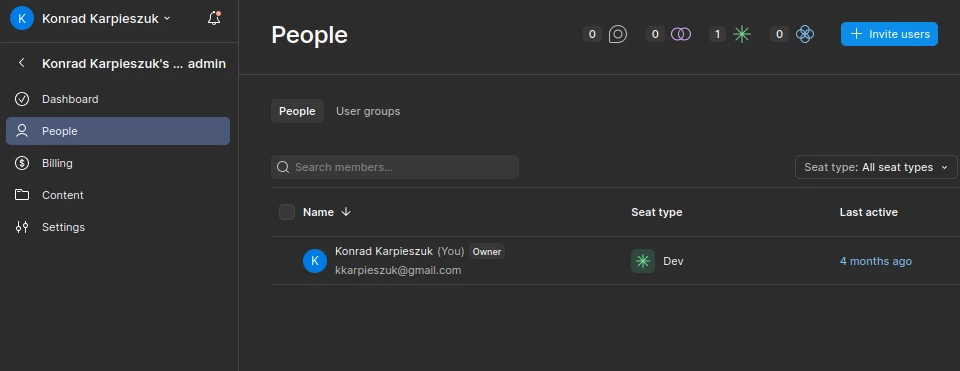
 although, it is strange it shows last active 4 month ago, weird, I am using Figma being logged in everyday


If I go to this design 

 and try to switch to dev mode at bottom, it tells me I still need to update.
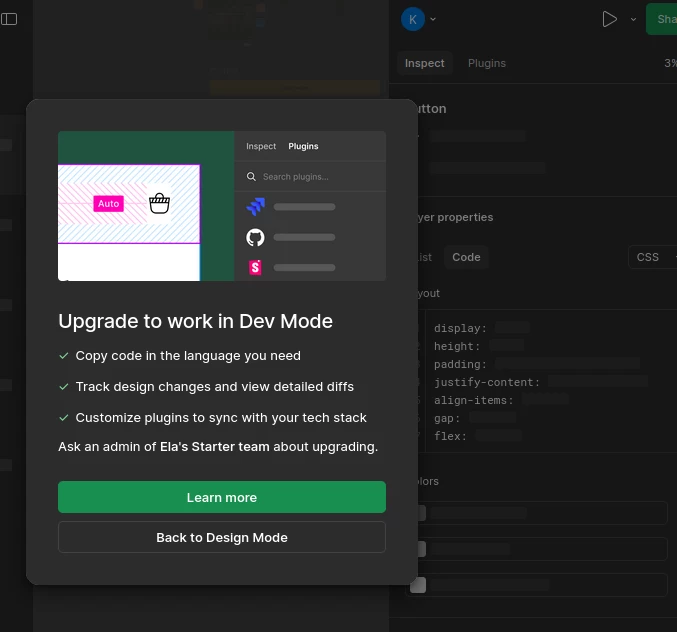
 

please resolve

Best answer by Konrad Karpieszuk

ok,i figured it out. it was on the designer’s team where I do not belong to. Copied it to my team

This topic has been closed for replies.

4 replies

Konrad Karpieszuk

ok,i figured it out. it was on the designer’s team where I do not belong to. Copied it to my team


Celine_
Figmate
  • Community Support
  • February 18, 2026

Hey Konrad, thanks for following up your issue. I am glad to hear you were able to find the root cause of the issue with your team!

I’ve gone ahead and marked as solved your topic, thank you!


TyDavis
  • New Member
  • April 13, 2026

ok,i figured it out. it was on the designer’s team where I do not belong to. Copied it to my team

I am having the same issue. Where is that option located?

Thanks

Ty


Celine_
Figmate
  • Community Support
  • April 13, 2026

Hey ​@TyDavis , I replied to you here: 


All requests in this thread have been addressed, so I'll go ahead and close this topic. If anyone else is experiencing a similar issue, feel free to open a new thread.

For others, please note this usually happen when the file doesn't belong to the right team / folder where the seat was purchased. Please double-check your team and folder.

Thank you! 🙏